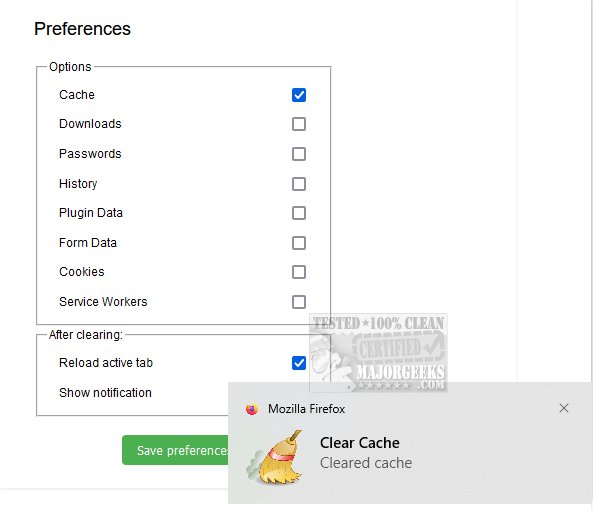
The newly released Clear Cache for Firefox 4.10 offers users a streamlined way to manage their browser's cache. This add-on allows for the efficient deletion of both disk and RAM cache with just a single click or by using keyboard shortcuts—F9 for Windows and Linux users, and fn + F9 for those on macOS.
Clearing the cache is essential for maintaining optimal browser performance. It removes stored data that can lead to slow browsing speeds or outdated versions of web pages. Clear Cache for Firefox goes a step further by enabling users to delete all historical data stored by the browser, including downloads, saved passwords, browsing history, cached plugin data, form entries, cookies, and service workers.
Benefits for Users and Developers
For regular users, this feature enhances privacy and security by erasing traces of online activity, while also optimizing browsing speed by eliminating unnecessary data. For app developers, having the ability to clear all cached data before testing is invaluable. It allows developers to start each session from a clean state, helping them identify and troubleshoot potential issues effectively. This ensures that applications and web platforms function as intended, enhancing the overall user experience.
Conclusion and User Verdict
Overall, Clear Cache for Firefox is a powerful tool for both average users and developers, significantly improving browser performance and user privacy. Its ease of use and effectiveness make it a recommended add-on for anyone looking to enhance their web browsing experience.
Further Reading:
- How to Use Storage Sense to Delete Junk Files in Windows 10/11 Automatically
- How to Disable Windows 10/11 Activity History Permanently
- How to Make Google Chrome and Mozilla Firefox Run Like New Again
In summary, the release of Clear Cache for Firefox 4.10 not only simplifies cache management but also plays a crucial role in maintaining browser efficiency and security for a wide range of users
Clearing the cache is essential for maintaining optimal browser performance. It removes stored data that can lead to slow browsing speeds or outdated versions of web pages. Clear Cache for Firefox goes a step further by enabling users to delete all historical data stored by the browser, including downloads, saved passwords, browsing history, cached plugin data, form entries, cookies, and service workers.
Benefits for Users and Developers
For regular users, this feature enhances privacy and security by erasing traces of online activity, while also optimizing browsing speed by eliminating unnecessary data. For app developers, having the ability to clear all cached data before testing is invaluable. It allows developers to start each session from a clean state, helping them identify and troubleshoot potential issues effectively. This ensures that applications and web platforms function as intended, enhancing the overall user experience.
Conclusion and User Verdict
Overall, Clear Cache for Firefox is a powerful tool for both average users and developers, significantly improving browser performance and user privacy. Its ease of use and effectiveness make it a recommended add-on for anyone looking to enhance their web browsing experience.
Further Reading:
- How to Use Storage Sense to Delete Junk Files in Windows 10/11 Automatically
- How to Disable Windows 10/11 Activity History Permanently
- How to Make Google Chrome and Mozilla Firefox Run Like New Again
In summary, the release of Clear Cache for Firefox 4.10 not only simplifies cache management but also plays a crucial role in maintaining browser efficiency and security for a wide range of users
Clear Cache for Firefox 4.10 released
Clear Cache for Firefox lets you clear the cache, efficiently removing both disk and RAM cache by utilizing a single button click or using convenient keyboard shortcuts.