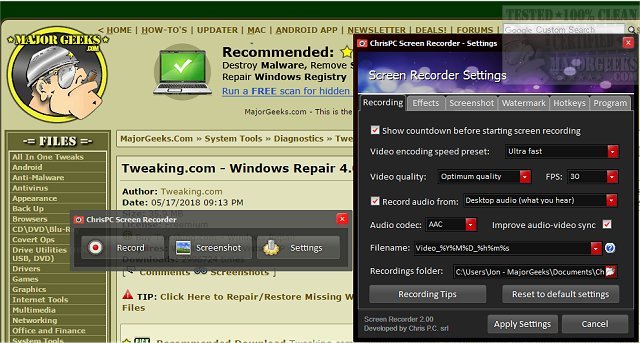
ChrisPC Screen Recorder has recently launched version 2.26.0810, providing users with a comprehensive toolbox for all their screen recording needs. This software allows users to effortlessly record audio alongside video in MP4 format, as well as capture high-quality screenshots in various formats such as PNG, JPG, and BMP.
The application is particularly useful for creating tutorials, enabling users to produce video walk-throughs for family, friends, or co-workers. This eliminates the need for lengthy verbal explanations on how to navigate specific software. Users can quickly upload their recorded clips to platforms like YouTube, facilitating easy sharing of knowledge. Additionally, ChrisPC Screen Recorder serves as a reliable tool for capturing video streams from web sources that may not permit direct downloads.
Key features of ChrisPC Screen Recorder include:
- One-click screen recording with audio in MP4 format.
- Three recording modes: full-screen, selected area, or specific application window.
- The ability to record gameplay in both windowed and borderless modes.
- Customizable recording quality settings to suit various computer configurations.
- Flexible frame rate options ranging from 1 to 60 FPS.
- Video encoding options using H.264 for MP4 and audio encoding in AAC or MP3 formats.
- Filename customization based on the date and time of the recording.
- A preview and editing function for recorded videos.
- Options to hide cursor movements and add both text and image watermarks.
- Screenshot capabilities in three modes, with customizable filenames.
- Fast hotkey configuration for efficiency.
- A skinnable interface for a personalized user experience.
In conclusion, ChrisPC Screen Recorder 2.26.0810 is an all-encompassing tool designed for users seeking to create high-quality screen recordings and tutorials efficiently. Its versatile features cater to a wide range of recording needs, making it a valuable addition to any content creator's toolkit
The application is particularly useful for creating tutorials, enabling users to produce video walk-throughs for family, friends, or co-workers. This eliminates the need for lengthy verbal explanations on how to navigate specific software. Users can quickly upload their recorded clips to platforms like YouTube, facilitating easy sharing of knowledge. Additionally, ChrisPC Screen Recorder serves as a reliable tool for capturing video streams from web sources that may not permit direct downloads.
Key features of ChrisPC Screen Recorder include:
- One-click screen recording with audio in MP4 format.
- Three recording modes: full-screen, selected area, or specific application window.
- The ability to record gameplay in both windowed and borderless modes.
- Customizable recording quality settings to suit various computer configurations.
- Flexible frame rate options ranging from 1 to 60 FPS.
- Video encoding options using H.264 for MP4 and audio encoding in AAC or MP3 formats.
- Filename customization based on the date and time of the recording.
- A preview and editing function for recorded videos.
- Options to hide cursor movements and add both text and image watermarks.
- Screenshot capabilities in three modes, with customizable filenames.
- Fast hotkey configuration for efficiency.
- A skinnable interface for a personalized user experience.
In conclusion, ChrisPC Screen Recorder 2.26.0810 is an all-encompassing tool designed for users seeking to create high-quality screen recordings and tutorials efficiently. Its versatile features cater to a wide range of recording needs, making it a valuable addition to any content creator's toolkit
ChrisPC Screen Recorder 2.26.0810 released
ChrisPC Screen Recorder puts all the screen recording options you need in one toolbox allowing you to record audio to MP4 video files or snap high-quality screenshots in PNG/JPG/BMP formats and more.