CareUEyes version 2.5.1.0 has been released, enhancing its functionality as an application designed to provide relief for your eyes through features like a blue light filter, screen dimmer, and break reminders. The app is user-friendly, featuring a clean and pleasant interface.
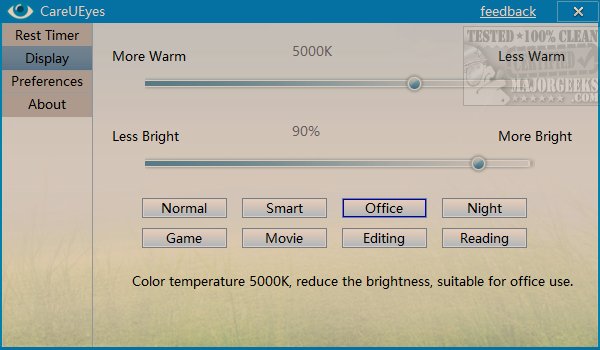
Upon launching CareUEyes, users can easily adjust display settings using sliders for warmth and brightness. It offers various presets tailored for different activities, including Normal, Smart, Office, Night, Game, Movie, Editing, and Reading. Each preset is accompanied by an explanation of its intended purpose, helping users select the most suitable option for their needs.
Additionally, CareUEyes includes a dedicated tab for managing rest intervals, allowing users to set specific times for breaks and their duration. The app provides flexibility, enabling users to modify intervals or take breaks immediately if needed.
In the preferences section, users can configure options such as starting the app with Windows, utilizing a tray icon, enabling a mini float feature, forcing breaks, and activating a do-not-disturb mode during full-screen activities.
While one might assume that a break timer app would be straightforward, CareUEyes effectively combines functionality with its distinct preset color modes, setting it apart from other similar applications.
In summary, CareUEyes 2.5.1.0 is an efficient tool for managing eye strain through customizable display settings and break reminders, making it an essential app for anyone spending extended periods in front of screens. Its user-friendly design and thoughtful presets cater to a variety of user needs, enhancing both comfort and productivity. As technology continues to evolve, apps like CareUEyes play a crucial role in promoting eye health in our digital age
Upon launching CareUEyes, users can easily adjust display settings using sliders for warmth and brightness. It offers various presets tailored for different activities, including Normal, Smart, Office, Night, Game, Movie, Editing, and Reading. Each preset is accompanied by an explanation of its intended purpose, helping users select the most suitable option for their needs.
Additionally, CareUEyes includes a dedicated tab for managing rest intervals, allowing users to set specific times for breaks and their duration. The app provides flexibility, enabling users to modify intervals or take breaks immediately if needed.
In the preferences section, users can configure options such as starting the app with Windows, utilizing a tray icon, enabling a mini float feature, forcing breaks, and activating a do-not-disturb mode during full-screen activities.
While one might assume that a break timer app would be straightforward, CareUEyes effectively combines functionality with its distinct preset color modes, setting it apart from other similar applications.
In summary, CareUEyes 2.5.1.0 is an efficient tool for managing eye strain through customizable display settings and break reminders, making it an essential app for anyone spending extended periods in front of screens. Its user-friendly design and thoughtful presets cater to a variety of user needs, enhancing both comfort and productivity. As technology continues to evolve, apps like CareUEyes play a crucial role in promoting eye health in our digital age
CareUEyes 2.5.1.0 released
CareUEyes is an app designed to give your eyes a break with a blue light filter, screen dimmer, and a break reminder.