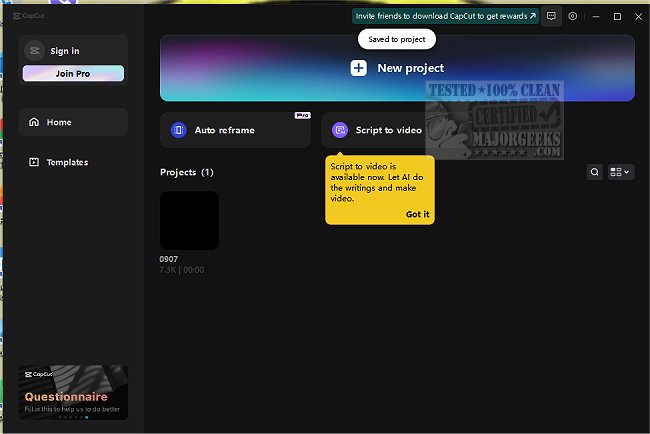
CapCut is an innovative and user-friendly video editing software that caters to a wide range of editing needs. Whether you're a daily vlogger, social media influencer, educator, or someone looking to create memorable family videos, CapCut provides the tools necessary to craft stunning content effortlessly.
Core Features of CapCut:
1. Versatile Editing Capabilities: CapCut is ideal for quick edits during daily commutes, crafting social media reels for platforms like Instagram, TikTok, and YouTube Shorts, and enhancing online classes through engaging visuals and captions.
2. User-Friendly Interface: Designed for both beginners and professionals, CapCut makes video editing enjoyable and accessible, allowing users to create polished content without extensive training.
3. Advanced Green Screen Functionality: The green screen feature enables users to swap backgrounds seamlessly, enhancing the creative potential of videos.
4. Pre-Designed Templates: For those pressed for time, CapCut offers a library of templates that streamline the video creation process, allowing for quick edits that still maintain a professional quality.
5. Speech-to-Text Capabilities: CapCut automatically generates subtitles and can convert text to natural-sounding speech, making it easier to create engaging content without the hassle of manual typing.
6. High-Quality Exports: With support for 4K resolution at 60fps, CapCut ensures that videos maintain a sharp, clear quality suitable for any platform.
7. Accurate Background Remover: The background removal tool effectively eliminates unwanted backgrounds, producing clean and professional-looking videos.
Why Choose CapCut?
CapCut stands out as a powerful video editor that allows users to produce professional-grade videos without needing a film degree. Its robust color grading tools and advanced features cater to various editing styles, making it an excellent choice for casual users and dedicated content creators alike. Importantly, CapCut is free and does not impose watermarks on outputs, ensuring that your finished videos look polished and professional.
In Conclusion:
CapCut is a versatile tool that empowers creativity and simplifies the video editing process. As the software continues to evolve, users can expect even more features to enhance their editing experience. So why not download CapCut, explore its capabilities, and let your imagination run wild?
Related Resources:
- How to Edit Your Videos With the Microsoft Photo App
- How to Convert Audio or Video Using VLC Media Player
- Video: How to Disable Video Tips In Windows 10 & 11
- How to Restore Default Shell Folders (Music, Videos, Pictures, Documents)
- How to Delete Your YouTube Watch and Search History
- How to Enable HDR in Windows 10 & 1
Core Features of CapCut:
1. Versatile Editing Capabilities: CapCut is ideal for quick edits during daily commutes, crafting social media reels for platforms like Instagram, TikTok, and YouTube Shorts, and enhancing online classes through engaging visuals and captions.
2. User-Friendly Interface: Designed for both beginners and professionals, CapCut makes video editing enjoyable and accessible, allowing users to create polished content without extensive training.
3. Advanced Green Screen Functionality: The green screen feature enables users to swap backgrounds seamlessly, enhancing the creative potential of videos.
4. Pre-Designed Templates: For those pressed for time, CapCut offers a library of templates that streamline the video creation process, allowing for quick edits that still maintain a professional quality.
5. Speech-to-Text Capabilities: CapCut automatically generates subtitles and can convert text to natural-sounding speech, making it easier to create engaging content without the hassle of manual typing.
6. High-Quality Exports: With support for 4K resolution at 60fps, CapCut ensures that videos maintain a sharp, clear quality suitable for any platform.
7. Accurate Background Remover: The background removal tool effectively eliminates unwanted backgrounds, producing clean and professional-looking videos.
Why Choose CapCut?
CapCut stands out as a powerful video editor that allows users to produce professional-grade videos without needing a film degree. Its robust color grading tools and advanced features cater to various editing styles, making it an excellent choice for casual users and dedicated content creators alike. Importantly, CapCut is free and does not impose watermarks on outputs, ensuring that your finished videos look polished and professional.
In Conclusion:
CapCut is a versatile tool that empowers creativity and simplifies the video editing process. As the software continues to evolve, users can expect even more features to enhance their editing experience. So why not download CapCut, explore its capabilities, and let your imagination run wild?
Related Resources:
- How to Edit Your Videos With the Microsoft Photo App
- How to Convert Audio or Video Using VLC Media Player
- Video: How to Disable Video Tips In Windows 10 & 11
- How to Restore Default Shell Folders (Music, Videos, Pictures, Documents)
- How to Delete Your YouTube Watch and Search History
- How to Enable HDR in Windows 10 & 1
CapCut 8.7.0 released
CapCut is a versatile video editing software with an intuitive interface that allows you to easily create stunning videos.