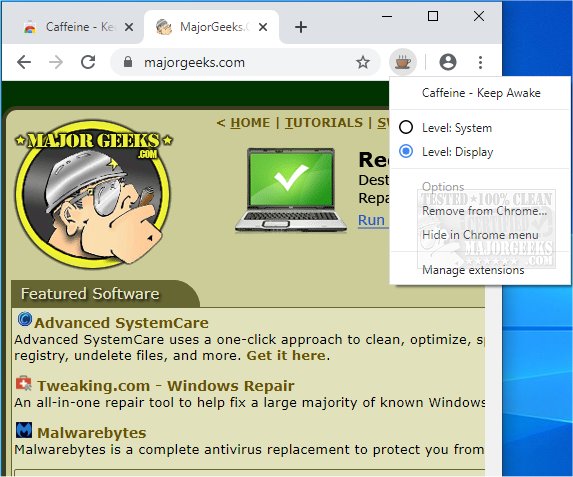
The browser extension "Caffeine - Keep Awake for Chrome and Edge" has been updated to version 0.3.1. This tool is designed to prevent your computer from entering sleep or hibernation modes while you are using it. Caffeine's functionality is straightforward: it features a toggle button that indicates whether the extension is active (when the coffee cup icon is colored) or inactive (when it appears grey). Users can easily set or release the awake state through the right-click context menu available on the toolbar button.
This extension is particularly useful in various scenarios, such as during lengthy app downloads, presentations, or while reading eBooks, ensuring that your screen remains active and does not dim unexpectedly. Notably, Caffeine operates without a dedicated visual interface, relying solely on the toolbar button for user interaction.
In addition to its primary function, users might also find it beneficial to explore related topics such as how to automatically lock a computer in Windows 10 and 11, managing power settings for remote access, and understanding the differences between sleep, hibernation, and shutdown options for PCs.
To further extend its utility, users could consider integrating Caffeine with productivity tools that require extended periods of active computer use, such as coding, video editing, or online meetings. Future updates could also potentially include customizable settings for different usage scenarios, allowing users to tailor the extension's functionality to their specific needs
This extension is particularly useful in various scenarios, such as during lengthy app downloads, presentations, or while reading eBooks, ensuring that your screen remains active and does not dim unexpectedly. Notably, Caffeine operates without a dedicated visual interface, relying solely on the toolbar button for user interaction.
In addition to its primary function, users might also find it beneficial to explore related topics such as how to automatically lock a computer in Windows 10 and 11, managing power settings for remote access, and understanding the differences between sleep, hibernation, and shutdown options for PCs.
To further extend its utility, users could consider integrating Caffeine with productivity tools that require extended periods of active computer use, such as coding, video editing, or online meetings. Future updates could also potentially include customizable settings for different usage scenarios, allowing users to tailor the extension's functionality to their specific needs
Caffeine - Keep Awake for Chrome and Edge 0.3.1 released
Caffeine - Keep Awake for Chrome and Edge is a browser extension that prevents your system from going to sleep/hibernate.
Caffeine - Keep Awake for Chrome and Edge 0.3.1 released @ MajorGeeks