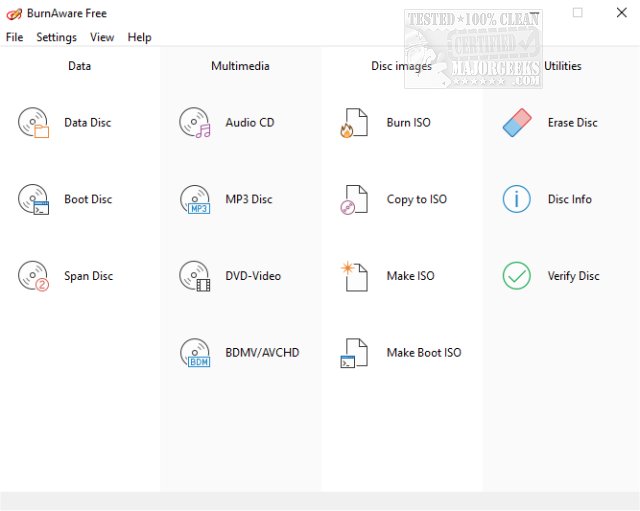
BurnAware Free has released version 19.3, which is a user-friendly CD, DVD, and Blu-ray Disc burning software for Windows. This free version offers a set of features that cater to the needs of most users, allowing them to easily create and burn various types of discs, including Audio CDs, MP3 CDs, Data DVDs, and DVD-Video discs, as well as manage ISO and Cue Images. It also provides the ability to erase or format rewritable discs and to copy CDs or DVDs to ISO images.
The software is versatile, enabling users to create standard and bootable data discs across multiple formats, such as CDs, DVDs, and Blu-ray Discs. It also supports the extraction of files from ISO images, verifies written discs, and displays essential disc and drive details. The range of features includes support for various hardware interfaces and file systems, on-the-fly writing, and auto-verification of written content.
For users looking for advanced capabilities, BurnAware offers Pro and Premium versions, priced between $19.95 and $39.95. These paid versions include additional features like direct disc copying, audio track extraction in multiple formats, and the ability to recover files from unreadable discs.
In summary, BurnAware Free version 19.3 is a comprehensive and easy-to-use burning tool that meets the basic needs of users, while the Pro and Premium versions offer enhanced functionalities for more demanding tasks. With continued updates and support for the latest hardware and software standards, BurnAware remains a reliable choice for disc burning tasks.
To extend the information, it would be beneficial to highlight the importance of data backup and the role of reliable burning software in ensuring data integrity. Users should consider utilizing such tools not only for media playback but also for archiving important information securely. Additionally, as technology evolves, there may be features in future releases that incorporate cloud integration or enhanced multimedia support, which would further improve user experience and capabilities
The software is versatile, enabling users to create standard and bootable data discs across multiple formats, such as CDs, DVDs, and Blu-ray Discs. It also supports the extraction of files from ISO images, verifies written discs, and displays essential disc and drive details. The range of features includes support for various hardware interfaces and file systems, on-the-fly writing, and auto-verification of written content.
For users looking for advanced capabilities, BurnAware offers Pro and Premium versions, priced between $19.95 and $39.95. These paid versions include additional features like direct disc copying, audio track extraction in multiple formats, and the ability to recover files from unreadable discs.
In summary, BurnAware Free version 19.3 is a comprehensive and easy-to-use burning tool that meets the basic needs of users, while the Pro and Premium versions offer enhanced functionalities for more demanding tasks. With continued updates and support for the latest hardware and software standards, BurnAware remains a reliable choice for disc burning tasks.
To extend the information, it would be beneficial to highlight the importance of data backup and the role of reliable burning software in ensuring data integrity. Users should consider utilizing such tools not only for media playback but also for archiving important information securely. Additionally, as technology evolves, there may be features in future releases that incorporate cloud integration or enhanced multimedia support, which would further improve user experience and capabilities
BurnAware Free 19.3 released
BurnAware Free is the free version of BurnAware Premium, an easy to use CD, DVD, Blu-ray Disc burning tool available for Windows.