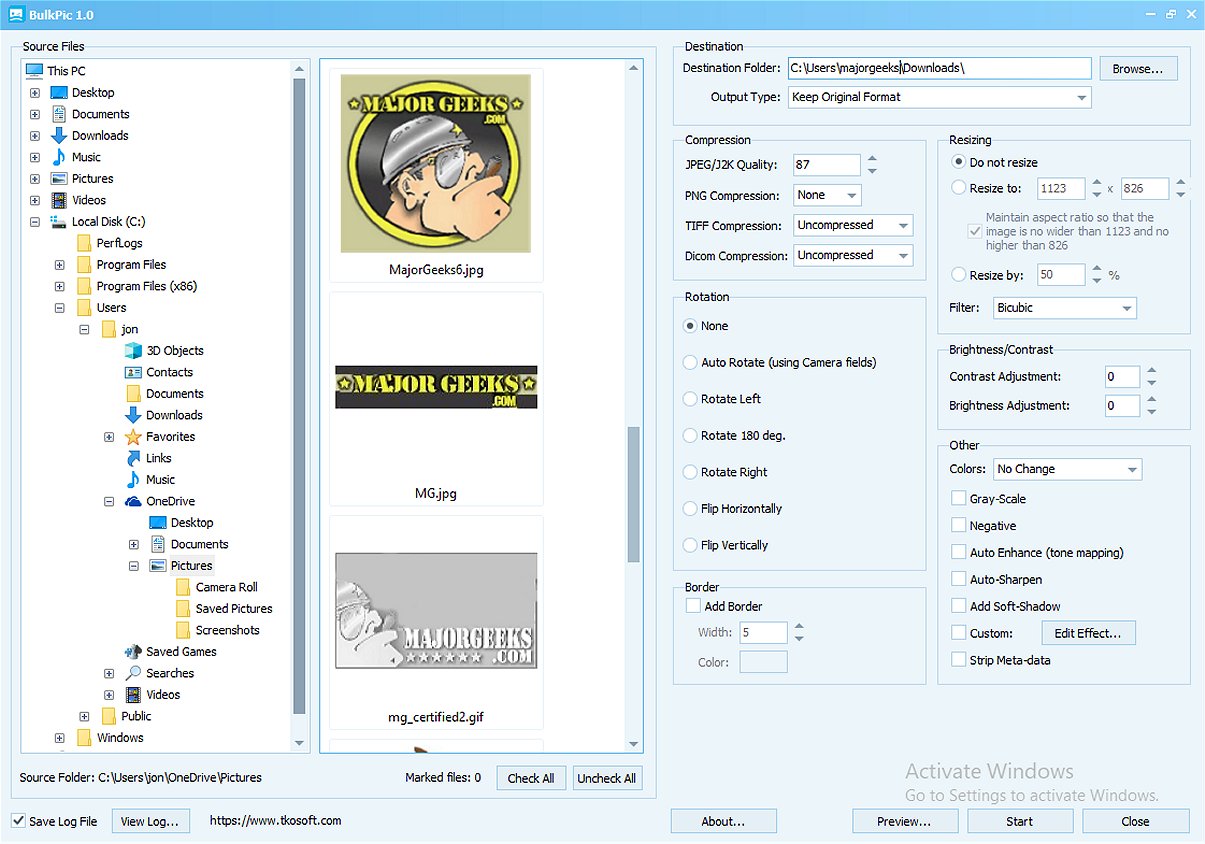
BulkPic has launched its latest version 2.2, solidifying its position as a versatile and user-friendly batch image converter and editor. This tool is designed to cater to both individuals and professionals who need to efficiently manage large volumes of images without compromising on quality.
Key Features of BulkPic
With BulkPic, users can quickly convert images in bulk into a wide array of popular formats, including JPG, PNG, BMP, TIFF, GIF, TGA, PSD, ICO, and more. The software also allows users to retain the original format of their images, enhancing flexibility in image management.
Resizing Capabilities and Filters
BulkPic boasts a powerful resizing feature that enables precise adjustments, whether by specifying exact dimensions or adjusting sizes by percentage. It also utilizes advanced resizing filters such as Lanczos, Bicubic, and Bilinear, ensuring that the integrity and quality of images are maintained during the resizing process.
Image Manipulation and Enhancement Options
The program offers a variety of image manipulation features, including rotation, flipping, and cropping tools, as well as automatic photo rotation based on camera orientation metadata. For enhancing image quality, users can adjust parameters like brightness, contrast, and RGB channels, alongside sophisticated correction tools like Color Curve and Levels.
Additionally, BulkPic allows users to apply various effects in bulk, such as sharpening, smoothing, pixelizing, and adding shadows. Creative options like converting images to grayscale or sepia tones and advanced color correction methods enhance the visual appeal of images.
Output Control for Quality Assurance
To ensure the output quality meets specific requirements, BulkPic offers control over output quality and compression for various formats, as well as options to adjust color depth and remove unnecessary metadata. This results in cleaner and smaller files, ideal for web use or storage.
Conclusion
BulkPic 2.2 stands out as an all-in-one solution for batch image processing, making it an invaluable addition to any image editing toolkit. Its extensive features, combined with the fact that it's free, make it a remarkable choice for anyone involved in image editing or management.
In the future, BulkPic could further enhance its offerings by incorporating cloud integration for seamless storage and sharing, as well as AI-driven features for automatic enhancement and organization of images. These advancements would make the tool even more indispensable for users looking to streamline their image processing workflows
Key Features of BulkPic
With BulkPic, users can quickly convert images in bulk into a wide array of popular formats, including JPG, PNG, BMP, TIFF, GIF, TGA, PSD, ICO, and more. The software also allows users to retain the original format of their images, enhancing flexibility in image management.
Resizing Capabilities and Filters
BulkPic boasts a powerful resizing feature that enables precise adjustments, whether by specifying exact dimensions or adjusting sizes by percentage. It also utilizes advanced resizing filters such as Lanczos, Bicubic, and Bilinear, ensuring that the integrity and quality of images are maintained during the resizing process.
Image Manipulation and Enhancement Options
The program offers a variety of image manipulation features, including rotation, flipping, and cropping tools, as well as automatic photo rotation based on camera orientation metadata. For enhancing image quality, users can adjust parameters like brightness, contrast, and RGB channels, alongside sophisticated correction tools like Color Curve and Levels.
Additionally, BulkPic allows users to apply various effects in bulk, such as sharpening, smoothing, pixelizing, and adding shadows. Creative options like converting images to grayscale or sepia tones and advanced color correction methods enhance the visual appeal of images.
Output Control for Quality Assurance
To ensure the output quality meets specific requirements, BulkPic offers control over output quality and compression for various formats, as well as options to adjust color depth and remove unnecessary metadata. This results in cleaner and smaller files, ideal for web use or storage.
Conclusion
BulkPic 2.2 stands out as an all-in-one solution for batch image processing, making it an invaluable addition to any image editing toolkit. Its extensive features, combined with the fact that it's free, make it a remarkable choice for anyone involved in image editing or management.
In the future, BulkPic could further enhance its offerings by incorporating cloud integration for seamless storage and sharing, as well as AI-driven features for automatic enhancement and organization of images. These advancements would make the tool even more indispensable for users looking to streamline their image processing workflows
BulkPic 2.2 released
BulkPic is a versatile, user-friendly batch image converter and editor. It is ideal for individuals and professionals alike who need to handle large volumes of images efficiently without sacrificing quality.