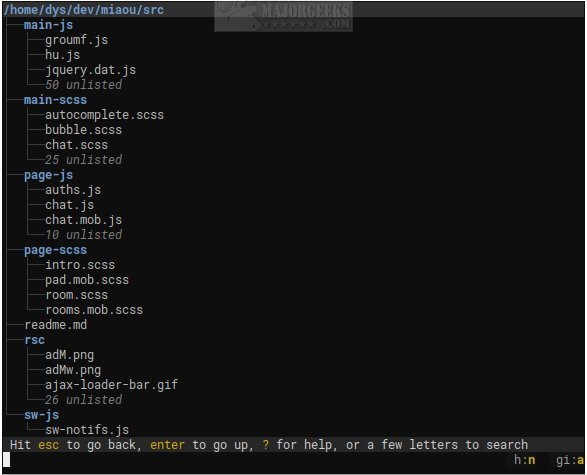
Broot version 1.60.2 has been released, enhancing the experience of navigating directory trees via the command line. This open-source tool transforms terminal navigation into a more streamlined and enjoyable process, moving away from the cumbersome use of traditional commands like ls, cd, and find. Instead, Broot features an interactive, live-updating tree view that allows users to search and navigate directories in real-time, making it particularly appealing for those who frequently use the terminal.
Designed with a focus on simplicity and speed, Broot avoids the complexity of typical text-based user interfaces (TUIs) that often come with numerous panels and intricate keyboard shortcuts. Instead, it offers a minimalist approach that presents the entire folder structure upfront, enabling users to jump directly to their desired files or directories.
In addition to basic navigation, Broot allows for file searching, the creation of custom shortcuts, and file manipulation while preserving the integrity of the directory structure. However, users must set up a shell function to launch Broot, requiring administrative permissions.
Broot is optimized for quick navigation, even on slower disks, with the capability to interrupt ongoing searches with new keystrokes. Users are encouraged to visit the author's website for a comprehensive usage guide to maximize their experience with this tool.
For those who are interested in further enhancing their command line skills, consider exploring resources such as "The Ultimate List of Every Known Command Prompt and PowerShell Commands" or guides on resetting folder view settings in Windows 10 and 11. These resources can complement the functionality offered by Broot and improve overall productivity in the terminal
Designed with a focus on simplicity and speed, Broot avoids the complexity of typical text-based user interfaces (TUIs) that often come with numerous panels and intricate keyboard shortcuts. Instead, it offers a minimalist approach that presents the entire folder structure upfront, enabling users to jump directly to their desired files or directories.
In addition to basic navigation, Broot allows for file searching, the creation of custom shortcuts, and file manipulation while preserving the integrity of the directory structure. However, users must set up a shell function to launch Broot, requiring administrative permissions.
Broot is optimized for quick navigation, even on slower disks, with the capability to interrupt ongoing searches with new keystrokes. Users are encouraged to visit the author's website for a comprehensive usage guide to maximize their experience with this tool.
For those who are interested in further enhancing their command line skills, consider exploring resources such as "The Ultimate List of Every Known Command Prompt and PowerShell Commands" or guides on resetting folder view settings in Windows 10 and 11. These resources can complement the functionality offered by Broot and improve overall productivity in the terminal
Broot 1.60.2 released
Broot is an Open Source way to view and navigate any size directory trees through the command line.