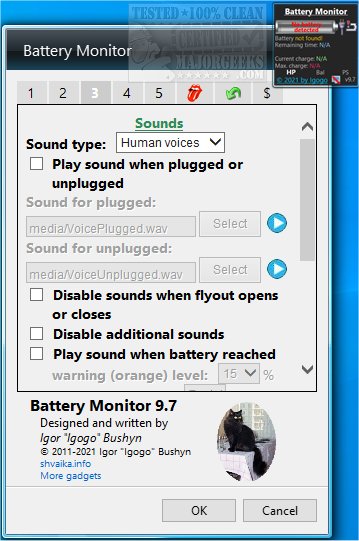
Battery Monitor version 10.9 has been released, enhancing users' ability to monitor their battery's performance. This application provides detailed insights into various battery parameters such as voltage, charge rate, current charge, and maximum charge capacity. For users operating on Windows 8.1 or 10 who experience installation issues, it is recommended to utilize Desktop Gadgets Revived or similar software for optimal functionality.
The app features dynamic graphics and animated indicators that visually represent the battery level, along with sound notifications that alert users when their laptop is plugged in, unplugged, or fully charged. Users can set two critical battery levels to trigger these sound alerts, ensuring they stay informed about their battery status. Additionally, Battery Monitor allows users to change their current power plan directly from the main interface, facilitating quick adjustments to power usage.
Customization options are available, enabling users to alter the app's interface by changing colors, backgrounds, and more, giving it a personalized touch while still providing essential battery information.
In addition to these features, users may find the following related topics helpful:
- How to Troubleshoot a Laptop That Is Plugged In but Not Charging
- How to Set Up Notifications for When Your Laptop Battery Is Fully Charged on Windows 10 & 11
- How to Modify Power Plan Settings in Windows 10 & 11
- How to Check Your Active Power Plan in Windows
Overall, Battery Monitor 10.9 is designed to enhance user experience by keeping them well-informed about their device's battery health and performance
The app features dynamic graphics and animated indicators that visually represent the battery level, along with sound notifications that alert users when their laptop is plugged in, unplugged, or fully charged. Users can set two critical battery levels to trigger these sound alerts, ensuring they stay informed about their battery status. Additionally, Battery Monitor allows users to change their current power plan directly from the main interface, facilitating quick adjustments to power usage.
Customization options are available, enabling users to alter the app's interface by changing colors, backgrounds, and more, giving it a personalized touch while still providing essential battery information.
In addition to these features, users may find the following related topics helpful:
- How to Troubleshoot a Laptop That Is Plugged In but Not Charging
- How to Set Up Notifications for When Your Laptop Battery Is Fully Charged on Windows 10 & 11
- How to Modify Power Plan Settings in Windows 10 & 11
- How to Check Your Active Power Plan in Windows
Overall, Battery Monitor 10.9 is designed to enhance user experience by keeping them well-informed about their device's battery health and performance
Battery Monitor 10.9 released
Battery Monitor gives you more details about your battery status, including voltage, charge rate, current charge, and max charge.