The Batch Rename Tool is a free utility launched to streamline the bulk renaming of files efficiently and safely. It enables users to rename multiple files simultaneously through an intuitive visual interface, featuring an instant preview function that enhances user experience.
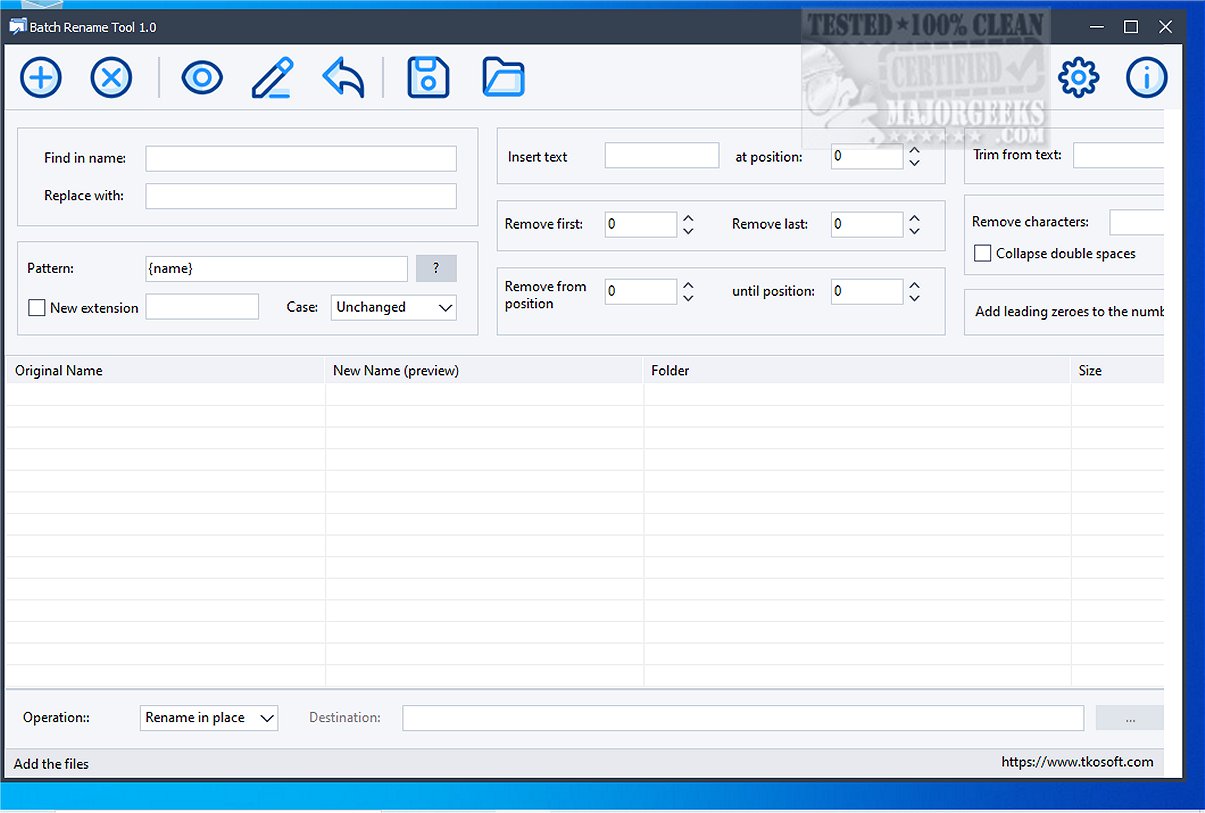
The Batch Rename Tool simplifies the renaming process by allowing users to compile a list of files, review proposed new names, and execute the renaming in a single operation. A preview table aids in this process, displaying original filenames alongside new ones, their folder locations, and file sizes, ensuring users can verify changes before finalizing.
- Bulk Renaming: Rename multiple files at once with ease.
- Preview Functionality: View new filenames before applying any changes.
- Text Manipulation: Find and replace text within filenames, insert custom strings at designated positions, or remove characters from the start or end of filenames.
- Character Management: Eliminate unwanted characters, trim filenames based on text markers, compress double spaces, and adjust filename cases.
- Dynamic File Naming: Utilize custom filename patterns that incorporate dynamic tokens such as counters, dates, folder names, file sizes, and original extensions.
- Number Formatting: Add leading zeros to numerical file names and change file extensions as necessary.
- Flexible Renaming Options: Rename files in their current location or specify a new destination folder, with the ability to undo the last rename operation if needed.
One standout feature of the Batch Rename Tool is its pattern-based renaming system, which allows users to create filenames by combining fixed text with dynamic elements. This flexibility caters to various needs, from personal file organization to complex project management.
The Batch Rename Tool is a versatile solution for a wide range of file management tasks. Whether organizing a personal photo collection, managing scanned documents, handling export reports, or maintaining media libraries, this tool is equipped to handle various scenarios effectively. Its user-friendly interface and comprehensive features make it an essential utility for anyone looking to optimize their file renaming process.
Looking ahead, potential enhancements for Batch Rename Tool could include advanced filtering options for selecting files based on specific criteria, cloud integration for file management across devices, and support for additional file types beyond standard documents and images to broaden its utility even further
What is the Batch Rename Tool and Its Purpose?
The Batch Rename Tool simplifies the renaming process by allowing users to compile a list of files, review proposed new names, and execute the renaming in a single operation. A preview table aids in this process, displaying original filenames alongside new ones, their folder locations, and file sizes, ensuring users can verify changes before finalizing.
Key Features of the Batch Rename Tool:
- Bulk Renaming: Rename multiple files at once with ease.
- Preview Functionality: View new filenames before applying any changes.
- Text Manipulation: Find and replace text within filenames, insert custom strings at designated positions, or remove characters from the start or end of filenames.
- Character Management: Eliminate unwanted characters, trim filenames based on text markers, compress double spaces, and adjust filename cases.
- Dynamic File Naming: Utilize custom filename patterns that incorporate dynamic tokens such as counters, dates, folder names, file sizes, and original extensions.
- Number Formatting: Add leading zeros to numerical file names and change file extensions as necessary.
- Flexible Renaming Options: Rename files in their current location or specify a new destination folder, with the ability to undo the last rename operation if needed.
Unique Pattern-Based Renaming System
One standout feature of the Batch Rename Tool is its pattern-based renaming system, which allows users to create filenames by combining fixed text with dynamic elements. This flexibility caters to various needs, from personal file organization to complex project management.
Conclusion and Use Cases
The Batch Rename Tool is a versatile solution for a wide range of file management tasks. Whether organizing a personal photo collection, managing scanned documents, handling export reports, or maintaining media libraries, this tool is equipped to handle various scenarios effectively. Its user-friendly interface and comprehensive features make it an essential utility for anyone looking to optimize their file renaming process.
Future Enhancements
Looking ahead, potential enhancements for Batch Rename Tool could include advanced filtering options for selecting files based on specific criteria, cloud integration for file management across devices, and support for additional file types beyond standard documents and images to broaden its utility even further
Batch Rename Tool 1.0 released
Batch Rename Tool is a free utility designed to facilitate efficient and safe bulk file renaming. This tool allows users to rename multiple files simultaneously through a user-friendly visual interface, complete with an instant preview feature.