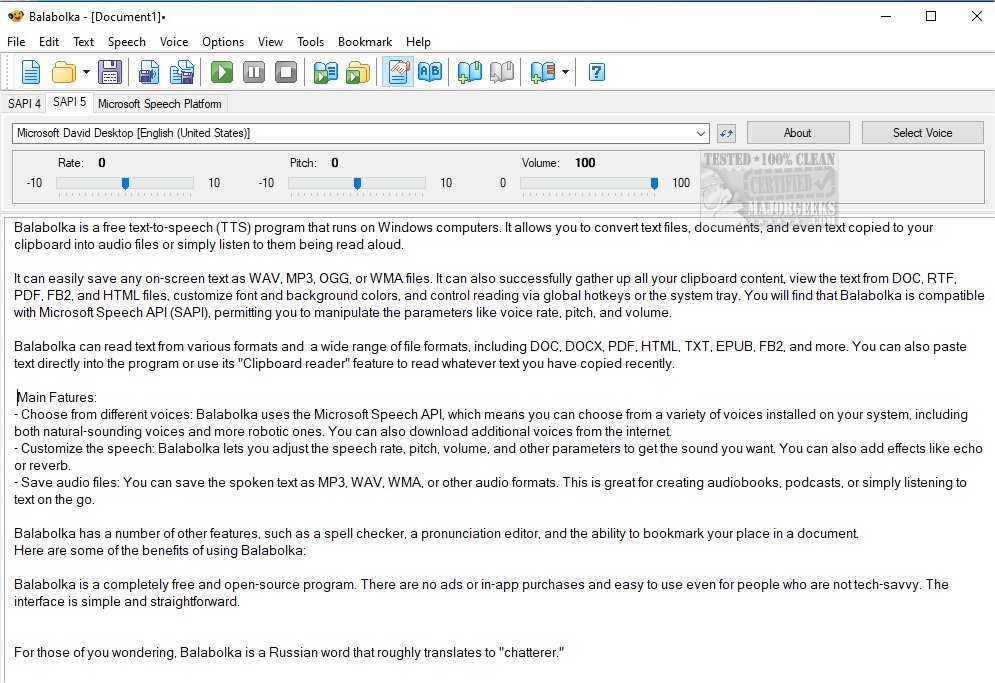
Balabolka has recently released version 2.15.0.918, further enhancing its capabilities as a free text-to-speech (TTS) application for Windows users. This software allows users to convert various text formats—such as documents and clipboard text—into audio files, or simply listen to them being read aloud.
One of Balabolka's standout features is its ability to utilize all installed voices on a user's computer, thanks to its compatibility with the Microsoft Speech API (SAPI). Users can customize the speech output by adjusting parameters such as voice rate, pitch, and volume, and can choose from a variety of available voices, including both natural-sounding and robotic options. Additional voices can be downloaded from the internet, expanding the customization options even further.
Balabolka supports multiple file formats, including DOC, DOCX, PDF, HTML, TXT, EPUB, and FB2, making it versatile for different user needs. Its "Clipboard reader" feature allows it to easily read any text that users have copied. Additionally, users can save spoken text as audio files in formats like MP3, WAV, WMA, and OGG, which is particularly useful for creating audiobooks or podcasts.
Other notable features include a spell checker, pronunciation editor, and bookmarking capabilities for easy navigation within documents. The program is designed to be user-friendly, with a straightforward interface that requires no technical expertise, making it accessible to a wide audience.
The name "Balabolka" translates to "chatterer" in Russian, reflecting the application's core functionality. As a completely free and open-source tool, it is devoid of ads or in-app purchases, appealing to users who seek a reliable TTS solution without financial commitment.
In summary, Balabolka version 2.15.0.918 is a powerful and customizable TTS application that offers extensive features for converting text to speech, catering to various user needs and preferences. Its ease of use and extensive compatibility with different file formats and voices make it an invaluable tool for anyone looking to enhance their productivity or enjoy content in audio form.
Extension: Looking ahead, future updates to Balabolka could potentially include features like integration with cloud-based services, allowing users to access their documents from anywhere, or support for more languages and dialects, further broadening its usability. Additionally, incorporating machine learning algorithms could enhance voice quality and naturalness, making the listening experience even more enjoyable
One of Balabolka's standout features is its ability to utilize all installed voices on a user's computer, thanks to its compatibility with the Microsoft Speech API (SAPI). Users can customize the speech output by adjusting parameters such as voice rate, pitch, and volume, and can choose from a variety of available voices, including both natural-sounding and robotic options. Additional voices can be downloaded from the internet, expanding the customization options even further.
Balabolka supports multiple file formats, including DOC, DOCX, PDF, HTML, TXT, EPUB, and FB2, making it versatile for different user needs. Its "Clipboard reader" feature allows it to easily read any text that users have copied. Additionally, users can save spoken text as audio files in formats like MP3, WAV, WMA, and OGG, which is particularly useful for creating audiobooks or podcasts.
Other notable features include a spell checker, pronunciation editor, and bookmarking capabilities for easy navigation within documents. The program is designed to be user-friendly, with a straightforward interface that requires no technical expertise, making it accessible to a wide audience.
The name "Balabolka" translates to "chatterer" in Russian, reflecting the application's core functionality. As a completely free and open-source tool, it is devoid of ads or in-app purchases, appealing to users who seek a reliable TTS solution without financial commitment.
In summary, Balabolka version 2.15.0.918 is a powerful and customizable TTS application that offers extensive features for converting text to speech, catering to various user needs and preferences. Its ease of use and extensive compatibility with different file formats and voices make it an invaluable tool for anyone looking to enhance their productivity or enjoy content in audio form.
Extension: Looking ahead, future updates to Balabolka could potentially include features like integration with cloud-based services, allowing users to access their documents from anywhere, or support for more languages and dialects, further broadening its usability. Additionally, incorporating machine learning algorithms could enhance voice quality and naturalness, making the listening experience even more enjoyable
Balabolka 2.15.0.918 released
Balabolka is a mildly customizable freeware text-to-speech application capable of utilizing all the installed computer voices on your PC.