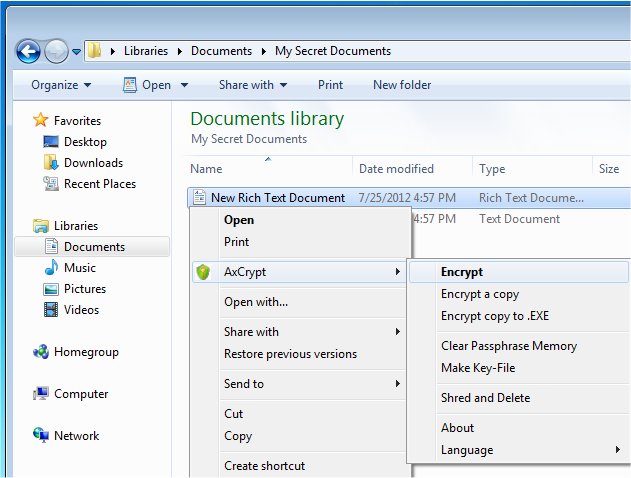
AxCrypt 3.1.6.0 has been released, enhancing its reputation as a user-friendly open-source file encryption tool that integrates effortlessly with Windows. This software enables users to encrypt, decrypt, compress, store, and share individual files, ensuring robust data protection. Encrypted files will display a ".axx" extension and a new icon, although they are typically hidden by default unless users choose to show known extensions in Windows.
One of AxCrypt's key features is its ability to allow users to directly edit or view secured files with a double-click, automatically re-encrypting them after modifications. The software employs AES encryption, offering both 128-bit and 256-bit key options to ensure strong security. It also supports optional passphrase caching, allowing users to access their files more conveniently after a login or reboot.
AxCrypt caters to users of all skill levels, requiring no prior configuration. Notable features include:
- Strong Encryption: Secure files with 128-bit or 256-bit AES encryption.
- User-Friendly Interface: Easily open and edit encrypted files with a simple double-click.
- Multilingual Support: The application is available in multiple languages, including English, Dutch, French, German, Italian, Korean, Portuguese, Spanish, Swedish, Turkish, Russian, Polish, and more.
- Collaboration: Users can share secured files with others who have AxCrypt accounts, allowing them to open the files with their own passwords.
- Password Management: A built-in feature for managing and accessing passwords efficiently.
- Secured Folders: A one-click feature that automatically secures new files placed in designated folders.
- Master Key: This feature allows business administrators to recover files of team members, reducing the risk of losing access to important documents when employees leave or forget their passwords.
In addition, AxCrypt continuously updates its features and user experience, making it a reliable choice for individuals and organizations looking for effective file encryption.
For those interested in enhancing their file security further, there are tutorials available, such as adding the Encrypting File System (EFS) to the right-click context menu, which can provide additional layers of protection and convenience for users managing sensitive data
One of AxCrypt's key features is its ability to allow users to directly edit or view secured files with a double-click, automatically re-encrypting them after modifications. The software employs AES encryption, offering both 128-bit and 256-bit key options to ensure strong security. It also supports optional passphrase caching, allowing users to access their files more conveniently after a login or reboot.
AxCrypt caters to users of all skill levels, requiring no prior configuration. Notable features include:
- Strong Encryption: Secure files with 128-bit or 256-bit AES encryption.
- User-Friendly Interface: Easily open and edit encrypted files with a simple double-click.
- Multilingual Support: The application is available in multiple languages, including English, Dutch, French, German, Italian, Korean, Portuguese, Spanish, Swedish, Turkish, Russian, Polish, and more.
- Collaboration: Users can share secured files with others who have AxCrypt accounts, allowing them to open the files with their own passwords.
- Password Management: A built-in feature for managing and accessing passwords efficiently.
- Secured Folders: A one-click feature that automatically secures new files placed in designated folders.
- Master Key: This feature allows business administrators to recover files of team members, reducing the risk of losing access to important documents when employees leave or forget their passwords.
In addition, AxCrypt continuously updates its features and user experience, making it a reliable choice for individuals and organizations looking for effective file encryption.
For those interested in enhancing their file security further, there are tutorials available, such as adding the Encrypting File System (EFS) to the right-click context menu, which can provide additional layers of protection and convenience for users managing sensitive data
AxCrypt 3.1.6.0 released
AxCrypt provides easy-to-use Open Source file encryption that integrates seamlessly with Windows to encrypt, decrypt, compress, store, send and work with individual files.