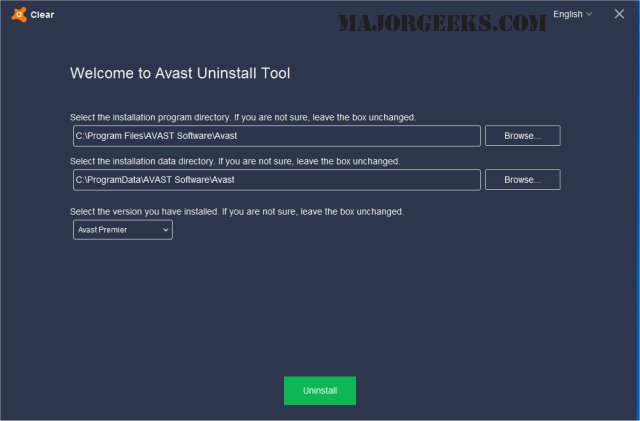
Avast has released version 26.8.11125 of its uninstall utility, Avast Clear, which is designed to completely remove Avast software when the standard Add/Remove programs feature fails to work effectively. This tool is particularly useful for users facing issues with uninstalling the antivirus program.
To uninstall Avast using Avast Clear, follow these steps:
1. Download the aswclear.exe file and save it to your desktop.
2. Boot your Windows operating system in Safe Mode by rebooting and pressing F8 during startup.
3. Execute the Avast Clear uninstall utility.
4. If Avast was installed in a non-default folder, navigate to that location (note that any content in the chosen folder will be deleted).
5. Click the REMOVE button to initiate the uninstallation process.
6. Restart your computer to complete the procedure.
For users looking for related guidance, additional topics include how to install Avast as a lightweight antivirus, what steps to take when Norton or McAfee antivirus subscriptions expire, distinguishing between a virus and a false positive, and recommendations for the best anti-malware applications that can operate alongside existing antivirus solutions.
In extending this information, it’s important to emphasize the significance of using dedicated uninstallation tools like Avast Clear. They can prevent leftover files and registry entries that may interfere with future installations or other programs. Additionally, before starting the uninstallation process, users should ensure they back up important data and create a system restore point to safeguard against any potential issues during the removal process
To uninstall Avast using Avast Clear, follow these steps:
1. Download the aswclear.exe file and save it to your desktop.
2. Boot your Windows operating system in Safe Mode by rebooting and pressing F8 during startup.
3. Execute the Avast Clear uninstall utility.
4. If Avast was installed in a non-default folder, navigate to that location (note that any content in the chosen folder will be deleted).
5. Click the REMOVE button to initiate the uninstallation process.
6. Restart your computer to complete the procedure.
For users looking for related guidance, additional topics include how to install Avast as a lightweight antivirus, what steps to take when Norton or McAfee antivirus subscriptions expire, distinguishing between a virus and a false positive, and recommendations for the best anti-malware applications that can operate alongside existing antivirus solutions.
In extending this information, it’s important to emphasize the significance of using dedicated uninstallation tools like Avast Clear. They can prevent leftover files and registry entries that may interfere with future installations or other programs. Additionally, before starting the uninstallation process, users should ensure they back up important data and create a system restore point to safeguard against any potential issues during the removal process
Avast Clear 26.8.11125 released
Avast Clear (Avast Software Uninstall Utility) can completely remove Avast when the Add/Remove programs option does not work properly.