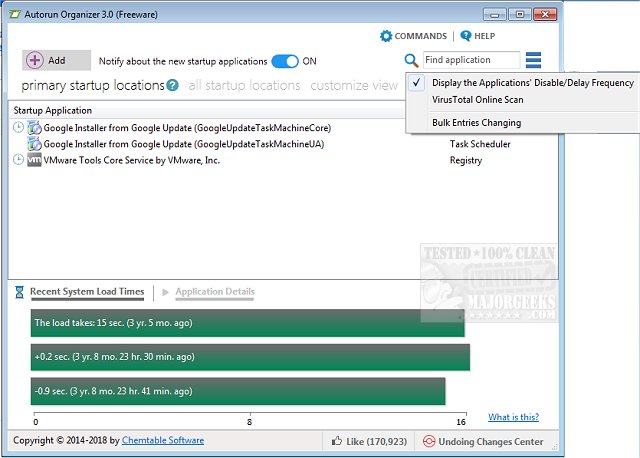
Autorun Organizer 7.1 has been released, offering users an enhanced tool for managing startup items and autoruns, which can significantly speed up boot-up times and improve overall Windows performance. This software provides a comprehensive suite of features that visually displays system boot times, enabling users to pinpoint and rectify delays in the startup process.
With Autorun Organizer, users can effortlessly disable unnecessary programs and organize the list of applications that start during system boot. This streamlining leads to a more efficient launch of programs, ultimately resulting in enhanced system performance. A standout feature of Autorun Organizer is its ability to automatically monitor disabled entries, ensuring they remain inactive and preventing unwanted programs from launching at startup. This allows users to maintain greater control over their startup processes and optimize system efficiency.
Key features of Autorun Organizer include:
- Enhanced boot-up speed and overall Windows performance
- Management of autorun priorities
- The ability to turn programs on or off in the autorun list
- Automatic control of disabled programs
In addition to its core functionalities, users may find value in related articles on managing startup applications in Windows 10 and 11, as well as tips for disabling unnecessary Task Scheduler functions and using Storage Sense to eliminate junk files automatically.
Looking ahead, future updates could include more advanced features such as integration with cloud services for backup of startup configurations, more intuitive user interfaces with AI-driven recommendations for optimizing startup items, and compatibility enhancements for newer versions of Windows. This could further solidify Autorun Organizer as an essential tool for users seeking to maximize their system's efficiency and performance
With Autorun Organizer, users can effortlessly disable unnecessary programs and organize the list of applications that start during system boot. This streamlining leads to a more efficient launch of programs, ultimately resulting in enhanced system performance. A standout feature of Autorun Organizer is its ability to automatically monitor disabled entries, ensuring they remain inactive and preventing unwanted programs from launching at startup. This allows users to maintain greater control over their startup processes and optimize system efficiency.
Key features of Autorun Organizer include:
- Enhanced boot-up speed and overall Windows performance
- Management of autorun priorities
- The ability to turn programs on or off in the autorun list
- Automatic control of disabled programs
In addition to its core functionalities, users may find value in related articles on managing startup applications in Windows 10 and 11, as well as tips for disabling unnecessary Task Scheduler functions and using Storage Sense to eliminate junk files automatically.
Looking ahead, future updates could include more advanced features such as integration with cloud services for backup of startup configurations, more intuitive user interfaces with AI-driven recommendations for optimizing startup items, and compatibility enhancements for newer versions of Windows. This could further solidify Autorun Organizer as an essential tool for users seeking to maximize their system's efficiency and performance
Autorun Organizer 7.1 released
Autorun Organizer manages startup items and autoruns to speed boot-up times and Windows performance.