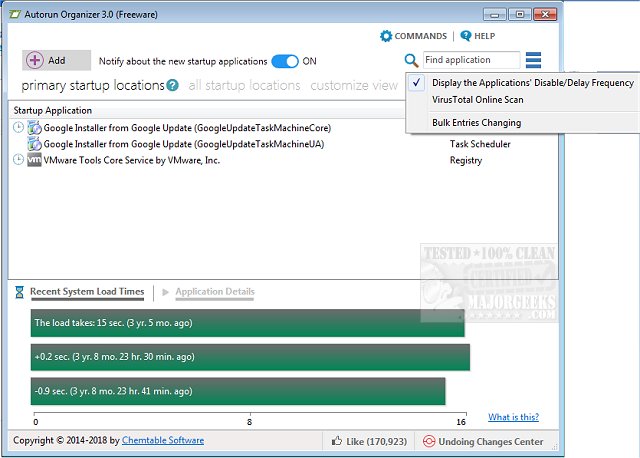
Autorun Organizer 7.02 has been released, offering users a powerful tool for managing startup items and autoruns to enhance boot-up times and overall Windows performance. This software provides an intuitive interface that visually represents the system's boot time, allowing users to pinpoint and resolve any delays affecting startup processes.
With Autorun Organizer, users can easily disable unnecessary startup programs and rearrange the order of autostart applications, leading to a more efficient launch sequence during system boot. This optimization not only improves boot times but also boosts the overall performance of the Windows operating system.
A notable feature of Autorun Organizer is its ability to automatically monitor and control disabled entries, ensuring they remain inactive and preventing unwanted programs from launching at startup. This empowers users to maintain greater control over their system's startup behavior, contributing to a smoother computing experience.
Key features of Autorun Organizer include:
- Accelerated boot-up and enhanced Windows performance
- Management of autorun priorities
- The ability to enable or disable programs in the autorun list
- Automatic oversight of disabled programs to keep them inactive
In addition to Autorun Organizer, users may find it beneficial to explore related tools and guides, such as how to disable Task Scheduler privacy tasks in Windows 10 and 11, utilize Storage Sense for automatic junk file deletion, and effectively manage startup apps in the latest Windows versions.
Overall, Autorun Organizer is an essential utility for users looking to optimize their system's performance by streamlining startup processes and enhancing overall efficiency
With Autorun Organizer, users can easily disable unnecessary startup programs and rearrange the order of autostart applications, leading to a more efficient launch sequence during system boot. This optimization not only improves boot times but also boosts the overall performance of the Windows operating system.
A notable feature of Autorun Organizer is its ability to automatically monitor and control disabled entries, ensuring they remain inactive and preventing unwanted programs from launching at startup. This empowers users to maintain greater control over their system's startup behavior, contributing to a smoother computing experience.
Key features of Autorun Organizer include:
- Accelerated boot-up and enhanced Windows performance
- Management of autorun priorities
- The ability to enable or disable programs in the autorun list
- Automatic oversight of disabled programs to keep them inactive
In addition to Autorun Organizer, users may find it beneficial to explore related tools and guides, such as how to disable Task Scheduler privacy tasks in Windows 10 and 11, utilize Storage Sense for automatic junk file deletion, and effectively manage startup apps in the latest Windows versions.
Overall, Autorun Organizer is an essential utility for users looking to optimize their system's performance by streamlining startup processes and enhancing overall efficiency
Autorun Organizer 7.02 released
Autorun Organizer manages startup items and autoruns to speed boot-up times and Windows performance.