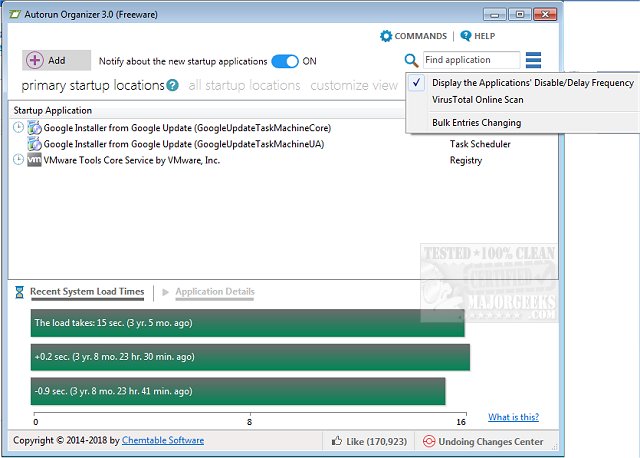
The newly released Autorun Organizer 7.0 is designed to optimize startup items and autoruns, improving boot-up times and overall Windows performance. This tool offers users a robust set of features for managing startup applications, providing a visual representation of system boot times to help identify and resolve delays in the startup process.
With Autorun Organizer, users can easily disable unnecessary programs and rearrange the list of autostart applications, streamlining the launch sequence during system boot. This capability leads to a noticeable enhancement in system performance. Additionally, the software automatically monitors disabled entries to ensure they remain inactive, preventing unwanted programs from launching at startup. This feature empowers users to maintain control over their startup process and optimize their system's efficiency effectively.
Key Features of Autorun Organizer 7.0:
- Accelerates boot-up times and enhances overall Windows performance
- Manages autorun priorities for a more organized startup experience
- Allows users to easily turn programs on or off in the autorun list
- Automatically monitors and controls disabled programs
Related Tools and Guides:
- Instructions on disabling Windows 10 & 11 Task Scheduler privacy settings and automatic maintenance tasks
- Tips on using Storage Sense to automatically delete junk files in Windows 10 & 11
- A guide on managing startup applications in Windows 10 & 11
In summary, Autorun Organizer 7.0 is an essential tool for Windows users seeking to improve their system’s startup efficiency and overall performance. By effectively managing startup applications, users can enjoy a faster, more responsive computing experience
With Autorun Organizer, users can easily disable unnecessary programs and rearrange the list of autostart applications, streamlining the launch sequence during system boot. This capability leads to a noticeable enhancement in system performance. Additionally, the software automatically monitors disabled entries to ensure they remain inactive, preventing unwanted programs from launching at startup. This feature empowers users to maintain control over their startup process and optimize their system's efficiency effectively.
Key Features of Autorun Organizer 7.0:
- Accelerates boot-up times and enhances overall Windows performance
- Manages autorun priorities for a more organized startup experience
- Allows users to easily turn programs on or off in the autorun list
- Automatically monitors and controls disabled programs
Related Tools and Guides:
- Instructions on disabling Windows 10 & 11 Task Scheduler privacy settings and automatic maintenance tasks
- Tips on using Storage Sense to automatically delete junk files in Windows 10 & 11
- A guide on managing startup applications in Windows 10 & 11
In summary, Autorun Organizer 7.0 is an essential tool for Windows users seeking to improve their system’s startup efficiency and overall performance. By effectively managing startup applications, users can enjoy a faster, more responsive computing experience
Autorun Organizer 7.0 released
Autorun Organizer manages startup items and autoruns to speed boot-up times and Windows performance.