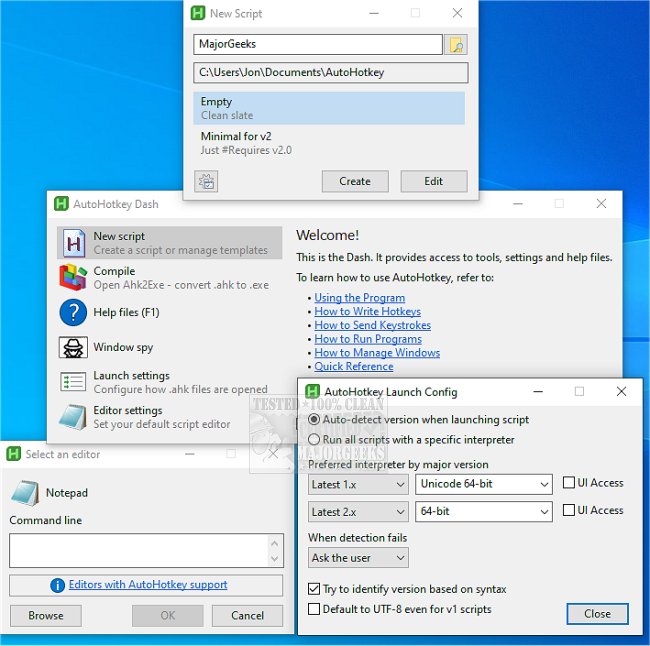
AutoHotkey has released two versions, 2.0.24 and 1.1.37.02, enhancing its functionality as a powerful free, open-source desktop automation tool for Windows. Designed for users who desire to streamline repetitive tasks, AutoHotkey allows for the creation of scripts that can automate virtually any action on a PC, from setting up hotkeys to executing complex macros.
The tool is particularly beneficial for individuals looking to enhance their productivity, whether they are gamers needing custom key binds, office workers automating routine tasks like email responses and data entry, or tech enthusiasts creating intricate scripts for multi-application control. Users can assign actions to hotkeys, expand text shortcuts into full phrases, record macros for repetitive actions, and even build simple graphical user interfaces (GUIs) for their scripts.
While AutoHotkey may have a steeper learning curve due to its scripting nature, the extensive help files and examples available make it accessible for beginners. A simple example demonstrates how to bind a key combination (e.g., WIN + MG) to open a website, showcasing the program's ease of use. More advanced users can create sophisticated scripts that improve gameplay by executing multiple commands simultaneously.
In summary, AutoHotkey is an invaluable tool for anyone looking to reduce the time spent on repetitive tasks, offering extensive customization and flexibility. It empowers users to transform their computing experience into a more efficient and enjoyable one, effectively mitigating the risk of repetitive strain injuries associated with excessive mouse and keyboard use.
Extension:
As automation and efficiency become increasingly vital in today's fast-paced digital environment, tools like AutoHotkey will only grow in importance. Users can explore further enhancements through community forums, where shared scripts and tips can provide inspiration and practical solutions. Additionally, AutoHotkey's ability to integrate with various applications enhances its utility—be it for streamlining a specific software workflow or enhancing gaming performance. As the software landscape continues to evolve, AutoHotkey stands as a testament to the power of user-driven automation, enabling individuals to customize their computing experiences profoundly. For those interested in diving deeper, learning basic scripting languages online can also complement AutoHotkey skills, unlocking even more potential for personalized automation solutions
The tool is particularly beneficial for individuals looking to enhance their productivity, whether they are gamers needing custom key binds, office workers automating routine tasks like email responses and data entry, or tech enthusiasts creating intricate scripts for multi-application control. Users can assign actions to hotkeys, expand text shortcuts into full phrases, record macros for repetitive actions, and even build simple graphical user interfaces (GUIs) for their scripts.
While AutoHotkey may have a steeper learning curve due to its scripting nature, the extensive help files and examples available make it accessible for beginners. A simple example demonstrates how to bind a key combination (e.g., WIN + MG) to open a website, showcasing the program's ease of use. More advanced users can create sophisticated scripts that improve gameplay by executing multiple commands simultaneously.
In summary, AutoHotkey is an invaluable tool for anyone looking to reduce the time spent on repetitive tasks, offering extensive customization and flexibility. It empowers users to transform their computing experience into a more efficient and enjoyable one, effectively mitigating the risk of repetitive strain injuries associated with excessive mouse and keyboard use.
Extension:
As automation and efficiency become increasingly vital in today's fast-paced digital environment, tools like AutoHotkey will only grow in importance. Users can explore further enhancements through community forums, where shared scripts and tips can provide inspiration and practical solutions. Additionally, AutoHotkey's ability to integrate with various applications enhances its utility—be it for streamlining a specific software workflow or enhancing gaming performance. As the software landscape continues to evolve, AutoHotkey stands as a testament to the power of user-driven automation, enabling individuals to customize their computing experiences profoundly. For those interested in diving deeper, learning basic scripting languages online can also complement AutoHotkey skills, unlocking even more potential for personalized automation solutions
AutoHotkey 2.0.24 / 1.1.37.02 released
AutoHotkey provides you with a fast, scriptable freeware desktop automation tool with hotkeys.