AutoClick is a user-friendly application designed to automate mouse clicks, streamlining repetitive clicking tasks for users. Its intuitive interface allows for easy customization of clicking speeds and patterns, making it particularly beneficial for gamers, data entry professionals, or anyone needing frequent mouse interactions.
The application offers advanced features such as setting precise time intervals and geographic coordinates for various clicking patterns. This is especially advantageous in scenarios that involve intricate challenges in click-intensive games, where quick and repeated clicks are critical for success. Furthermore, AutoClick can prevent your computer from entering idle mode during extended tasks, ensuring uninterrupted workflows.
Functionality and Ease of Use
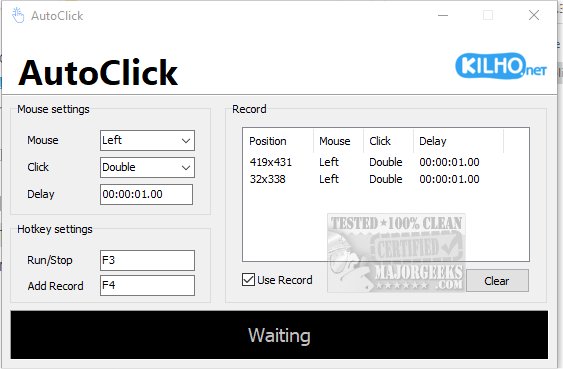
Using AutoClick is straightforward. Users can create specific click sequences by defining the series of clicks, their timing, and order. After positioning the cursor on the desired target on the screen, users select which mouse button to utilize (left, right, or wheel) and the type of click action (single click, double click, or mouse wheel). Additionally, users can set delays between actions for more controlled execution.
To activate the clicking process, users simply press a designated hotkey. All recorded actions are displayed in an organized table format, providing clear visibility of the mouse position and type of click for each action. This structured setup enhances the efficiency of task automation. If users wish to record a different sequence, they can easily clear the previous one and start anew. However, a limitation is that there is currently no option to save click profiles, which could enhance usability.
Conclusion and Recommendations
For anyone in search of a straightforward auto-clicker application, AutoClick stands out as a solid choice. Its ease of use makes it accessible for users of all skill levels, and its features cater to a variety of clicking needs.
Potential Extensions and Enhancements
To further improve AutoClick's functionality, future updates could consider adding the ability to save click profiles, enabling users to quickly switch between different sequences. Additionally, integrating advanced scripting options could allow users to create more complex automation routines. Implementing more customizable hotkeys and user-friendly tutorials could also enhance the overall user experience, making AutoClick not only a tool for automation but also a platform for learning and efficiency in repetitive tasks
The application offers advanced features such as setting precise time intervals and geographic coordinates for various clicking patterns. This is especially advantageous in scenarios that involve intricate challenges in click-intensive games, where quick and repeated clicks are critical for success. Furthermore, AutoClick can prevent your computer from entering idle mode during extended tasks, ensuring uninterrupted workflows.
Functionality and Ease of Use
Using AutoClick is straightforward. Users can create specific click sequences by defining the series of clicks, their timing, and order. After positioning the cursor on the desired target on the screen, users select which mouse button to utilize (left, right, or wheel) and the type of click action (single click, double click, or mouse wheel). Additionally, users can set delays between actions for more controlled execution.
To activate the clicking process, users simply press a designated hotkey. All recorded actions are displayed in an organized table format, providing clear visibility of the mouse position and type of click for each action. This structured setup enhances the efficiency of task automation. If users wish to record a different sequence, they can easily clear the previous one and start anew. However, a limitation is that there is currently no option to save click profiles, which could enhance usability.
Conclusion and Recommendations
For anyone in search of a straightforward auto-clicker application, AutoClick stands out as a solid choice. Its ease of use makes it accessible for users of all skill levels, and its features cater to a variety of clicking needs.
Potential Extensions and Enhancements
To further improve AutoClick's functionality, future updates could consider adding the ability to save click profiles, enabling users to quickly switch between different sequences. Additionally, integrating advanced scripting options could allow users to create more complex automation routines. Implementing more customizable hotkeys and user-friendly tutorials could also enhance the overall user experience, making AutoClick not only a tool for automation but also a platform for learning and efficiency in repetitive tasks
AutoClick 2.0.1 released
AutoClick is a straightforward app designed to automate mouse clicks, allowing you to perform repetitive clicking tasks effortlessly.