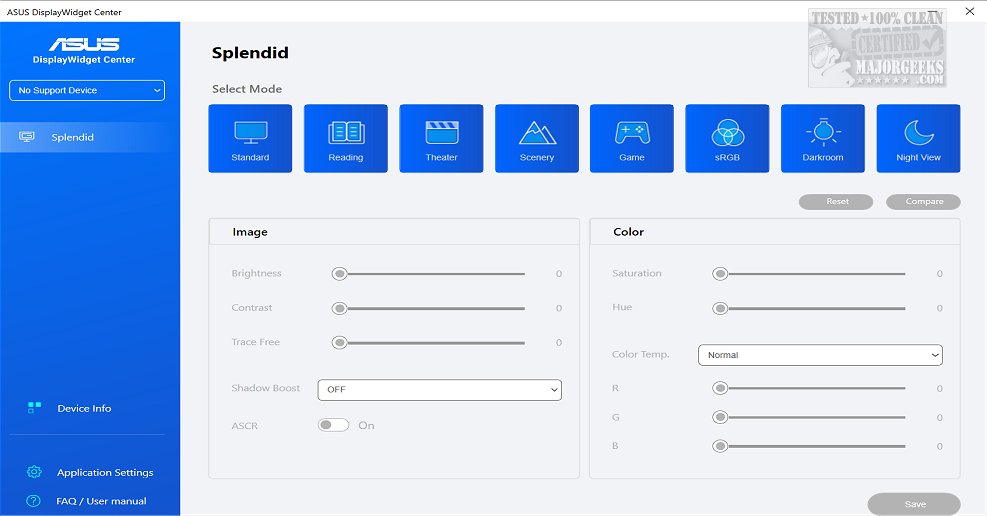
ASUS has released version 1.4.0.0 of the DisplayWidget Center, a powerful monitor management tool specifically designed for ASUS monitors. This software enables users to optimize their display settings to meet personal needs, enhancing their overall viewing experience. Key features include the ability to adjust screen brightness, contrast, and color temperature, which is particularly advantageous for designers and gamers who spend long hours in front of their screens.
The DisplayWidget Center also integrates a MultiScreen feature that streamlines workflow by offering customizable window layouts, thus maximizing productivity. Users can take advantage of the Picture-in-Picture (PIP) and Picture-by-Picture (PBP) functionalities to view and interact with multiple input sources simultaneously, allowing for tailored layout configurations that suit individual workflows.
Additionally, the software includes a KVM (Keyboard, Video, Mouse) feature, enabling users to control two systems with a single monitor, keyboard, and mouse. This Smart KVM functionality facilitates easy file transfers between systems, provided the monitor supports it. The App Tweaker feature enhances the user experience by offering tailored settings for activities such as gaming and movie watching.
For users with OLED monitors, the DisplayWidget Center includes an OLED Care feature designed to protect screens from burn-in and image retention. This feature allows users to initiate pixel cleaning, maintain uniform brightness, and set reminders to ensure the longevity of their monitors.
In summary, the ASUS DisplayWidget Center is an essential tool for ASUS monitor users, providing extensive customization options and features that enhance productivity and protect display quality. As technology continues to evolve, future updates may bring even more functionalities and improvements, further empowering users to tailor their display experiences. Whether for work or leisure, the DisplayWidget Center is poised to become an indispensable part of the ASUS monitor ecosystem
The DisplayWidget Center also integrates a MultiScreen feature that streamlines workflow by offering customizable window layouts, thus maximizing productivity. Users can take advantage of the Picture-in-Picture (PIP) and Picture-by-Picture (PBP) functionalities to view and interact with multiple input sources simultaneously, allowing for tailored layout configurations that suit individual workflows.
Additionally, the software includes a KVM (Keyboard, Video, Mouse) feature, enabling users to control two systems with a single monitor, keyboard, and mouse. This Smart KVM functionality facilitates easy file transfers between systems, provided the monitor supports it. The App Tweaker feature enhances the user experience by offering tailored settings for activities such as gaming and movie watching.
For users with OLED monitors, the DisplayWidget Center includes an OLED Care feature designed to protect screens from burn-in and image retention. This feature allows users to initiate pixel cleaning, maintain uniform brightness, and set reminders to ensure the longevity of their monitors.
In summary, the ASUS DisplayWidget Center is an essential tool for ASUS monitor users, providing extensive customization options and features that enhance productivity and protect display quality. As technology continues to evolve, future updates may bring even more functionalities and improvements, further empowering users to tailor their display experiences. Whether for work or leisure, the DisplayWidget Center is poised to become an indispensable part of the ASUS monitor ecosystem
ASUS DisplayWidget Center 1.4.0.0 released
ASUS DisplayWidget Center offers a comprehensive monitor management solution that allows you to optimize, personalize, and fully utilize your display to suit your needs and preferences.