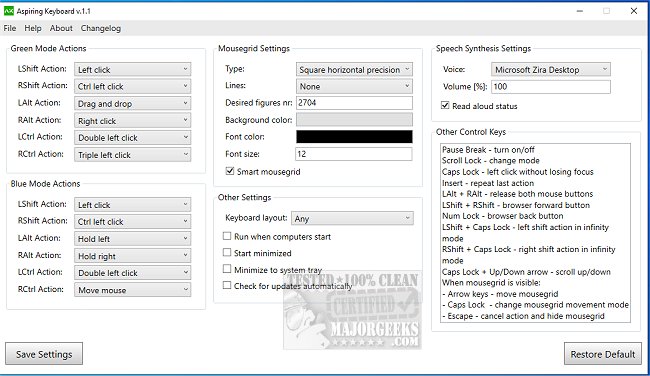
Aspiring Keyboard has launched its latest version, offering a unique solution for users who wish to navigate and control their computers without the reliance on a mouse. This innovative software enhances productivity and convenience by allowing users to perform various actions, including opening applications, typing text, scrolling, and selecting items, all through keyboard commands.
Boosting Productivity and Efficiency
The Aspiring Keyboard is designed to enhance efficiency, particularly for users who are proficient at touch typing and are familiar with essential Windows key combinations. By streamlining the interaction process, the software allows for quicker task completion compared to traditional mouse usage. Users benefit from not having to switch between the keyboard and mouse, which can save time and effort. Furthermore, it eliminates the need for physical mouse devices, potentially leading to cost savings.
Health Benefits and Accessibility
Another significant advantage of Aspiring Keyboard is its contribution to healthier computer use. Traditional mouse and keyboard setups can often result in repetitive strain injuries (RSI), which can be detrimental to long-term health. By using the Aspiring Keyboard, users can mitigate these risks while also providing an accessible option for those with mobility challenges.
Who Can Benefit?
Aspiring Keyboard is particularly beneficial for a wide range of users, including students, professionals, and anyone who spends considerable time on a computer. Its design caters to individuals who prefer keyboard navigation or face difficulties using a mouse, making it an invaluable tool for enhancing overall productivity and comfort.
In addition to the core features, the development team has compiled a comprehensive list of essential keyboard shortcuts to further assist users in maximizing their experience with the software.
Conclusion
Aspiring Keyboard stands out as an effective and efficient tool that encourages users to work smarter rather than harder. Whether you are looking to boost your productivity, enhance your workflow, or simply enjoy a more ergonomic computing experience, Aspiring Keyboard is a must-have addition to your software toolkit.
Related Resources
For users interested in optimizing their computer experience, additional resources include guides on enhancing mouse pointer precision, enabling mouse pointer trails, troubleshooting mouse issues, customizing touch keyboard themes, and managing touch keyboard settings in Windows
Boosting Productivity and Efficiency
The Aspiring Keyboard is designed to enhance efficiency, particularly for users who are proficient at touch typing and are familiar with essential Windows key combinations. By streamlining the interaction process, the software allows for quicker task completion compared to traditional mouse usage. Users benefit from not having to switch between the keyboard and mouse, which can save time and effort. Furthermore, it eliminates the need for physical mouse devices, potentially leading to cost savings.
Health Benefits and Accessibility
Another significant advantage of Aspiring Keyboard is its contribution to healthier computer use. Traditional mouse and keyboard setups can often result in repetitive strain injuries (RSI), which can be detrimental to long-term health. By using the Aspiring Keyboard, users can mitigate these risks while also providing an accessible option for those with mobility challenges.
Who Can Benefit?
Aspiring Keyboard is particularly beneficial for a wide range of users, including students, professionals, and anyone who spends considerable time on a computer. Its design caters to individuals who prefer keyboard navigation or face difficulties using a mouse, making it an invaluable tool for enhancing overall productivity and comfort.
In addition to the core features, the development team has compiled a comprehensive list of essential keyboard shortcuts to further assist users in maximizing their experience with the software.
Conclusion
Aspiring Keyboard stands out as an effective and efficient tool that encourages users to work smarter rather than harder. Whether you are looking to boost your productivity, enhance your workflow, or simply enjoy a more ergonomic computing experience, Aspiring Keyboard is a must-have addition to your software toolkit.
Related Resources
For users interested in optimizing their computer experience, additional resources include guides on enhancing mouse pointer precision, enabling mouse pointer trails, troubleshooting mouse issues, customizing touch keyboard themes, and managing touch keyboard settings in Windows
Aspiring Keyboard 1.3 released
Aspiring Keyboard provides an innovative option for navigating and controlling your computer without relying on a mouse.