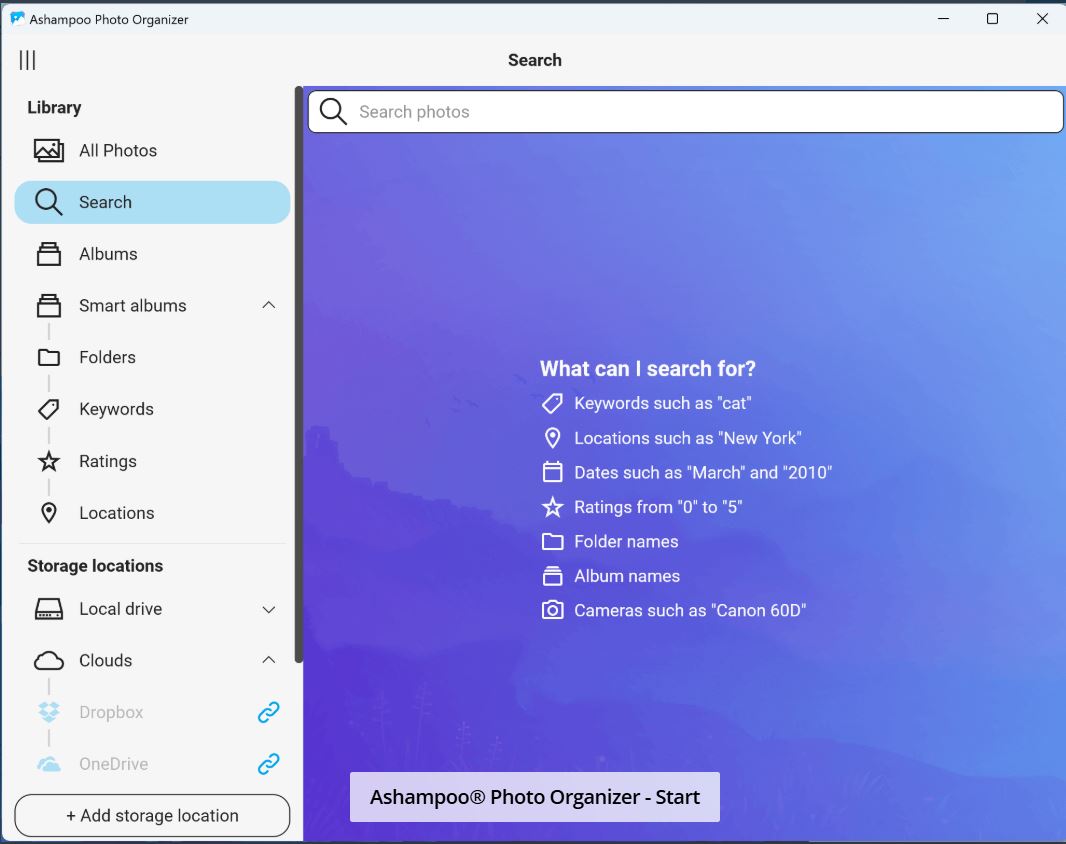
Ashampoo has released version 27.2.31 of its Photo Organizer, a free software for Windows designed to help users manage their disorganized photo collections. The program is ideal for those whose digital photo folders resemble chaotic junk drawers filled with images from various sources, such as vacations and different devices.
Why Use Ashampoo Photo Organizer?
Digital clutter accumulates quickly, whether from casual photography or professional image management. Ashampoo Photo Organizer simplifies the process of grouping, renaming, and sorting photos into albums without relying on complex databases or cloud services. It operates locally, allowing users to maintain complete control over their files, especially useful for those with images spread across multiple drives. Users can easily drop folders into the program, which will then scan and sort them using customizable filters based on criteria like creation date or camera metadata.
Features of Ashampoo Photo Organizer
The software prioritizes photo management over editing, making it straightforward to use. Upon startup, users can create a library that captures metadata and geo data, generating thumbnails for easier navigation. While the initial setup may take some time, particularly for large collections, the detailed organization it offers is beneficial. Notable features include:
- Batch renaming: Rename files with user-defined rules.
- Auto-sorting: Organize photos into folders based on metadata or other criteria automatically.
- Preview pane: Quickly view images before making changes.
- Support for EXIF and IPTC data: Enhance accuracy in organizing by utilizing camera-provided information.
- Drag-and-drop functionality: Simplifies moving and sorting photos.
- User-friendly interface: No need for guidance; users can start organizing immediately.
Target Audience
Ashampoo Photo Organizer is tailored for anyone who struggles with photo organization, from casual users to professionals. It's particularly advantageous for those managing family albums, client folders, or post-vacation photo sorting. Content creators and digital marketers can benefit from its consistent naming and folder structuring capabilities.
Pros and Cons
Pros:
- Swift batch renaming and sorting.
- Intuitive drag-and-drop interface.
- Accurate sorting through EXIF/metadata support.
Cons:
- Lacks image editing tools, focusing solely on organization.
- No portable version available.
- Interface design may feel outdated compared to modern standards.
Conclusion
Ashampoo Photo Organizer is a focused tool that effectively addresses the common problem of photo disorganization. If you find yourself overwhelmed by a plethora of images, this lightweight Windows application can help restore order with ease and efficiency. It serves as a reliable solution for users seeking a straightforward method to manage their photo libraries without additional complexity.
Extension Ideas
To further enhance Ashampoo Photo Organizer, future updates could consider integrating advanced editing tools for basic photo adjustments, adding a portable version for flexibility, and refreshing the user interface to align with contemporary design standards. Additionally, incorporating cloud sync options could allow users to access their organized collections from multiple devices, catering to a broader audience
Why Use Ashampoo Photo Organizer?
Digital clutter accumulates quickly, whether from casual photography or professional image management. Ashampoo Photo Organizer simplifies the process of grouping, renaming, and sorting photos into albums without relying on complex databases or cloud services. It operates locally, allowing users to maintain complete control over their files, especially useful for those with images spread across multiple drives. Users can easily drop folders into the program, which will then scan and sort them using customizable filters based on criteria like creation date or camera metadata.
Features of Ashampoo Photo Organizer
The software prioritizes photo management over editing, making it straightforward to use. Upon startup, users can create a library that captures metadata and geo data, generating thumbnails for easier navigation. While the initial setup may take some time, particularly for large collections, the detailed organization it offers is beneficial. Notable features include:
- Batch renaming: Rename files with user-defined rules.
- Auto-sorting: Organize photos into folders based on metadata or other criteria automatically.
- Preview pane: Quickly view images before making changes.
- Support for EXIF and IPTC data: Enhance accuracy in organizing by utilizing camera-provided information.
- Drag-and-drop functionality: Simplifies moving and sorting photos.
- User-friendly interface: No need for guidance; users can start organizing immediately.
Target Audience
Ashampoo Photo Organizer is tailored for anyone who struggles with photo organization, from casual users to professionals. It's particularly advantageous for those managing family albums, client folders, or post-vacation photo sorting. Content creators and digital marketers can benefit from its consistent naming and folder structuring capabilities.
Pros and Cons
Pros:
- Swift batch renaming and sorting.
- Intuitive drag-and-drop interface.
- Accurate sorting through EXIF/metadata support.
Cons:
- Lacks image editing tools, focusing solely on organization.
- No portable version available.
- Interface design may feel outdated compared to modern standards.
Conclusion
Ashampoo Photo Organizer is a focused tool that effectively addresses the common problem of photo disorganization. If you find yourself overwhelmed by a plethora of images, this lightweight Windows application can help restore order with ease and efficiency. It serves as a reliable solution for users seeking a straightforward method to manage their photo libraries without additional complexity.
Extension Ideas
To further enhance Ashampoo Photo Organizer, future updates could consider integrating advanced editing tools for basic photo adjustments, adding a portable version for flexibility, and refreshing the user interface to align with contemporary design standards. Additionally, incorporating cloud sync options could allow users to access their organized collections from multiple devices, catering to a broader audience
Ashampoo Photo Organizer 27.2.31 released
Ashampoo Photo Organizer is a clean way to bring order to your chaotic photo collection.