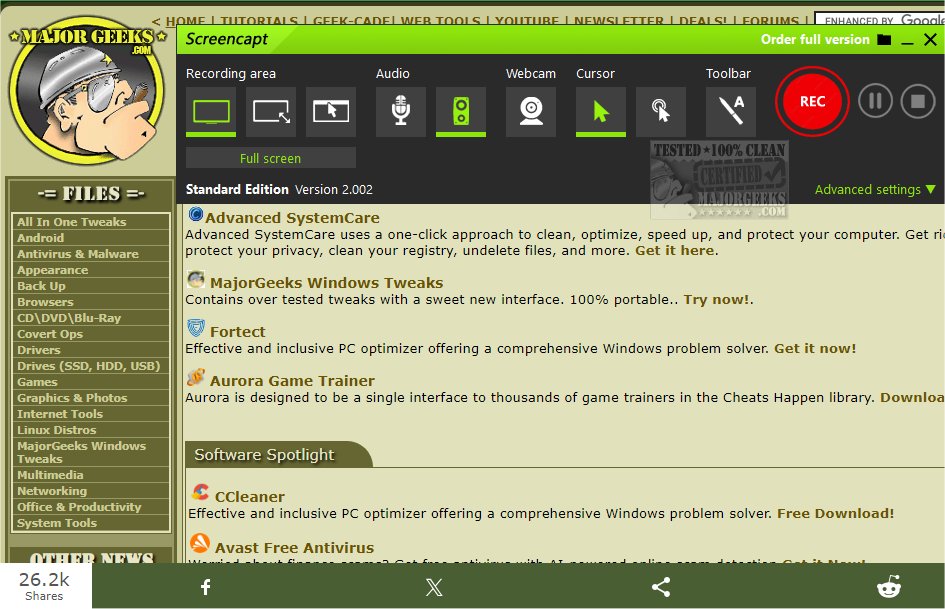
ASCOMP Screencapt 3.005 has been released, offering users a robust and intuitive screen recording tool designed to easily capture screen activities and save them in various video formats such as MP4, AVI, and FLV. This software is ideal for a multitude of recording purposes, including creating tutorials, recording webinars, and capturing gameplay, all while ensuring an effortless user experience.
One of the standout features of ASCOMP Screencapt is its flexibility, allowing users to record the entire screen, a selected portion, or a specific application window. The software also integrates audio recording capabilities, enabling users to include commentary or system sounds directly in their recordings, which is particularly beneficial for instructional videos and presentations.
Furthermore, ASCOMP Screencapt includes a webcam overlay feature that allows users to add their live reactions and comments to the recordings, enhancing the personal touch of the videos. Advanced cursor recording options are also available, allowing users to choose whether to hide the cursor or apply effects to highlight specific actions, making it ideal for software demonstrations and tutorials.
The software utilizes the H.264 codec for efficient compression without compromising image quality. Users can select from different compression levels, optimizing the balance between file size and visual clarity. With a maximum frame rate of 120 FPS, ASCOMP Screencapt ensures smooth recordings, making it suitable for fast-paced gaming and dynamic applications.
In addition to these features, users can draw directly on the screen and add annotations during recording, further enhancing engagement and clarity in video content.
In summary, ASCOMP Screencapt 3.005 is a comprehensive tool that empowers users to capture their screens with remarkable efficiency and flexibility, making it a valuable asset for content creators, educators, and professionals alike. Whether for creating educational content, live streaming, or documenting software processes, ASCOMP Screencapt stands out as a top choice in screen recording software
One of the standout features of ASCOMP Screencapt is its flexibility, allowing users to record the entire screen, a selected portion, or a specific application window. The software also integrates audio recording capabilities, enabling users to include commentary or system sounds directly in their recordings, which is particularly beneficial for instructional videos and presentations.
Furthermore, ASCOMP Screencapt includes a webcam overlay feature that allows users to add their live reactions and comments to the recordings, enhancing the personal touch of the videos. Advanced cursor recording options are also available, allowing users to choose whether to hide the cursor or apply effects to highlight specific actions, making it ideal for software demonstrations and tutorials.
The software utilizes the H.264 codec for efficient compression without compromising image quality. Users can select from different compression levels, optimizing the balance between file size and visual clarity. With a maximum frame rate of 120 FPS, ASCOMP Screencapt ensures smooth recordings, making it suitable for fast-paced gaming and dynamic applications.
In addition to these features, users can draw directly on the screen and add annotations during recording, further enhancing engagement and clarity in video content.
In summary, ASCOMP Screencapt 3.005 is a comprehensive tool that empowers users to capture their screens with remarkable efficiency and flexibility, making it a valuable asset for content creators, educators, and professionals alike. Whether for creating educational content, live streaming, or documenting software processes, ASCOMP Screencapt stands out as a top choice in screen recording software
ASCOMP Screencapt 3.005 released
ASCOMP Screencapt is a powerful screen recording tool designed to capture screen activity easily and save the recordings in various video formats, including MP4, AVI, and FLV.