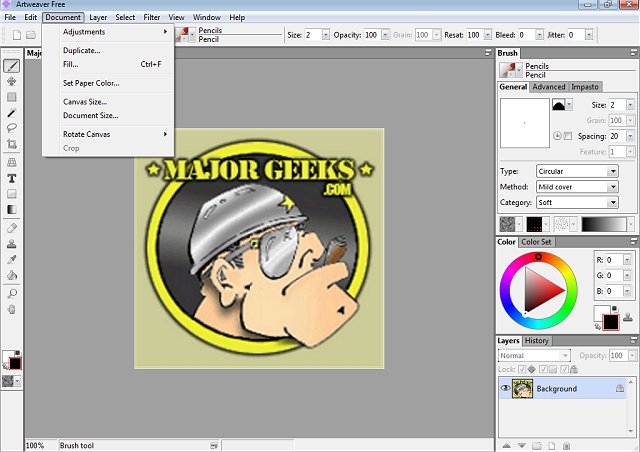
Artweaver Free 8.1.6 has been released, providing a powerful yet affordable solution for digital painting enthusiasts. This software allows users to create imaginative artwork using an extensive range of painting tools, making it ideal for both beginners and seasoned artists. Whether you're sketching, airbrushing, or trying out different textures, Artweaver Free offers a comprehensive digital art studio experience right on your PC.
One of the highlights of Artweaver Free is its customizable brush system, which includes options like pencils, airbrushes, sponges, and oil brushes. Users can adjust settings such as pressure, size, and opacity to craft their ideal strokes. Layer support and grouping features enable artists to work on complex compositions with ease, allowing for adjustments without impacting the entire piece. Notably, Artweaver Free is compatible with PSD files, facilitating smooth collaboration with Photoshop users and supporting a variety of plug-ins.
The software also caters to artists using drawing tablets with its pressure-sensitive input, which provides a more natural painting experience. For those interested in teamwork, the Artweaver Plus version offers real-time collaboration, enabling multiple artists to work on a project at the same time.
Artweaver comes in two versions: the free version, which includes essential features, and Artweaver Plus (a shareware option) that unlocks advanced tools and improved performance, including a 14-day trial of the Plus version without restrictions.
Pros:
- Free and feature-rich for casual users.
- Supports layers, PSD files, and Photoshop plug-ins.
- Customizable brush engine with pen pressure sensitivity.
- Excellent compatibility with drawing tablets.
- 14-day free trial of the Plus version.
Cons:
- The user interface may feel outdated to some.
- Lacks some advanced features found in high-end software like Photoshop or Corel Painter.
- The free version does not include real-time collaboration features.
Geek Verdict:
Artweaver Free is a fantastic choice for beginners and casual artists seeking a user-friendly digital painting tool. With its robust features, including layers, custom brushes, and compatibility with tablets, it equips users with everything needed to embark on their digital art journey. For those seeking additional functionality, the Plus version offers even greater capabilities, making Artweaver Free an excellent value in the realm of digital art software.
In conclusion, if you're looking to explore your creative side without investing in expensive software, Artweaver Free is a compelling option that punches well above its weight, making it a worthy addition to any artist's toolkit
One of the highlights of Artweaver Free is its customizable brush system, which includes options like pencils, airbrushes, sponges, and oil brushes. Users can adjust settings such as pressure, size, and opacity to craft their ideal strokes. Layer support and grouping features enable artists to work on complex compositions with ease, allowing for adjustments without impacting the entire piece. Notably, Artweaver Free is compatible with PSD files, facilitating smooth collaboration with Photoshop users and supporting a variety of plug-ins.
The software also caters to artists using drawing tablets with its pressure-sensitive input, which provides a more natural painting experience. For those interested in teamwork, the Artweaver Plus version offers real-time collaboration, enabling multiple artists to work on a project at the same time.
Artweaver comes in two versions: the free version, which includes essential features, and Artweaver Plus (a shareware option) that unlocks advanced tools and improved performance, including a 14-day trial of the Plus version without restrictions.
Pros:
- Free and feature-rich for casual users.
- Supports layers, PSD files, and Photoshop plug-ins.
- Customizable brush engine with pen pressure sensitivity.
- Excellent compatibility with drawing tablets.
- 14-day free trial of the Plus version.
Cons:
- The user interface may feel outdated to some.
- Lacks some advanced features found in high-end software like Photoshop or Corel Painter.
- The free version does not include real-time collaboration features.
Geek Verdict:
Artweaver Free is a fantastic choice for beginners and casual artists seeking a user-friendly digital painting tool. With its robust features, including layers, custom brushes, and compatibility with tablets, it equips users with everything needed to embark on their digital art journey. For those seeking additional functionality, the Plus version offers even greater capabilities, making Artweaver Free an excellent value in the realm of digital art software.
In conclusion, if you're looking to explore your creative side without investing in expensive software, Artweaver Free is a compelling option that punches well above its weight, making it a worthy addition to any artist's toolkit
Artweaver Free 8.1.6 released
Artweaver Free lets you paint creatively with the help of a vast range of painting tools so you can create sketches from photos or experiment with colors.