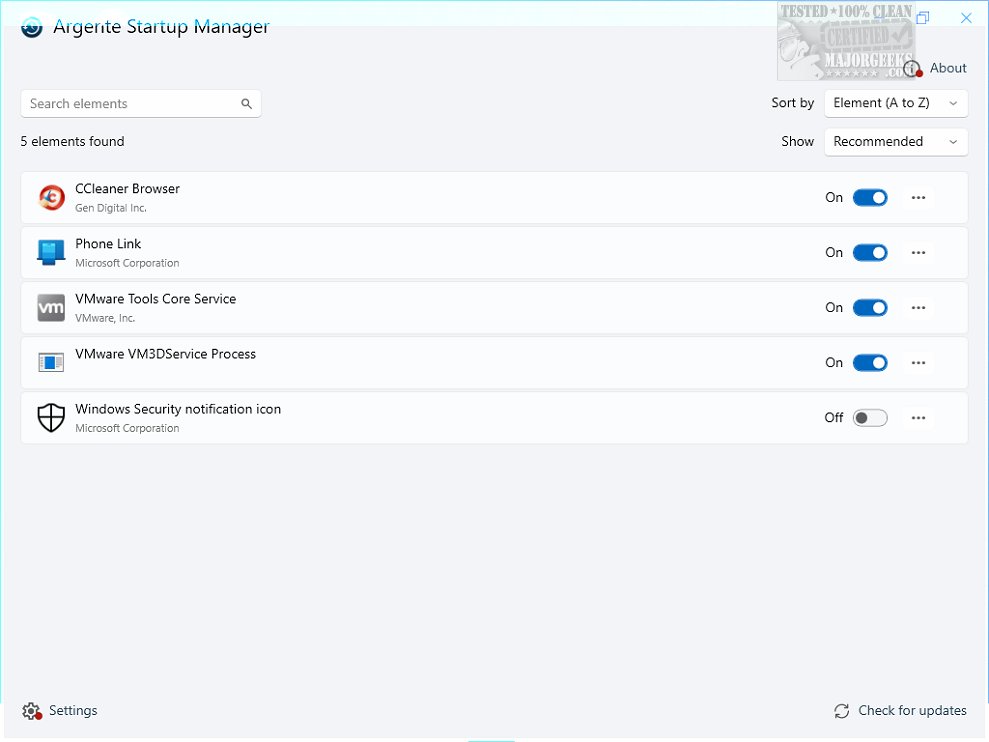
Argente Startup Manager 4.0.7.1 has been released, providing users with a robust tool for managing applications that automatically launch during system startup. This utility is part of the Argente Utilities suite and is designed to enhance system performance by allowing users to easily manage their startup items.
With Argente Startup Manager, users can view a detailed list of all startup applications, delay their launch times, remove unnecessary entries, edit properties, and add new applications to the startup queue. This level of control is crucial for optimizing boot times and overall system efficiency.
The software features an intuitive user interface that simplifies navigation, enabling users to quickly access and manage their startup programs. Upon launching the application, it automatically compiles a comprehensive list of all configured startup programs, displaying their names and complete file paths for clarity.
Users can customize their startup processes by disabling specific applications they do not want to run at startup. The interface also allows for the easy addition of new programs, modification of existing entries, and the inclusion of command-line arguments for advanced configurations. Quick access features, such as direct links to program folders and a refresh function, aid in effective management. A powerful search function further enhances usability by allowing users to find specific startup items quickly.
The software is lightweight, consuming minimal CPU and RAM resources, making it an efficient option for users looking to streamline their system's startup process. While it may not offer an extensive array of features or deep customization options, its simple yet effective design provides a seamless solution for managing autostart entries.
In summary, Argente Startup Manager is an essential tool for users aiming to optimize their Windows boot times and enhance system performance. By empowering users with the ability to manage startup applications effortlessly, it transforms the startup routine into a faster and more efficient process. This tool is included in the Argente Utilities suite, making it easily accessible for all users.
Extension:
Future updates to Argente Startup Manager could potentially include more advanced features such as automated optimization suggestions based on user behavior, integration with system performance monitoring tools, and enhanced reporting capabilities to track changes made to startup applications over time. Additionally, expanding support for more operating systems beyond Windows could broaden its user base, making it a versatile tool for managing startup processes across various platforms. Enhanced security measures, such as alerts for suspicious startup entries, could also be beneficial in safeguarding users' systems from malware that often embeds itself in startup sequences
With Argente Startup Manager, users can view a detailed list of all startup applications, delay their launch times, remove unnecessary entries, edit properties, and add new applications to the startup queue. This level of control is crucial for optimizing boot times and overall system efficiency.
The software features an intuitive user interface that simplifies navigation, enabling users to quickly access and manage their startup programs. Upon launching the application, it automatically compiles a comprehensive list of all configured startup programs, displaying their names and complete file paths for clarity.
Users can customize their startup processes by disabling specific applications they do not want to run at startup. The interface also allows for the easy addition of new programs, modification of existing entries, and the inclusion of command-line arguments for advanced configurations. Quick access features, such as direct links to program folders and a refresh function, aid in effective management. A powerful search function further enhances usability by allowing users to find specific startup items quickly.
The software is lightweight, consuming minimal CPU and RAM resources, making it an efficient option for users looking to streamline their system's startup process. While it may not offer an extensive array of features or deep customization options, its simple yet effective design provides a seamless solution for managing autostart entries.
In summary, Argente Startup Manager is an essential tool for users aiming to optimize their Windows boot times and enhance system performance. By empowering users with the ability to manage startup applications effortlessly, it transforms the startup routine into a faster and more efficient process. This tool is included in the Argente Utilities suite, making it easily accessible for all users.
Extension:
Future updates to Argente Startup Manager could potentially include more advanced features such as automated optimization suggestions based on user behavior, integration with system performance monitoring tools, and enhanced reporting capabilities to track changes made to startup applications over time. Additionally, expanding support for more operating systems beyond Windows could broaden its user base, making it a versatile tool for managing startup processes across various platforms. Enhanced security measures, such as alerts for suspicious startup entries, could also be beneficial in safeguarding users' systems from malware that often embeds itself in startup sequences
Argente Startup Manager 4.0.7.1 released
Argente Startup Manager allows you to manage the applications that launch automatically at startup and more. This tool is included in Argente Utilities.