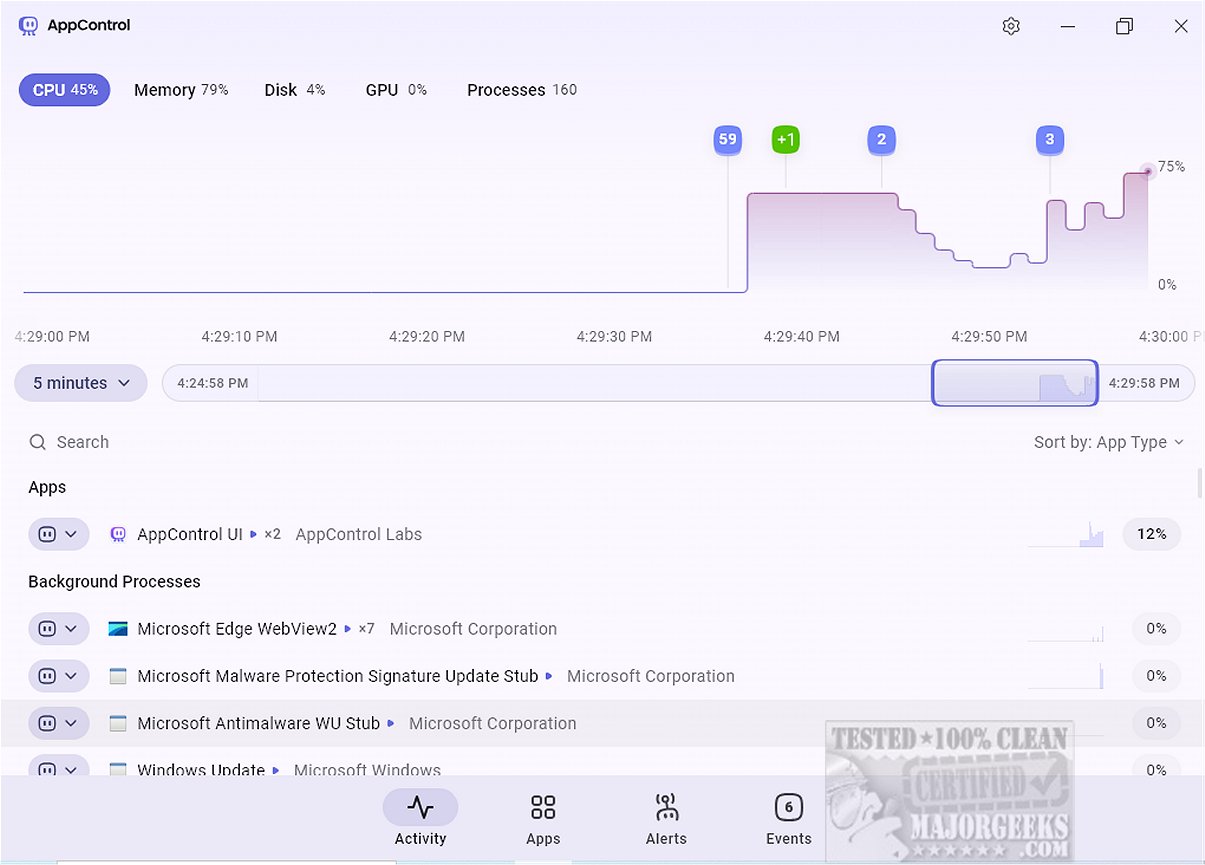
AppControl has launched its latest version, 1.4.0.414, presenting users with an advanced system monitoring tool designed to simplify resource usage tracking. This application serves as a robust alternative to traditional task managers, equipped with a historical timeline that visualizes CPU, GPU, memory, disk usage, and temperature data, all while using clear language to describe active processes.
User-Friendly Interface
The modern and sleek interface of AppControl enhances usability, allowing users to navigate through a scrollable timeline that details resource consumption over the past three days. This functionality aids users in identifying spikes in resource usage and understanding the contributing factors, which is beneficial for troubleshooting and preventive maintenance.
Users can access a consolidated view of running applications, background processes, and Windows processes within a single window. Although it allows for terminating or disabling processes, it does not yet support suspending individual browser tabs, a feature available in Task Manager. However, AppControl shines with its app insights, which provide descriptions of processes, reducing the need for users to search online for information regarding Windows applications.
Focus on Privacy
A standout feature of AppControl is its emphasis on privacy-related events. The Apps tab monitors running applications, highlighting privacy settings concerning access to sensitive hardware resources, such as cameras, microphones, and user locations. Users can set custom alerts for significant privacy events, like when an application accesses critical hardware or activates location tracking.
Event Tracking Capabilities
The Events tab offers users a detailed overview of actions taken by running processes, including when applications are launched, updated, or when hardware components are accessed or modified. This comprehensive tracking provides valuable insights into system activity.
Areas for Improvement
Despite its user-friendly design and timeline visualization, AppControl lacks certain features that could enhance its functionality. For instance, it does not allow users to restart Windows Explorer or initiate new processes directly within the application. Additionally, incorporating features to display running services and startup applications would further elevate its utility.
Conclusion
In conclusion, AppControl emerges as a powerful alternative to conventional task managers, equipped with a wide range of features tailored for power users. With its real-time and historical resource monitoring, customizable alerts, and continuous event tracking, AppControl empowers users to gain deeper insights into their system's performance and activity, ensuring full control over device resources and an improved computing experience. The developer provides a help section for troubleshooting, making it accessible for users who may need assistance.
In light of its strengths and weaknesses, AppControl represents a significant tool for users seeking to optimize their system's performance while maintaining a focus on privacy and resource management. Future updates may address its current limitations, further solidifying its position as a leading system monitoring tool
User-Friendly Interface
The modern and sleek interface of AppControl enhances usability, allowing users to navigate through a scrollable timeline that details resource consumption over the past three days. This functionality aids users in identifying spikes in resource usage and understanding the contributing factors, which is beneficial for troubleshooting and preventive maintenance.
Users can access a consolidated view of running applications, background processes, and Windows processes within a single window. Although it allows for terminating or disabling processes, it does not yet support suspending individual browser tabs, a feature available in Task Manager. However, AppControl shines with its app insights, which provide descriptions of processes, reducing the need for users to search online for information regarding Windows applications.
Focus on Privacy
A standout feature of AppControl is its emphasis on privacy-related events. The Apps tab monitors running applications, highlighting privacy settings concerning access to sensitive hardware resources, such as cameras, microphones, and user locations. Users can set custom alerts for significant privacy events, like when an application accesses critical hardware or activates location tracking.
Event Tracking Capabilities
The Events tab offers users a detailed overview of actions taken by running processes, including when applications are launched, updated, or when hardware components are accessed or modified. This comprehensive tracking provides valuable insights into system activity.
Areas for Improvement
Despite its user-friendly design and timeline visualization, AppControl lacks certain features that could enhance its functionality. For instance, it does not allow users to restart Windows Explorer or initiate new processes directly within the application. Additionally, incorporating features to display running services and startup applications would further elevate its utility.
Conclusion
In conclusion, AppControl emerges as a powerful alternative to conventional task managers, equipped with a wide range of features tailored for power users. With its real-time and historical resource monitoring, customizable alerts, and continuous event tracking, AppControl empowers users to gain deeper insights into their system's performance and activity, ensuring full control over device resources and an improved computing experience. The developer provides a help section for troubleshooting, making it accessible for users who may need assistance.
In light of its strengths and weaknesses, AppControl represents a significant tool for users seeking to optimize their system's performance while maintaining a focus on privacy and resource management. Future updates may address its current limitations, further solidifying its position as a leading system monitoring tool
AppControl 1.4.0.414 released
AppControl offers a comprehensive system monitoring tool that provides users with an intuitive way to track resource usage over time.