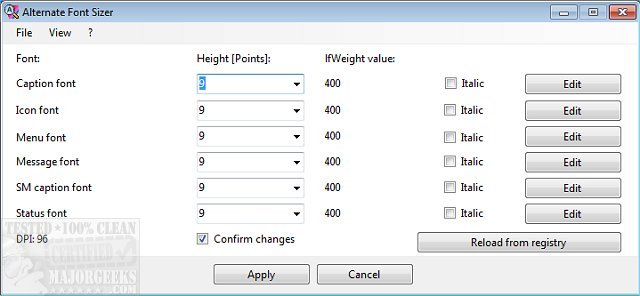
Alternate Font Sizer version 1.640 has been released, allowing users to customize font sizes on their Windows 10 desktops without the need to scale the entire display. This utility addresses some of the limitations of Windows 10, particularly the automatic scaling issues that can occur when changing font sizes.
With an intuitive interface, Alternate Font Sizer enables users to adjust various font settings effortlessly. Users can modify caption height, DPI font, icon size, menu text, and small caption sizes. Additionally, it provides options to view and italicize the DPI of the display and edit multiple font attributes, including width, strikeout, charset, and orientation. After making changes, users simply need to click the apply button and restart their system for the adjustments to take effect.
While the software does not include a feature to restore default settings, it allows users to save their configuration settings. Therefore, it is advisable to create and save a default settings file to easily revert changes if needed.
In addition to this new release, users may find it helpful to explore related guides on installing or uninstalling fonts in Windows, restoring default font settings, and acquiring additional fonts for both Windows 10 and 11.
Extension:
The release of Alternate Font Sizer 1.640 could be particularly beneficial for users with visual impairments or those who prefer specific font styles and sizes for better readability. Customizing fonts can enhance user experience significantly, especially for long periods of computer use. Furthermore, as remote work and digital communication become more prevalent, having control over font appearance can help users maintain a professional look in documents and presentations.
Future updates could consider integrating a feature for restoring default settings or implementing a preview option that allows users to see changes in real-time before applying them. This would further streamline the customization process and enhance user satisfaction. Additionally, expanding compatibility to include other versions of Windows, such as Windows 11, could broaden the utility's audience and usability
With an intuitive interface, Alternate Font Sizer enables users to adjust various font settings effortlessly. Users can modify caption height, DPI font, icon size, menu text, and small caption sizes. Additionally, it provides options to view and italicize the DPI of the display and edit multiple font attributes, including width, strikeout, charset, and orientation. After making changes, users simply need to click the apply button and restart their system for the adjustments to take effect.
While the software does not include a feature to restore default settings, it allows users to save their configuration settings. Therefore, it is advisable to create and save a default settings file to easily revert changes if needed.
In addition to this new release, users may find it helpful to explore related guides on installing or uninstalling fonts in Windows, restoring default font settings, and acquiring additional fonts for both Windows 10 and 11.
Extension:
The release of Alternate Font Sizer 1.640 could be particularly beneficial for users with visual impairments or those who prefer specific font styles and sizes for better readability. Customizing fonts can enhance user experience significantly, especially for long periods of computer use. Furthermore, as remote work and digital communication become more prevalent, having control over font appearance can help users maintain a professional look in documents and presentations.
Future updates could consider integrating a feature for restoring default settings or implementing a preview option that allows users to see changes in real-time before applying them. This would further streamline the customization process and enhance user satisfaction. Additionally, expanding compatibility to include other versions of Windows, such as Windows 11, could broaden the utility's audience and usability
Alternate Font Sizer 1.640 released
Alternate Font Sizer permits you to adjust Windows 10 desktop font sizes without scaling the display.