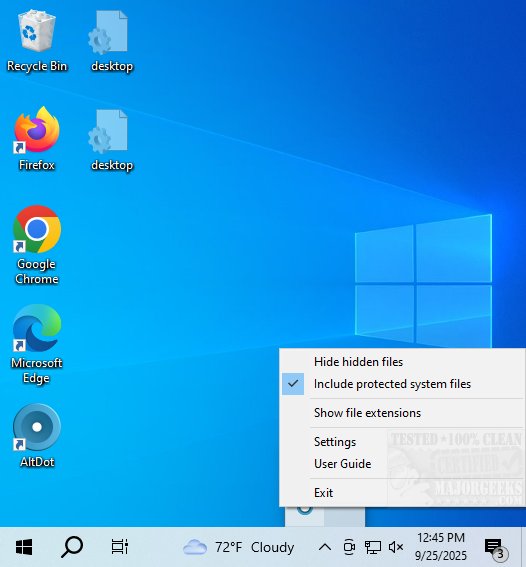
AltDot 1.3 has been released, enhancing its role as a valuable tool for file management. This application conveniently resides in your system tray, allowing users to manage the visibility of hidden files and file extensions with ease. The newly updated version simplifies navigation and organization by enabling toggling of these often-overlooked elements with just a few clicks.
Developed in C++, AltDot operates smoothly without the need for additional libraries, ensuring efficient performance across various applications. Users can easily toggle display settings by double-clicking the app icon in the system tray. For those who prefer keyboard shortcuts, pressing Alt + Dot will show or hide hidden files, while Shift + Alt + Dot controls the visibility of file extensions. This intuitive functionality caters to both casual users and tech enthusiasts, enhancing workspace organization based on individual preferences.
AltDot’s capabilities resemble features commonly found in Linux, offering Windows users a straightforward method to access hidden files. This streamlined approach greatly enhances user convenience, making file management tasks more efficient.
The "Geek Verdict" emphasizes that AltDot is a fantastic application that provides an exceptionally user-friendly interface for managing file visibility. Whether you're looking for a portable version or the standard application, AltDot ensures that you can navigate your digital space effectively, ensuring that no important data remains concealed when needed.
In addition to its existing features, future updates may include customizable themes, advanced search functionalities for hidden files, and integration with cloud storage services to further improve the user experience. AltDot aims to remain an essential tool for anyone who values effective file management on their computer
Developed in C++, AltDot operates smoothly without the need for additional libraries, ensuring efficient performance across various applications. Users can easily toggle display settings by double-clicking the app icon in the system tray. For those who prefer keyboard shortcuts, pressing Alt + Dot will show or hide hidden files, while Shift + Alt + Dot controls the visibility of file extensions. This intuitive functionality caters to both casual users and tech enthusiasts, enhancing workspace organization based on individual preferences.
AltDot’s capabilities resemble features commonly found in Linux, offering Windows users a straightforward method to access hidden files. This streamlined approach greatly enhances user convenience, making file management tasks more efficient.
The "Geek Verdict" emphasizes that AltDot is a fantastic application that provides an exceptionally user-friendly interface for managing file visibility. Whether you're looking for a portable version or the standard application, AltDot ensures that you can navigate your digital space effectively, ensuring that no important data remains concealed when needed.
In addition to its existing features, future updates may include customizable themes, advanced search functionalities for hidden files, and integration with cloud storage services to further improve the user experience. AltDot aims to remain an essential tool for anyone who values effective file management on their computer
AltDot 1.3 released
AltDot is a handy application that resides in your system tray, providing a user-friendly way to manage the visibility of hidden files and file extensions on your computer. Portable version is also available.