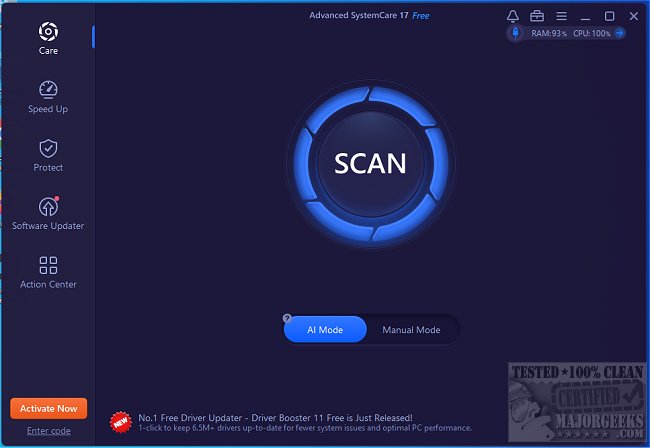
Advanced SystemCare is an effective all-in-one tool designed to clean, optimize, speed up, and protect your computer. A video tutorial is available to help users get started.
Why Choose Advanced SystemCare?
If your computer is slow or cluttered, Advanced SystemCare is specifically engineered to restore its performance. The software provides one-click optimization that tackles junk files, improves startup times, resolves registry issues, and enhances privacy. It's suitable for various uses, including work, gaming, and everyday browsing, ensuring a smooth experience without complex configurations.
How Advanced SystemCare Works
Over time, computers accumulate junk files and unnecessary programs that hinder performance. Advanced SystemCare automates the cleanup process, resulting in a fast, responsive, and secure PC with minimal user effort. Key features include:
- Speed Optimization: It deactivates unneeded background processes and clears RAM.
- Junk File Cleaning: Removes system clutter, temporary files, and remnants of uninstalled software.
- Startup Improvement: Disables unnecessary startup programs to enhance boot speed.
- Error Repair: Fixes registry issues that can lead to crashes or slow performance.
- Real-time Monitoring: Keeps track of CPU, RAM, and disk usage to prevent slowdowns.
- Privacy Protection: Clears browsing history, blocks trackers, and safeguards against unauthorized access.
- Turbo Boost Mode: Optimizes system resources for gamers and professionals, resulting in smoother gameplay and increased productivity.
When to Use Advanced SystemCare
- If your PC takes a long time to start up.
- When you're running low on storage space.
- If applications are slow or frequently freezing.
- When gaming performance decreases.
- If privacy concerns arise regarding tracking.
- When you prefer automatic, hassle-free optimization over manual adjustments.
Pros and Cons
Pros:
- Simple one-click cleanup and performance enhancement.
- Speeds up Windows without the need for intricate tweaks.
- Effective for gaming and demanding applications.
- Robust privacy and security features.
Cons:
- Some advanced features are only available in the Pro version.
- May recommend additional IObit software during installation.
Geek Verdict
Having utilized Advanced SystemCare for years, we find it to be an invaluable tool for cleaning, optimizing, and speeding up PCs. Whether facing slow startups, low storage, or lagging performance, this software addresses issues efficiently and automatically.
Additional Resources
For those looking to enhance their PC management skills further, consider exploring similar topics such as:
- Using Storage Sense for automatic junk file deletion in Windows 10 & 11.
- Improving wireless network performance.
- Fixing slow internet issues on Windows.
- Downloading the latest drivers for Windows.
- Managing startup applications in Windows 10.
In conclusion, Advanced SystemCare is a powerful ally for anyone seeking to maintain a well-functioning computer with minimal effort. Its comprehensive suite of tools makes it an essential addition to your software arsenal
Why Choose Advanced SystemCare?
If your computer is slow or cluttered, Advanced SystemCare is specifically engineered to restore its performance. The software provides one-click optimization that tackles junk files, improves startup times, resolves registry issues, and enhances privacy. It's suitable for various uses, including work, gaming, and everyday browsing, ensuring a smooth experience without complex configurations.
How Advanced SystemCare Works
Over time, computers accumulate junk files and unnecessary programs that hinder performance. Advanced SystemCare automates the cleanup process, resulting in a fast, responsive, and secure PC with minimal user effort. Key features include:
- Speed Optimization: It deactivates unneeded background processes and clears RAM.
- Junk File Cleaning: Removes system clutter, temporary files, and remnants of uninstalled software.
- Startup Improvement: Disables unnecessary startup programs to enhance boot speed.
- Error Repair: Fixes registry issues that can lead to crashes or slow performance.
- Real-time Monitoring: Keeps track of CPU, RAM, and disk usage to prevent slowdowns.
- Privacy Protection: Clears browsing history, blocks trackers, and safeguards against unauthorized access.
- Turbo Boost Mode: Optimizes system resources for gamers and professionals, resulting in smoother gameplay and increased productivity.
When to Use Advanced SystemCare
- If your PC takes a long time to start up.
- When you're running low on storage space.
- If applications are slow or frequently freezing.
- When gaming performance decreases.
- If privacy concerns arise regarding tracking.
- When you prefer automatic, hassle-free optimization over manual adjustments.
Pros and Cons
Pros:
- Simple one-click cleanup and performance enhancement.
- Speeds up Windows without the need for intricate tweaks.
- Effective for gaming and demanding applications.
- Robust privacy and security features.
Cons:
- Some advanced features are only available in the Pro version.
- May recommend additional IObit software during installation.
Geek Verdict
Having utilized Advanced SystemCare for years, we find it to be an invaluable tool for cleaning, optimizing, and speeding up PCs. Whether facing slow startups, low storage, or lagging performance, this software addresses issues efficiently and automatically.
Additional Resources
For those looking to enhance their PC management skills further, consider exploring similar topics such as:
- Using Storage Sense for automatic junk file deletion in Windows 10 & 11.
- Improving wireless network performance.
- Fixing slow internet issues on Windows.
- Downloading the latest drivers for Windows.
- Managing startup applications in Windows 10.
In conclusion, Advanced SystemCare is a powerful ally for anyone seeking to maintain a well-functioning computer with minimal effort. Its comprehensive suite of tools makes it an essential addition to your software arsenal
Advanced SystemCare 19.5.0.221 released
Advanced SystemCare is a popular and efficient all-in-one computer tweaker that will help clean, optimize, speed up, and protect your computer. Video tutorial available.