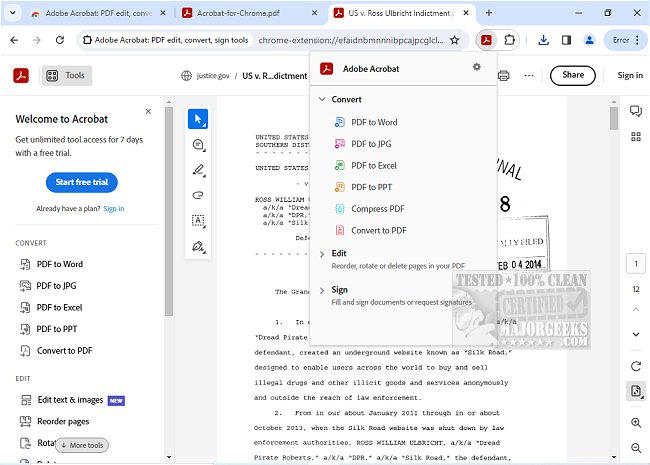
Adobe has released version 26.6.1.0 of Adobe Acrobat for Chrome, enhancing the ability to work with PDFs directly within the browser. This extension allows users to access a variety of PDF tools, making it easier to view, fill out, comment, sign, convert, and compress PDF files while browsing.
Adobe Acrobat is a comprehensive PDF solution that is widely utilized for its diverse features designed to improve PDF management. The latest version offers a seamless integration within Google Chrome, allowing users to enrich their PDF viewing experiences. Basic functionalities like adding comments—such as sticky notes, text annotations, and highlights—are available for free. For users requiring advanced capabilities, options are provided to export to and from PDF formats, create new PDFs, merge multiple documents, organize content within a PDF, and reduce file sizes.
To use Adobe Acrobat for Chrome, users simply need to install the extension, pin it for quick access, and open any PDF file in their browser. They can then select the Acrobat tool they wish to use, ensuring an efficient workflow. The extension facilitates easy downloads and printing with just one click, and it also offers the ability to store files online for quick retrieval from anywhere.
Furthermore, users can enhance their documents by adding notes, text, and comments, including sticky notes and highlights. The PDF editor features allow for writing directly on PDF documents through text or drawings. For more formal tasks, users can open PDFs in Adobe Acrobat Reader to fill out and sign forms using the desktop application, utilizing the Acrobat form filler feature to complete PDF forms effortlessly. E-signing documents with personal signatures or initials is also streamlined.
Overall, Adobe Acrobat for Chrome presents a user-friendly approach to managing PDF documents, offering quick access to both basic and premium features that significantly streamline productivity and workflow.
Extension Idea: Future updates could include features such as collaborative editing, allowing multiple users to comment and edit a document simultaneously, integration with cloud storage services for enhanced accessibility, and AI-driven suggestions for document improvements. Additionally, enhancing mobile compatibility would allow users to work seamlessly across devices
Adobe Acrobat is a comprehensive PDF solution that is widely utilized for its diverse features designed to improve PDF management. The latest version offers a seamless integration within Google Chrome, allowing users to enrich their PDF viewing experiences. Basic functionalities like adding comments—such as sticky notes, text annotations, and highlights—are available for free. For users requiring advanced capabilities, options are provided to export to and from PDF formats, create new PDFs, merge multiple documents, organize content within a PDF, and reduce file sizes.
To use Adobe Acrobat for Chrome, users simply need to install the extension, pin it for quick access, and open any PDF file in their browser. They can then select the Acrobat tool they wish to use, ensuring an efficient workflow. The extension facilitates easy downloads and printing with just one click, and it also offers the ability to store files online for quick retrieval from anywhere.
Furthermore, users can enhance their documents by adding notes, text, and comments, including sticky notes and highlights. The PDF editor features allow for writing directly on PDF documents through text or drawings. For more formal tasks, users can open PDFs in Adobe Acrobat Reader to fill out and sign forms using the desktop application, utilizing the Acrobat form filler feature to complete PDF forms effortlessly. E-signing documents with personal signatures or initials is also streamlined.
Overall, Adobe Acrobat for Chrome presents a user-friendly approach to managing PDF documents, offering quick access to both basic and premium features that significantly streamline productivity and workflow.
Extension Idea: Future updates could include features such as collaborative editing, allowing multiple users to comment and edit a document simultaneously, integration with cloud storage services for enhanced accessibility, and AI-driven suggestions for document improvements. Additionally, enhancing mobile compatibility would allow users to work seamlessly across devices
Adobe Acrobat for Chrome 26.6.1.0 released
Access Adobe Acrobat PDF tools in Chrome; view, fill, comment, sign, convert, and compress tools available.