The AB Download Manager has released version 1.9.0, enhancing its reputation as a user-friendly tool designed for efficient file downloads from various online sources. This application is ideal for users looking to download documents, images, videos, or software, as it simplifies the downloading process, making it quick and straightforward.
User-Friendly Interface: The AB Download Manager features an intuitive interface that is easy to navigate. It comes with a sleek dark mode to provide a visually appealing experience while reducing eye strain, particularly in low-light settings. This thoughtful design enhances user engagement and makes file downloading more enjoyable.
Fast Downloading: One of the key benefits of the AB Download Manager is its ability to boost download speeds significantly. By utilizing multiple connections, users can experience speeds up to 500% faster than traditional downloading methods, making it a powerful tool for managing and organizing downloads.
Manage Download Queues: A standout feature of the AB Download Manager is its ability to create and manage download queues. This allows users to line up multiple files for sequential download without interruptions, which is particularly useful for handling large data sets or downloading several files at once.
Download Scheduling: The application includes a scheduling feature, enabling users to set specific times for download queues to start and stop automatically. This flexibility allows users to optimize their internet usage, particularly during off-peak times, and customize their downloading experience according to personal preferences.
Set Download Speeds: Users can also set download speed limits, which is vital for those sharing their internet connection. This feature ensures that downloads do not adversely affect other users' internet speeds, allowing for a balanced network performance.
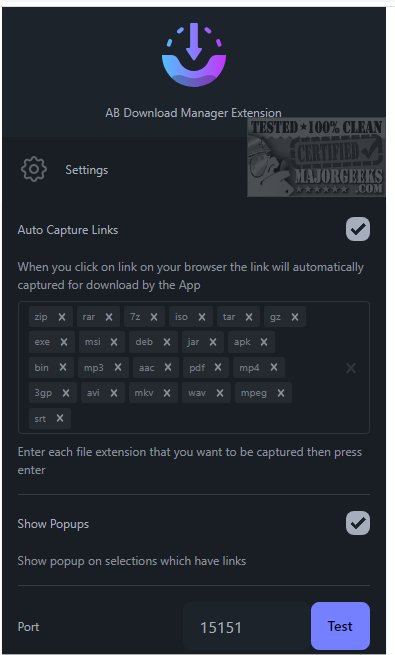
Key Features: The AB Download Manager adds a "Download With AB DM" option to the browser context menu, shows pop-ups for selected links for easy downloading, and automatically captures download links to send to the app.
In summary, the AB Download Manager version 1.9.0 is an essential tool for anyone looking to enhance their downloading experience. With features designed to optimize speed, organization, and user control, it stands out as a reliable solution for fast and efficient content downloads. Users are encouraged to integrate this tool into their downloading toolkit to simplify their online experience.
Extension: As the digital landscape continues to evolve, download managers like AB Download Manager play an increasingly crucial role in streamlining the way users interact with content online. Future updates could include expanded support for cloud storage integration, allowing users to save downloads directly to their preferred cloud services, or enhanced security features to ensure that downloads are free from malware and other threats. Additionally, integrating machine learning algorithms could personalize the download experience by predicting user preferences and optimizing settings automatically
User-Friendly Interface: The AB Download Manager features an intuitive interface that is easy to navigate. It comes with a sleek dark mode to provide a visually appealing experience while reducing eye strain, particularly in low-light settings. This thoughtful design enhances user engagement and makes file downloading more enjoyable.
Fast Downloading: One of the key benefits of the AB Download Manager is its ability to boost download speeds significantly. By utilizing multiple connections, users can experience speeds up to 500% faster than traditional downloading methods, making it a powerful tool for managing and organizing downloads.
Manage Download Queues: A standout feature of the AB Download Manager is its ability to create and manage download queues. This allows users to line up multiple files for sequential download without interruptions, which is particularly useful for handling large data sets or downloading several files at once.
Download Scheduling: The application includes a scheduling feature, enabling users to set specific times for download queues to start and stop automatically. This flexibility allows users to optimize their internet usage, particularly during off-peak times, and customize their downloading experience according to personal preferences.
Set Download Speeds: Users can also set download speed limits, which is vital for those sharing their internet connection. This feature ensures that downloads do not adversely affect other users' internet speeds, allowing for a balanced network performance.
Key Features: The AB Download Manager adds a "Download With AB DM" option to the browser context menu, shows pop-ups for selected links for easy downloading, and automatically captures download links to send to the app.
In summary, the AB Download Manager version 1.9.0 is an essential tool for anyone looking to enhance their downloading experience. With features designed to optimize speed, organization, and user control, it stands out as a reliable solution for fast and efficient content downloads. Users are encouraged to integrate this tool into their downloading toolkit to simplify their online experience.
Extension: As the digital landscape continues to evolve, download managers like AB Download Manager play an increasingly crucial role in streamlining the way users interact with content online. Future updates could include expanded support for cloud storage integration, allowing users to save downloads directly to their preferred cloud services, or enhanced security features to ensure that downloads are free from malware and other threats. Additionally, integrating machine learning algorithms could personalize the download experience by predicting user preferences and optimizing settings automatically
AB Download Manager 1.9.0 released
AB Download Manager provides a user-friendly tool designed to help you efficiently download files from various sources on the internet.