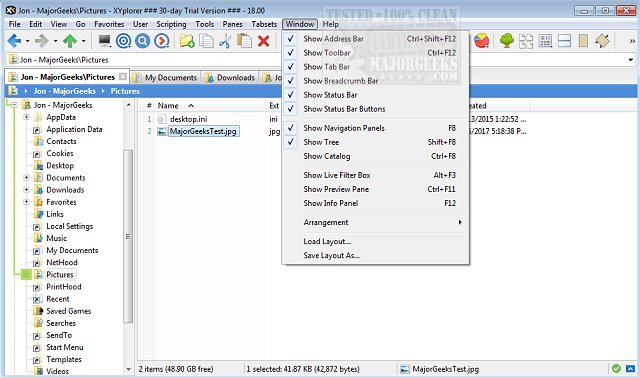
XYplorer has recently released updates with versions 28.30.2600 and 27.20.1600. This software is a tabbed file manager designed for Windows, providing users with advanced file management capabilities that surpass those of the standard Windows File Explorer. It integrates features such as dual-pane browsing, enhanced file search, batch renaming, duplicate file detection, ZIP file support, file previews, and automation tools, all within a fast and customizable interface that can be used portably.
What XYplorer Offers:
XYplorer is particularly useful for users who manage large volumes of files. It allows them to keep multiple folders open in tabs, work with two locations simultaneously, search extensive drives, preview files before moving them, rename files in batches, and identify duplicates—all from a single interface. This functionality is especially beneficial for those who frequently organize, move, or sort through files, eliminating the hassle of managing multiple Windows Explorer windows.
Why Use XYplorer:
While Windows File Explorer suffices for basic tasks like opening documents or transferring files, its limitations become evident when dealing with thousands of files across various drives. XYplorer's tabbed interface and dual-pane setup streamline these processes. Users can easily manage a downloads folder alongside an archive, preview files, rename them in groups, and find duplicates without switching between different applications. The portable version is also advantageous for technicians and users who need a consistent file management experience across multiple PCs.
Key Features of XYplorer:
- Enhanced File Management: XYplorer significantly improves file management efficiency, especially for users who often face the “Explorer shuffle.” The dual panes and tabbed browsing facilitate easier file organization—users can, for instance, view an unsorted folder alongside an organized collection, making it simpler to sort through files.
- Queued Operations: This feature is particularly useful for moving large amounts of data, especially with slower storage devices where multiple copy operations can complicate the process.
- Customization Options: While XYplorer offers extensive customization options, making the interface appear busy initially, users can start with the most essential features without needing to learn everything at once. The basic functionalities—tabs, dual panes, previews, and renaming tools—are intuitive and user-friendly.
Conclusion:
XYplorer is an excellent choice for users who frequently deal with substantial file management tasks and find Windows File Explorer cumbersome. It combines a robust set of features in a portable, fast, and customizable package, making it suitable for both casual users and advanced file-management enthusiasts. While there is a learning curve for those wishing to utilize all of XYplorer's capabilities, the essential tools are readily accessible for immediate use. For anyone frustrated with the limitations of File Explorer, XYplorer presents a compelling alternative to enhance productivity and streamline file organization.
Additional Resources:
For further tips on optimizing your file management experience, consider exploring guides on disabling Quick Access, customizing context menus, adjusting folder view settings, and more
What XYplorer Offers:
XYplorer is particularly useful for users who manage large volumes of files. It allows them to keep multiple folders open in tabs, work with two locations simultaneously, search extensive drives, preview files before moving them, rename files in batches, and identify duplicates—all from a single interface. This functionality is especially beneficial for those who frequently organize, move, or sort through files, eliminating the hassle of managing multiple Windows Explorer windows.
Why Use XYplorer:
While Windows File Explorer suffices for basic tasks like opening documents or transferring files, its limitations become evident when dealing with thousands of files across various drives. XYplorer's tabbed interface and dual-pane setup streamline these processes. Users can easily manage a downloads folder alongside an archive, preview files, rename them in groups, and find duplicates without switching between different applications. The portable version is also advantageous for technicians and users who need a consistent file management experience across multiple PCs.
Key Features of XYplorer:
- Enhanced File Management: XYplorer significantly improves file management efficiency, especially for users who often face the “Explorer shuffle.” The dual panes and tabbed browsing facilitate easier file organization—users can, for instance, view an unsorted folder alongside an organized collection, making it simpler to sort through files.
- Queued Operations: This feature is particularly useful for moving large amounts of data, especially with slower storage devices where multiple copy operations can complicate the process.
- Customization Options: While XYplorer offers extensive customization options, making the interface appear busy initially, users can start with the most essential features without needing to learn everything at once. The basic functionalities—tabs, dual panes, previews, and renaming tools—are intuitive and user-friendly.
Conclusion:
XYplorer is an excellent choice for users who frequently deal with substantial file management tasks and find Windows File Explorer cumbersome. It combines a robust set of features in a portable, fast, and customizable package, making it suitable for both casual users and advanced file-management enthusiasts. While there is a learning curve for those wishing to utilize all of XYplorer's capabilities, the essential tools are readily accessible for immediate use. For anyone frustrated with the limitations of File Explorer, XYplorer presents a compelling alternative to enhance productivity and streamline file organization.
Additional Resources:
For further tips on optimizing your file management experience, consider exploring guides on disabling Quick Access, customizing context menus, adjusting folder view settings, and more
XYplorer 28.30.2600 / 27.20.1600 released
XYplorer is a tabbed file manager for Windows featuring powerful file search, zip support, duplicate file finder and much more.