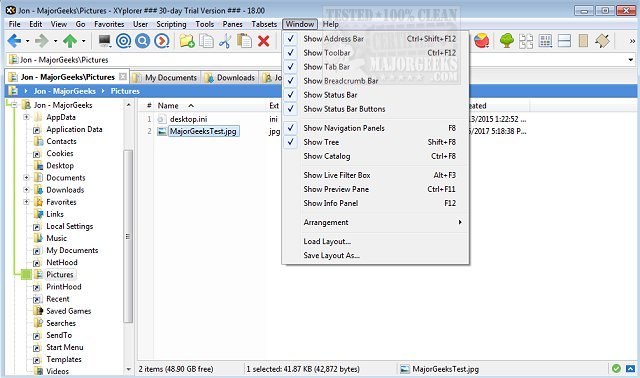
XYplorer has recently released two versions: 28.20.0400 and 27.20.1006. This software serves as a tabbed file manager for Windows, offering a plethora of features designed to enhance file management efficiency. Among its capabilities are powerful file search functions, zip file support, and a duplicate file finder. Additionally, XYplorer boasts a versatile preview feature, a customizable interface, and an optional dual-pane layout, making it particularly user-friendly and adaptable to individual needs.
The application is noted for its speed and lightweight nature, along with innovative tools that help automate repetitive tasks. Key features include tabbed browsing, dual panes, six-key navigation, queued file operations, batch renaming, and one-click previews. Users also have the ability to set folder view preferences tailored to their workflow.
In addition to its rich functionality, XYplorer is portable, allowing users to run it from USB drives without installation. This flexibility makes it an appealing choice for those who require a robust file management solution that can be easily accessed across different systems.
Furthermore, XYplorer's recent updates may include enhancements to existing features and potentially introduce new tools for improved user experience. As file management continues to evolve, software like XYplorer remains essential for users seeking efficiency and customization in their workflow.
For those looking for tips on optimizing their file management experience, similar topics include disabling Quick Access and Recent Files in Windows File Explorer, adding a Details Pane to context menus, rearranging Libraries within File Explorer, and resetting folder view settings in Windows 10 and 11
The application is noted for its speed and lightweight nature, along with innovative tools that help automate repetitive tasks. Key features include tabbed browsing, dual panes, six-key navigation, queued file operations, batch renaming, and one-click previews. Users also have the ability to set folder view preferences tailored to their workflow.
In addition to its rich functionality, XYplorer is portable, allowing users to run it from USB drives without installation. This flexibility makes it an appealing choice for those who require a robust file management solution that can be easily accessed across different systems.
Furthermore, XYplorer's recent updates may include enhancements to existing features and potentially introduce new tools for improved user experience. As file management continues to evolve, software like XYplorer remains essential for users seeking efficiency and customization in their workflow.
For those looking for tips on optimizing their file management experience, similar topics include disabling Quick Access and Recent Files in Windows File Explorer, adding a Details Pane to context menus, rearranging Libraries within File Explorer, and resetting folder view settings in Windows 10 and 11
XYplorer 28.20.0400 / 27.20.1006 released
XYplorer is a tabbed file manager for Windows featuring powerful file search, zip support, duplicate file finder and much more.