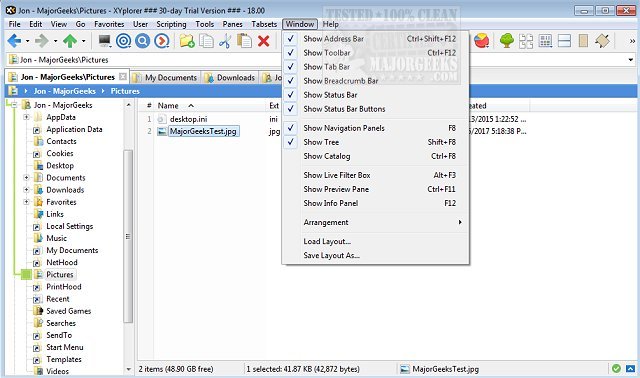
XYplorer has recently released updates in version 28.20 and 27.20.0904, enhancing its functionality as a versatile tabbed file manager for Windows. This powerful application boasts features such as an efficient file search, zip file support, and a duplicate file finder, among others. Users can benefit from its advanced preview capabilities, a customizable interface, and optional dual-pane view, which allows for streamlined file management.
In addition to these features, XYplorer supports innovative solutions for automating repetitive tasks, ensuring a fast and lightweight user experience. Key functionalities include tabbed browsing, dual panes for easier navigation, six key navigation shortcuts, queued file operations for efficient processing, and batch renaming for mass file updates. The software also offers one-click previews and customizable folder view settings for improved organization.
In comparison to traditional file explorers, XYplorer provides unique enhancements such as the ability to disable Quick Access and manage Recent Files and Favorite Folders more effectively. The updates further solidify XYplorer's position as a powerful alternative for users seeking a more efficient file management solution.
Looking ahead, users can anticipate future updates that may include additional features, further optimizations for speed and usability, and enhanced automation tools to simplify file management tasks even more. With its ongoing development, XYplorer continues to stand out in the realm of file management solutions for Windows
In addition to these features, XYplorer supports innovative solutions for automating repetitive tasks, ensuring a fast and lightweight user experience. Key functionalities include tabbed browsing, dual panes for easier navigation, six key navigation shortcuts, queued file operations for efficient processing, and batch renaming for mass file updates. The software also offers one-click previews and customizable folder view settings for improved organization.
In comparison to traditional file explorers, XYplorer provides unique enhancements such as the ability to disable Quick Access and manage Recent Files and Favorite Folders more effectively. The updates further solidify XYplorer's position as a powerful alternative for users seeking a more efficient file management solution.
Looking ahead, users can anticipate future updates that may include additional features, further optimizations for speed and usability, and enhanced automation tools to simplify file management tasks even more. With its ongoing development, XYplorer continues to stand out in the realm of file management solutions for Windows
XYplorer 28.20 / 27.20.0904 released
XYplorer is a tabbed file manager for Windows featuring powerful file search, zip support, duplicate file finder and much more.