XnView Full version 2.52.5 has been released, offering an advanced solution for users to view, process, and convert image files effortlessly. This comprehensive version includes all plug-ins and languages, expanding its functionality far beyond the limited offerings of the XnView Standard version. With support for over 500 image formats, XnView Full allows conversions to popular formats such as GIF, BMP, JPG, PNG, and multi-page TIFF. It also accommodates various video formats and specialized formats like Amiga IFF and Calamus.
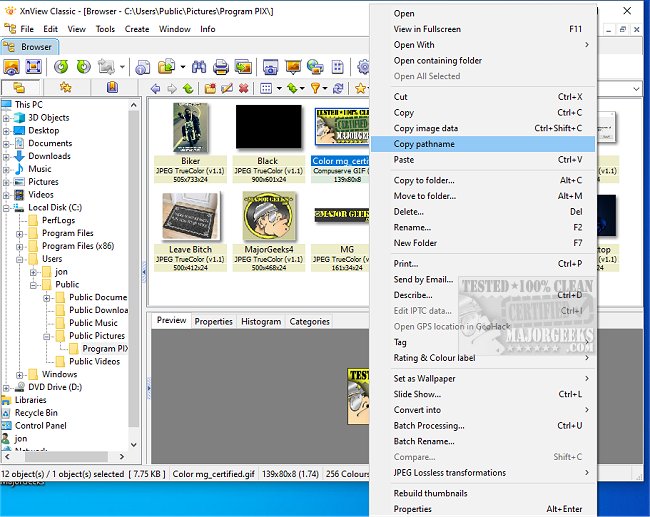
The user interface features an intuitive image viewer that resembles Windows Explorer, making navigation through directories straightforward. Users can easily view thumbnails of images, helping them maintain an organized view and quickly select specific files. Notably, XnView Full can be utilized without installation, making it an ideal solution for creating a portable "photograph album on CD," and it remains free for personal use.
In addition to basic image viewing, XnView Full offers a suite of advanced features, including web page creation, contact prints, batch conversion capabilities, slide shows, screen capturing, and Twain support for scanners and digital cameras. The program includes numerous image filters and effects for enhanced image processing. It also seamlessly integrates with popular graphics software like Adobe Photoshop, allowing for efficient workflows through drag-and-drop functionality and clipboard support.
Moreover, XnView Full includes built-in file operations such as copying, moving, and managing directories and files, solidifying its role as a versatile tool for both casual users and professionals in the graphics field.
For those interested in enhancing their image management and processing experience, XnView Full represents a robust solution, particularly for users looking for a free and portable option.
Additionally, users may explore more features and tips related to image handling, such as restoring Windows Photo Viewer, adding slow-motion video effects, taking screenshots, and creating screen snip shortcuts in the latest Windows operating systems
The user interface features an intuitive image viewer that resembles Windows Explorer, making navigation through directories straightforward. Users can easily view thumbnails of images, helping them maintain an organized view and quickly select specific files. Notably, XnView Full can be utilized without installation, making it an ideal solution for creating a portable "photograph album on CD," and it remains free for personal use.
In addition to basic image viewing, XnView Full offers a suite of advanced features, including web page creation, contact prints, batch conversion capabilities, slide shows, screen capturing, and Twain support for scanners and digital cameras. The program includes numerous image filters and effects for enhanced image processing. It also seamlessly integrates with popular graphics software like Adobe Photoshop, allowing for efficient workflows through drag-and-drop functionality and clipboard support.
Moreover, XnView Full includes built-in file operations such as copying, moving, and managing directories and files, solidifying its role as a versatile tool for both casual users and professionals in the graphics field.
For those interested in enhancing their image management and processing experience, XnView Full represents a robust solution, particularly for users looking for a free and portable option.
Additionally, users may explore more features and tips related to image handling, such as restoring Windows Photo Viewer, adding slow-motion video effects, taking screenshots, and creating screen snip shortcuts in the latest Windows operating systems
XnView Full 2.52.5 released
XnView Full is a powerful tool that enables users to view, process, and convert image files easily. XnView Full has all plug-ins and languages included. XnView Standard has just a few add-ons included.