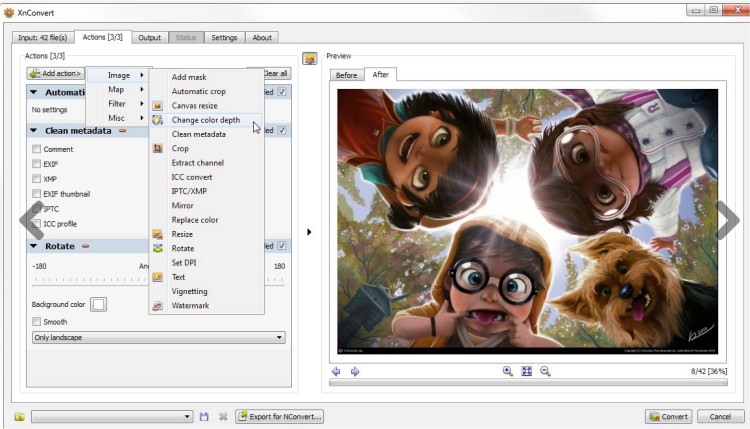
XnConvert version 1.111.0 has been released, continuing to build on its reputation as a user-friendly yet robust image conversion tool. Developed by the creators of the widely-used XnView and XnView MP, this software is designed to simplify the image conversion process while offering a wealth of features. A portable version is also available for users who prefer a version that doesn't require installation.
The application supports over 400 file formats, including popular ones like JPEG, TIFF, PNG, GIF, and various camera raw formats. Its intuitive interface is easy to navigate, making it accessible for both beginners and experienced users. XnConvert allows for a range of image processing tasks, enabling users to resize images, add watermarks, and adjust settings like contrast, brightness, and gamma. Additionally, it offers advanced features such as cropping, mirroring effects, and DPI adjustments.
Users can choose from various processing modes, including image, map, filter, and miscellaneous options. The software includes more than 80 different operations, which encompass metadata editing, transformations (like rotating and cropping), adjustments (such as brightness and saturation), filters (including blur and sharpen), and effects (like masking and vignetting). Furthermore, XnConvert integrates seamlessly with NConvert for command-line usage, providing additional flexibility for advanced users.
In summary, XnConvert is a versatile and powerful tool for anyone looking to convert and edit images efficiently. Its broad format support and rich feature set make it a valuable asset for photographers, graphic designers, and casual users alike. With ongoing updates, XnConvert continues to enhance its capabilities, ensuring it remains a top choice in the realm of image processing software
The application supports over 400 file formats, including popular ones like JPEG, TIFF, PNG, GIF, and various camera raw formats. Its intuitive interface is easy to navigate, making it accessible for both beginners and experienced users. XnConvert allows for a range of image processing tasks, enabling users to resize images, add watermarks, and adjust settings like contrast, brightness, and gamma. Additionally, it offers advanced features such as cropping, mirroring effects, and DPI adjustments.
Users can choose from various processing modes, including image, map, filter, and miscellaneous options. The software includes more than 80 different operations, which encompass metadata editing, transformations (like rotating and cropping), adjustments (such as brightness and saturation), filters (including blur and sharpen), and effects (like masking and vignetting). Furthermore, XnConvert integrates seamlessly with NConvert for command-line usage, providing additional flexibility for advanced users.
In summary, XnConvert is a versatile and powerful tool for anyone looking to convert and edit images efficiently. Its broad format support and rich feature set make it a valuable asset for photographers, graphic designers, and casual users alike. With ongoing updates, XnConvert continues to enhance its capabilities, ensuring it remains a top choice in the realm of image processing software
XnConvert 1.111.0 released
XnConvert was developed to be a simple yet powerful tool that allows you to convert images easily. From the author of the popular XnView and XnView MP. Portable version is also available.