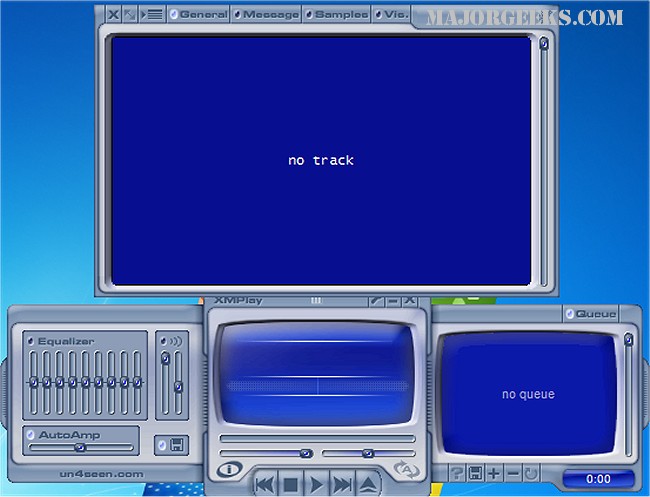
XMPlay has released its Beta version 4.1.0.6, along with the official version 4.1. This versatile audio player supports an extensive range of audio formats, including OGG, MP3, WMA, WAV, AIFF, and various module formats such as MOD and UMX. It can also handle playlists in formats like PLS, M3U, and CUE, and even supports ZIP archives. For users seeking additional format compatibility, XMPlay offers the ability to utilize Winamp plugins.
Originally launched in 1998 with support only for the XM format—hence its name—XMPlay has evolved to incorporate a wide array of features. Its user-friendly interface is slim and organized, complete with multiple visualizations. Notably, XMPlay does not require installation; users can simply unzip the application and start using it.
Key features of XMPlay include high-quality audio output with support for 32/24-bit and multi-channel playback. The player ensures gapless playback, crossfading, and various digital signal processing (DSP) options such as automatic gain control and a nine-band equalizer. Additionally, users can stream audio files from FTP and HTTP servers, including support for Shoutcast and Icecast.
XMPlay also offers a variety of functionalities such as track information display, customizable title formatting, and a library for easy access to tracks. Users can save preset settings for consistent playback experiences and have the option to write audio to disk in various WAV formats. The application supports customizable keyboard shortcuts, facilitates integration with Windows Explorer, and allows for the handling of archived files seamlessly.
Moreover, XMPlay is equipped with Unicode support for various languages, making it accessible to a wider audience. The visualizations are compatible with Sonique plugins and even include a full-screen display mode.
In summary, XMPlay continues to be a robust audio player that combines a rich feature set with extensive format support, making it a preferred choice for audiophiles and casual listeners alike. Its ongoing development and updates reflect a commitment to enhancing user experience and audio quality
Originally launched in 1998 with support only for the XM format—hence its name—XMPlay has evolved to incorporate a wide array of features. Its user-friendly interface is slim and organized, complete with multiple visualizations. Notably, XMPlay does not require installation; users can simply unzip the application and start using it.
Key features of XMPlay include high-quality audio output with support for 32/24-bit and multi-channel playback. The player ensures gapless playback, crossfading, and various digital signal processing (DSP) options such as automatic gain control and a nine-band equalizer. Additionally, users can stream audio files from FTP and HTTP servers, including support for Shoutcast and Icecast.
XMPlay also offers a variety of functionalities such as track information display, customizable title formatting, and a library for easy access to tracks. Users can save preset settings for consistent playback experiences and have the option to write audio to disk in various WAV formats. The application supports customizable keyboard shortcuts, facilitates integration with Windows Explorer, and allows for the handling of archived files seamlessly.
Moreover, XMPlay is equipped with Unicode support for various languages, making it accessible to a wider audience. The visualizations are compatible with Sonique plugins and even include a full-screen display mode.
In summary, XMPlay continues to be a robust audio player that combines a rich feature set with extensive format support, making it a preferred choice for audiophiles and casual listeners alike. Its ongoing development and updates reflect a commitment to enhancing user experience and audio quality
XMPlay 4.1.0.6 Beta / 4.1 released
XMPlay is an audio player that supports OGG / MP3 / MP2 / MP1 / WMA / WAV / AIFF / CDA / MO3 / IT / XM / S3M / MTM / MOD / UMX audio formats, PLS / M3U / ASX / WAX / CUE playlists, and ZIP archives.