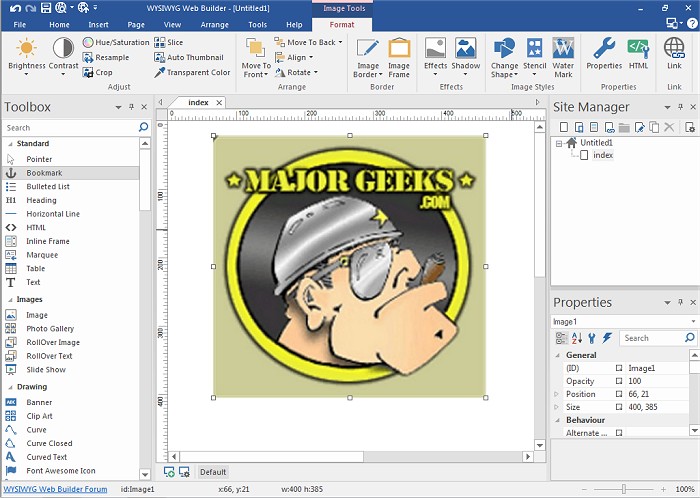
WYSIWYG Web Builder 21.2.1 has been released, offering users a powerful tool for creating their own web pages without needing extensive knowledge of HTML. This (What-You-See-Is-What-You-Get) software ensures that web pages will display exactly as designed, allowing users to build their sites through a simple point-and-click interface. The program generates HTML tags automatically, enabling users to drag and drop elements onto their pages and publish their work seamlessly to a web server using the built-in Publish tool.
Key features of WYSIWYG Web Builder include customizable menus, toolbars, and layouts, granting users full control over their web content. The software offers an array of components such as form layout objects, various form fields (like edit boxes, checkboxes, and buttons), and a Form Wizard that simplifies the process of creating forms in just four steps. Additionally, a Captcha object is available for PHP forms to prevent automated spam submissions.
WYSIWYG Web Builder supports rich text formatting, allowing users to incorporate different fonts, colors, and links into text objects. It also provides a Custom HTML object for inserting personalized HTML or JavaScript code, and supports various multimedia formats, including Java, Flash, and YouTube videos. Users can easily publish their entire website or select pages to a local drive or web server.
Moreover, the software includes built-in tools for creating photo galleries and banners, as well as features like rollover images. As web design continues to evolve, WYSIWYG Web Builder remains a valuable asset for both novice and experienced web developers, ensuring accessible, creative, and efficient web page design.
With the ongoing advancements in web technology, future updates to WYSIWYG Web Builder may incorporate even more sophisticated features, such as enhanced responsive design capabilities, integration with popular content management systems, and improved SEO optimization tools, making it an even more indispensable tool for web creators
Key features of WYSIWYG Web Builder include customizable menus, toolbars, and layouts, granting users full control over their web content. The software offers an array of components such as form layout objects, various form fields (like edit boxes, checkboxes, and buttons), and a Form Wizard that simplifies the process of creating forms in just four steps. Additionally, a Captcha object is available for PHP forms to prevent automated spam submissions.
WYSIWYG Web Builder supports rich text formatting, allowing users to incorporate different fonts, colors, and links into text objects. It also provides a Custom HTML object for inserting personalized HTML or JavaScript code, and supports various multimedia formats, including Java, Flash, and YouTube videos. Users can easily publish their entire website or select pages to a local drive or web server.
Moreover, the software includes built-in tools for creating photo galleries and banners, as well as features like rollover images. As web design continues to evolve, WYSIWYG Web Builder remains a valuable asset for both novice and experienced web developers, ensuring accessible, creative, and efficient web page design.
With the ongoing advancements in web technology, future updates to WYSIWYG Web Builder may incorporate even more sophisticated features, such as enhanced responsive design capabilities, integration with popular content management systems, and improved SEO optimization tools, making it an even more indispensable tool for web creators
WYSIWYG Web Builder 21.2.1 released
WYSIWYG Web Builder is a (What-You-See-Is-What-You-Get) program used for creating your own web pages.