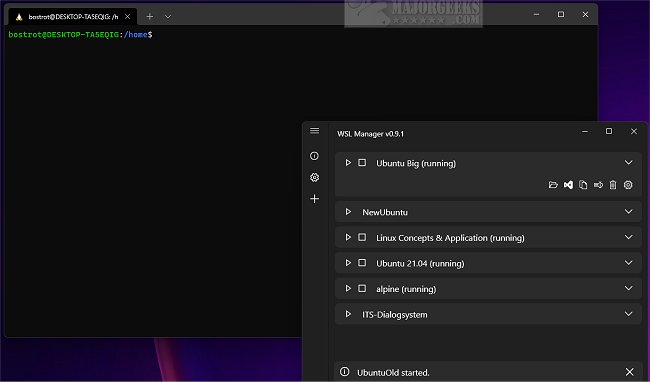
The WSL Distro Manager version 1.11.0 has been released, providing users with a streamlined graphical interface for managing Windows Subsystem for Linux (WSL) distributions. This tool simplifies various tasks related to WSL, allowing users to backup, restore, configure settings, install, uninstall, update, and launch distributions with just a click.
In addition to basic management functions, WSL Distro Manager enhances the WSL experience with features like sharing distributions across multiple machines and creating quick actions for executing repetitive tasks effortlessly. This makes it suitable for both beginners and advanced users looking to optimize their WSL usage.
Key features of WSL Distro Manager include:
- Management of WSL instances
- Ability to download and utilize Docker images as WSL instances without needing Docker
- Quick Actions for executing pre-defined scripts for rapid configurations
- Downloading and using experimental LXC containers, such as Turnkey WordPress
- Support for using custom repositories for root filesystems (rootfs) or LXC containers
For those seeking to enhance their Linux experience on Windows, WSL Distro Manager is a valuable tool. Additionally, users can explore resources like the best Linux distributions for Windows users and guides on installing Linux in Windows 10/11 to further enrich their knowledge and capabilities.
In future updates, it would be beneficial to see improvements in user interface design and support for more container types, as well as tutorials for maximizing the use of the Quick Actions feature. Enhancing compatibility with a broader range of Linux distributions could also appeal to a wider audience
In addition to basic management functions, WSL Distro Manager enhances the WSL experience with features like sharing distributions across multiple machines and creating quick actions for executing repetitive tasks effortlessly. This makes it suitable for both beginners and advanced users looking to optimize their WSL usage.
Key features of WSL Distro Manager include:
- Management of WSL instances
- Ability to download and utilize Docker images as WSL instances without needing Docker
- Quick Actions for executing pre-defined scripts for rapid configurations
- Downloading and using experimental LXC containers, such as Turnkey WordPress
- Support for using custom repositories for root filesystems (rootfs) or LXC containers
For those seeking to enhance their Linux experience on Windows, WSL Distro Manager is a valuable tool. Additionally, users can explore resources like the best Linux distributions for Windows users and guides on installing Linux in Windows 10/11 to further enrich their knowledge and capabilities.
In future updates, it would be beneficial to see improvements in user interface design and support for more container types, as well as tutorials for maximizing the use of the Quick Actions feature. Enhancing compatibility with a broader range of Linux distributions could also appeal to a wider audience
WSL Distro Manager 1.11.0 released
WSL Distro Manager allows Windows Subsystem for Linux distribution management via a user-friendly graphical interface.