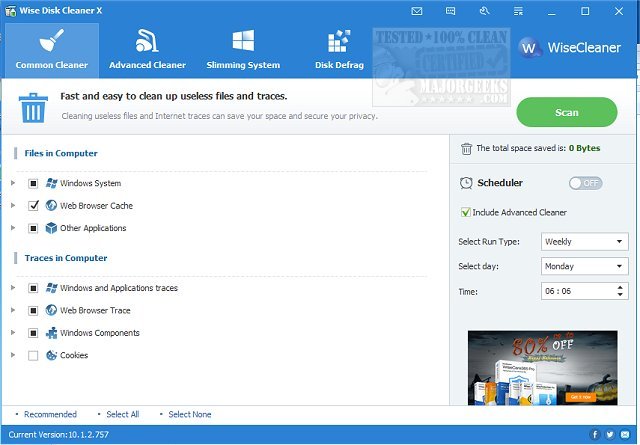
Wise Disk Cleaner is a free, efficient, and user-friendly application designed to help users reclaim disk space on their PCs. The latest version, 11.3.2.852, offers enhanced features and improvements, making it even easier to optimize your system. For those looking for guidance, a video tutorial is available to explain the application’s functionalities.
Why Choose Wise Disk Cleaner?
As computers accumulate digital clutter over time, Wise Disk Cleaner steps in to provide a solution. This tool is ideal for users experiencing sluggish performance or low storage warnings. Here are some standout features:
- Deep Junk File Removal: Effectively eliminates temporary files, system logs, old downloads, and other unnecessary data.
- Privacy Protection: Securely wipes browsing history, cookies, and cached data from all major browsers to protect user privacy.
- Disk Defragmentation & Optimization: Not only cleans up junk files but also reorganizes disk data for improved speed and performance.
- Customizable & Fast: Users can select specific items to clean, with rapid scanning capabilities that do not hinder system performance.
- Automated Cleanups: Schedule regular cleanups (daily, weekly, or monthly) to maintain an optimized system effortlessly.
Practical Applications of Wise Disk Cleaner
For users frequently encountering low disk space alerts, Wise Disk Cleaner can reclaim significant storage in just minutes. Gamers can clear game caches to make room for new installations, while office workers will benefit from enhanced performance when managing large files. Privacy-conscious individuals can rest easy knowing their online activity can be easily erased.
Geek Verdict
Wise Disk Cleaner stands out as more than just a typical disk cleanup tool; it is an essential software for maintaining a fast, organized, and optimized PC. With its lightweight design, comprehensive cleaning abilities, and privacy features, adding Wise Disk Cleaner to your toolkit is a smart choice. Give it a try, perform a scan, and experience the immediate performance boost it can provide.
Further Exploration
For those interested in comparing disk cleaning solutions, consider looking into similar tools like CCleaner and PrivaZer. Additionally, users can explore Windows’ built-in feature, Storage Sense, for automatic junk file deletion in Windows 10 and 11. This combination of tools can ensure optimal system performance and storage management
Why Choose Wise Disk Cleaner?
As computers accumulate digital clutter over time, Wise Disk Cleaner steps in to provide a solution. This tool is ideal for users experiencing sluggish performance or low storage warnings. Here are some standout features:
- Deep Junk File Removal: Effectively eliminates temporary files, system logs, old downloads, and other unnecessary data.
- Privacy Protection: Securely wipes browsing history, cookies, and cached data from all major browsers to protect user privacy.
- Disk Defragmentation & Optimization: Not only cleans up junk files but also reorganizes disk data for improved speed and performance.
- Customizable & Fast: Users can select specific items to clean, with rapid scanning capabilities that do not hinder system performance.
- Automated Cleanups: Schedule regular cleanups (daily, weekly, or monthly) to maintain an optimized system effortlessly.
Practical Applications of Wise Disk Cleaner
For users frequently encountering low disk space alerts, Wise Disk Cleaner can reclaim significant storage in just minutes. Gamers can clear game caches to make room for new installations, while office workers will benefit from enhanced performance when managing large files. Privacy-conscious individuals can rest easy knowing their online activity can be easily erased.
Geek Verdict
Wise Disk Cleaner stands out as more than just a typical disk cleanup tool; it is an essential software for maintaining a fast, organized, and optimized PC. With its lightweight design, comprehensive cleaning abilities, and privacy features, adding Wise Disk Cleaner to your toolkit is a smart choice. Give it a try, perform a scan, and experience the immediate performance boost it can provide.
Further Exploration
For those interested in comparing disk cleaning solutions, consider looking into similar tools like CCleaner and PrivaZer. Additionally, users can explore Windows’ built-in feature, Storage Sense, for automatic junk file deletion in Windows 10 and 11. This combination of tools can ensure optimal system performance and storage management
Wise Disk Cleaner 11.3.2.852 released
Wise Disk Cleaner is a free, user-friendly, fast, and easy-to-use application developed to free up disk space. Video tutorial available.