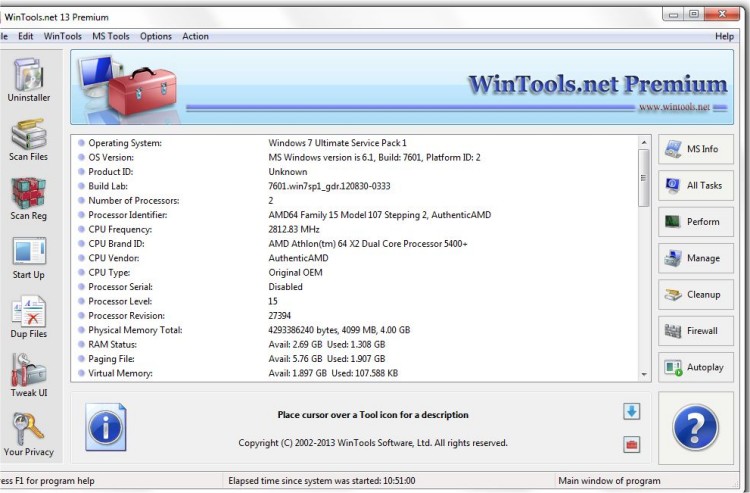
WinTools.net Professional has released version 26.8.1, a comprehensive software suite designed to enhance user control over Windows systems. This toolset provides features for managing startup processes, monitoring memory usage, and customizing desktop and system settings to meet individual preferences.
Key components of WinTools.net include:
1. Clean Uninstaller: Effectively removes software and tracks changes to the hard drive, registry, and system files during installations.
2. Scan Files: Cleans up hard drives by removing outdated references and junk files that slow down access times.
3. Scan Shortcuts: Tidies up the desktop, Start menu, and application data by eliminating dead shortcuts that can hinder system performance.
4. Scan Registry: Cleans the Windows registry of unused applications and invalid entries, thereby improving system speed and load times.
5. Startup Manager: Allows users to monitor and control startup items, enabling the addition, removal, or disabling of applications that launch during system boot.
6. Tweak UI: Offers additional settings for enhancing safety, system performance, and user preferences not covered by standard Windows settings.
7. Net Tweaker: Optimizes network settings to boost data transfer speeds, available exclusively in the Professional edition.
8. Your Privacy: A suite of tools focused on maintaining user privacy and securing sensitive information, also exclusive to the Professional edition.
9. Invisible Man: A utility for securely saving and restoring private information, ensuring that it is not stored by the system.
10. File Shredder: Permanently deletes files and documents, preventing any possibility of recovery.
11. IE Favorites: Simplifies the management of Internet Explorer favorites, allowing for quick deletion, backup, and restoration of links.
12. RAM Memory Booster: Monitors and optimizes RAM usage to enhance overall system performance, although users are recommended to consider RAM Saver Pro for more advanced features.
With these tools, WinTools.net Professional aims to streamline system performance, enhance privacy, and provide users with greater control over their Windows operating environment. As technology evolves, maintaining an efficient and secure system becomes increasingly important, and tools like WinTools.net are essential for achieving these goals.
Future enhancements may include additional tools for improved user experience, compatibility updates for new Windows versions, and more comprehensive privacy features to address growing concerns regarding data security
Key components of WinTools.net include:
1. Clean Uninstaller: Effectively removes software and tracks changes to the hard drive, registry, and system files during installations.
2. Scan Files: Cleans up hard drives by removing outdated references and junk files that slow down access times.
3. Scan Shortcuts: Tidies up the desktop, Start menu, and application data by eliminating dead shortcuts that can hinder system performance.
4. Scan Registry: Cleans the Windows registry of unused applications and invalid entries, thereby improving system speed and load times.
5. Startup Manager: Allows users to monitor and control startup items, enabling the addition, removal, or disabling of applications that launch during system boot.
6. Tweak UI: Offers additional settings for enhancing safety, system performance, and user preferences not covered by standard Windows settings.
7. Net Tweaker: Optimizes network settings to boost data transfer speeds, available exclusively in the Professional edition.
8. Your Privacy: A suite of tools focused on maintaining user privacy and securing sensitive information, also exclusive to the Professional edition.
9. Invisible Man: A utility for securely saving and restoring private information, ensuring that it is not stored by the system.
10. File Shredder: Permanently deletes files and documents, preventing any possibility of recovery.
11. IE Favorites: Simplifies the management of Internet Explorer favorites, allowing for quick deletion, backup, and restoration of links.
12. RAM Memory Booster: Monitors and optimizes RAM usage to enhance overall system performance, although users are recommended to consider RAM Saver Pro for more advanced features.
With these tools, WinTools.net Professional aims to streamline system performance, enhance privacy, and provide users with greater control over their Windows operating environment. As technology evolves, maintaining an efficient and secure system becomes increasingly important, and tools like WinTools.net are essential for achieving these goals.
Future enhancements may include additional tools for improved user experience, compatibility updates for new Windows versions, and more comprehensive privacy features to address growing concerns regarding data security
WinTools.net Professional 26.8.1 released
WinTools.net Professional puts you in control of the Windows startup process, memory monitoring and gives you the power to customize desktop and system settings to fit your needs.