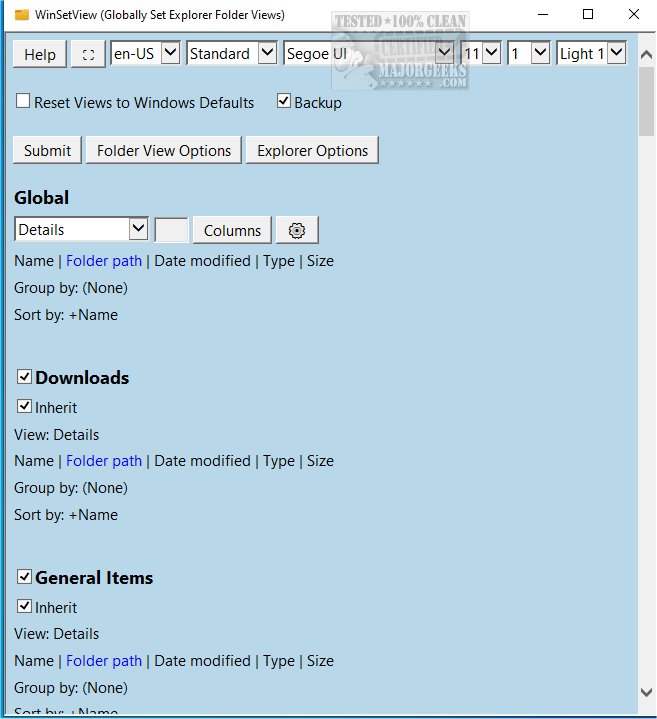
WinSetView 3.1.8 has been released, providing users with the ability to set folder views in Windows Explorer on a global scale. This tool allows customization of the Details View, including user-defined column headings that will apply to all folders, enhancing user experience and organization.
Using WinSetView is straightforward, but it is recommended to close all open applications beforehand to ensure that the view settings are correctly applied to open/save dialogs. The tool operates within the HKEY_CURRENT_USER registry hive, meaning it only affects individual user settings without altering system-wide configurations. No elevated privileges are necessary for installation or operation.
A notable feature of WinSetView is its automatic creation of a backup file for the affected registry values every time it is run. Users can easily restore previous settings using the provided restore function, and there is an option available to reset all Explorer views back to the default Windows values.
To use WinSetView, simply double-click the WinSetView.exe file to launch the graphical user interface (GUI). After making your selections, clicking submit will pass the choices to WinSetView.ps1 via an INI file, which will implement the changes and restart Explorer for them to take effect.
In addition, users may find related guides beneficial, such as how to show hidden files and folders, manage file name extensions in the context menu, and explore keyboard shortcuts for File Explorer.
Extended Summary:
The release of WinSetView 3.1.8 introduces a powerful tool for Windows users who want greater control over their file management experience. With its user-friendly interface, the software streamlines the process of customizing folder views, making it easier for individuals to tailor their file organization to their specific needs. The ability to back up settings and restore them ensures that users can experiment with different configurations without the fear of irreversible changes. This version also supports a seamless integration with Windows Explorer, providing a smooth user experience. Furthermore, the inclusion of related tips and tricks enhances the overall functionality of WinSetView, making it an essential utility for anyone looking to optimize their Windows file management system
Using WinSetView is straightforward, but it is recommended to close all open applications beforehand to ensure that the view settings are correctly applied to open/save dialogs. The tool operates within the HKEY_CURRENT_USER registry hive, meaning it only affects individual user settings without altering system-wide configurations. No elevated privileges are necessary for installation or operation.
A notable feature of WinSetView is its automatic creation of a backup file for the affected registry values every time it is run. Users can easily restore previous settings using the provided restore function, and there is an option available to reset all Explorer views back to the default Windows values.
To use WinSetView, simply double-click the WinSetView.exe file to launch the graphical user interface (GUI). After making your selections, clicking submit will pass the choices to WinSetView.ps1 via an INI file, which will implement the changes and restart Explorer for them to take effect.
In addition, users may find related guides beneficial, such as how to show hidden files and folders, manage file name extensions in the context menu, and explore keyboard shortcuts for File Explorer.
Extended Summary:
The release of WinSetView 3.1.8 introduces a powerful tool for Windows users who want greater control over their file management experience. With its user-friendly interface, the software streamlines the process of customizing folder views, making it easier for individuals to tailor their file organization to their specific needs. The ability to back up settings and restore them ensures that users can experiment with different configurations without the fear of irreversible changes. This version also supports a seamless integration with Windows Explorer, providing a smooth user experience. Furthermore, the inclusion of related tips and tricks enhances the overall functionality of WinSetView, making it an essential utility for anyone looking to optimize their Windows file management system
WinSetView 3.1.8 released
WinSetView allows you to set Windows Explorer folder views globally.