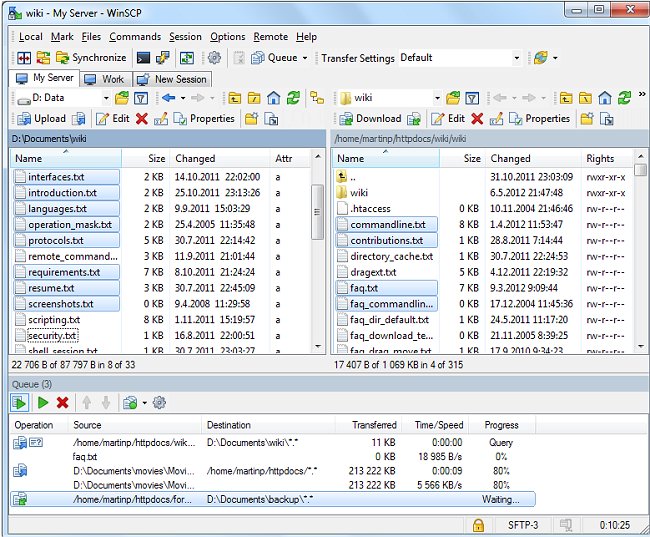
WinSCP version 6.5.6 has been released, continuing its reputation as a dependable Open Source SFTP and FTP client designed for secure file transfer between local and remote systems. The application is available in a Portable version, allowing users to run it without installation.
WinSCP is well-integrated with Windows and boasts features such as drag-and-drop functionality, support for URLs and shortcut icons, and compatibility with U3. It supports several protocols including SFTP, traditional FTP, SCP over SSH-1/2, and Legacy SCP. For users who prefer command-line interfaces, WinSCP offers batch file scripting options as an alternative to its user-friendly graphical interface. Furthermore, it accommodates multiple languages, including Chinese, French, German, and Czech.
Users can connect to SSH servers utilizing SFTP or SCP services, as well as FTP servers, making WinSCP a versatile choice for file management and transfer.
In addition to its core features, WinSCP continues to evolve with regular updates that enhance security, performance, and user experience. The latest version may include bug fixes, improved protocol support, and user interface enhancements. Users are encouraged to explore the comprehensive documentation and community forums for additional support and tips on maximizing WinSCP's capabilities. As file transfer needs continue to grow in complexity, tools like WinSCP remain essential for maintaining secure and efficient workflows
WinSCP is well-integrated with Windows and boasts features such as drag-and-drop functionality, support for URLs and shortcut icons, and compatibility with U3. It supports several protocols including SFTP, traditional FTP, SCP over SSH-1/2, and Legacy SCP. For users who prefer command-line interfaces, WinSCP offers batch file scripting options as an alternative to its user-friendly graphical interface. Furthermore, it accommodates multiple languages, including Chinese, French, German, and Czech.
Users can connect to SSH servers utilizing SFTP or SCP services, as well as FTP servers, making WinSCP a versatile choice for file management and transfer.
In addition to its core features, WinSCP continues to evolve with regular updates that enhance security, performance, and user experience. The latest version may include bug fixes, improved protocol support, and user interface enhancements. Users are encouraged to explore the comprehensive documentation and community forums for additional support and tips on maximizing WinSCP's capabilities. As file transfer needs continue to grow in complexity, tools like WinSCP remain essential for maintaining secure and efficient workflows
WinSCP 6.5.6 released
WinSCP is a reliable Open Source SFTP and FTP client that allows the safe copying of files between a local and a remote computer. A Portable version is also available.