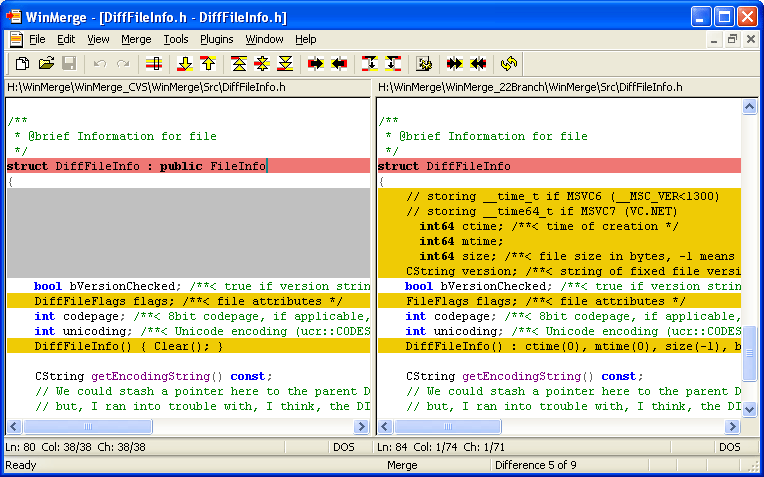
WinMerge has released two versions, 2.16.55 Beta and 2.16.54.2, enhancing its capabilities as an open-source visual text file comparison and merging tool for Windows. This software is particularly useful for developers and teams to identify changes between different project versions and to effectively merge those changes.
Key features of WinMerge include:
- Visual comparison and merging of text files
- A flexible editor with syntax highlighting
- Support for various text file formats including DOS, UNIX, and MAC
- Unicode compatibility
- A Difference pane that displays current changes in a side-by-side format
- A Location pane that provides a map of the compared files
- The ability to highlight differences within lines
- Directory comparison with file filters
- Detection of moved lines during file comparisons
- Shell integration for easy access
- Basic integration with Visual SourceSafe and Rational ClearCase
- Support for archive files using 7-Zip
- Extensibility through plugins
- A localizable interface using resource DLLs
- An HTML-based manual for user guidance
Additionally, this release includes features aimed at improving user experience and expanding the functionalities available to users working with text files.
In extending the capabilities of WinMerge, one might consider incorporating more advanced merging algorithms or integrating cloud storage options for collaborative work. Furthermore, enhancing the user interface with customizable themes or improved navigation tools could facilitate a smoother user experience. As the software evolves, ongoing community feedback and contributions will be essential to its continuous improvement and adaptation to modern development environments.
For users looking to enhance their workflow further, similar topics such as how to add 'Open With Notepad' to the context menu or manage Microsoft WordPad in Windows 10 and 11 are also available
Key features of WinMerge include:
- Visual comparison and merging of text files
- A flexible editor with syntax highlighting
- Support for various text file formats including DOS, UNIX, and MAC
- Unicode compatibility
- A Difference pane that displays current changes in a side-by-side format
- A Location pane that provides a map of the compared files
- The ability to highlight differences within lines
- Directory comparison with file filters
- Detection of moved lines during file comparisons
- Shell integration for easy access
- Basic integration with Visual SourceSafe and Rational ClearCase
- Support for archive files using 7-Zip
- Extensibility through plugins
- A localizable interface using resource DLLs
- An HTML-based manual for user guidance
Additionally, this release includes features aimed at improving user experience and expanding the functionalities available to users working with text files.
In extending the capabilities of WinMerge, one might consider incorporating more advanced merging algorithms or integrating cloud storage options for collaborative work. Furthermore, enhancing the user interface with customizable themes or improved navigation tools could facilitate a smoother user experience. As the software evolves, ongoing community feedback and contributions will be essential to its continuous improvement and adaptation to modern development environments.
For users looking to enhance their workflow further, similar topics such as how to add 'Open With Notepad' to the context menu or manage Microsoft WordPad in Windows 10 and 11 are also available
WinMerge 2.16.55 Beta / 2.16.54.2 released
WinMerge is an Open Source visual text file differentiating and merging tool for Windows.