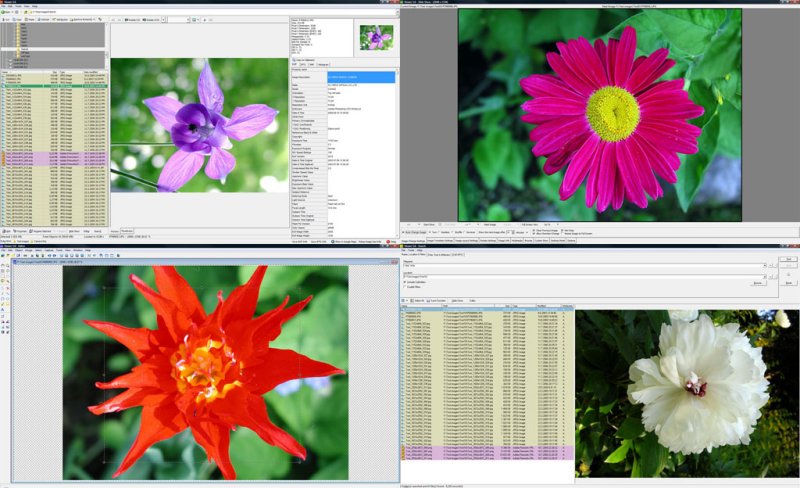
WildBit Viewer has released version 6.19, enhancing its reputation as a compact and efficient image viewer equipped with slideshow and editing capabilities. This software is designed with a user-friendly interface that allows for rapid navigation through folders, file lists, and thumbnails, while offering a host of features for image management.
Key features of WildBit Viewer include:
- Image Information: It provides detailed image info, including EXIF data, metadata, and support for JPEG and TIFF formats. Users can also access IPTC information akin to Photoshop file details.
- Thumbnail Management: The thumbnail viewer allows for customizable views, sorting options, and predefined thumbnail sizes, making it easy to manage large image collections.
- Slide Show Capabilities: Users can create customized slide shows with 176 transition effects and multi-monitor support, enhancing the viewing experience across different displays.
- Image Comparison: The software allows for side-by-side image comparisons, which is useful for evaluating differences between images.
- Editing Tools: An integrated editor offers a range of features including cropping, color adjustments, multiple undo/redo levels, and batch processing for applying actions to multiple images at once.
In addition to the above, WildBit Viewer supports a wide array of graphic formats (over 70), including BMP, PNG, and animated GIFs, as well as Camera RAW files. It also includes advanced features such as image rotation based on EXIF orientation, a customizable favorites list, and the ability to generate file lists in various formats (HTML, CSV, etc.).
The editor allows for extensive image manipulation with features like edge detection, red-eye removal, and various effects filters. Users can also annotate images and perform actions like metadata clearing or updating.
Overall, WildBit Viewer 6.19 is a comprehensive tool for anyone needing a powerful yet easy-to-use image viewer and editor, suitable for both casual users and professionals handling a variety of image formats and tasks.
As technology continues to advance, users can anticipate further updates and features that will enhance the capabilities of WildBit Viewer, keeping it relevant in the competitive field of image management software. Future releases may include AI-driven enhancements for image editing, improved integration with cloud services, and expanded support for emerging image formats
Key features of WildBit Viewer include:
- Image Information: It provides detailed image info, including EXIF data, metadata, and support for JPEG and TIFF formats. Users can also access IPTC information akin to Photoshop file details.
- Thumbnail Management: The thumbnail viewer allows for customizable views, sorting options, and predefined thumbnail sizes, making it easy to manage large image collections.
- Slide Show Capabilities: Users can create customized slide shows with 176 transition effects and multi-monitor support, enhancing the viewing experience across different displays.
- Image Comparison: The software allows for side-by-side image comparisons, which is useful for evaluating differences between images.
- Editing Tools: An integrated editor offers a range of features including cropping, color adjustments, multiple undo/redo levels, and batch processing for applying actions to multiple images at once.
In addition to the above, WildBit Viewer supports a wide array of graphic formats (over 70), including BMP, PNG, and animated GIFs, as well as Camera RAW files. It also includes advanced features such as image rotation based on EXIF orientation, a customizable favorites list, and the ability to generate file lists in various formats (HTML, CSV, etc.).
The editor allows for extensive image manipulation with features like edge detection, red-eye removal, and various effects filters. Users can also annotate images and perform actions like metadata clearing or updating.
Overall, WildBit Viewer 6.19 is a comprehensive tool for anyone needing a powerful yet easy-to-use image viewer and editor, suitable for both casual users and professionals handling a variety of image formats and tasks.
As technology continues to advance, users can anticipate further updates and features that will enhance the capabilities of WildBit Viewer, keeping it relevant in the competitive field of image management software. Future releases may include AI-driven enhancements for image editing, improved integration with cloud services, and expanded support for emerging image formats
WildBit Viewer 6.19 released
WildBit Viewer is compact & fast image viewer with slide show and editor.