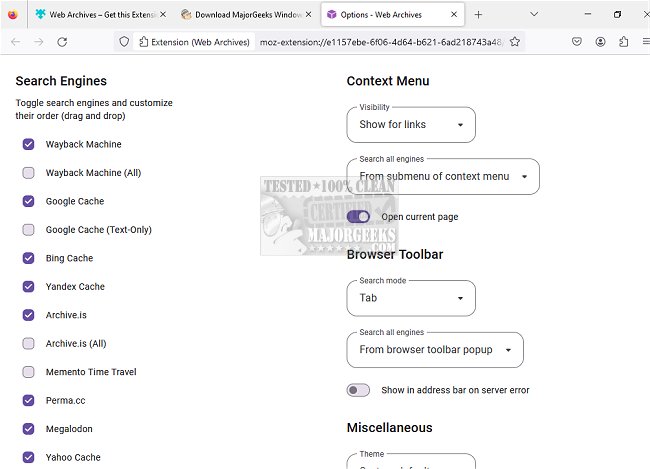
The newly released version 7.1.0 of Web Archives is a versatile browser extension compatible with Chrome, Firefox, Edge, Opera, and Safari. This tool enables users to access cached versions of websites from various leading search engines, including the Wayback Machine, Google, and Bing, providing a seamless way to retrieve archived content.
Web Archives simplifies the process of finding older versions of web pages. With just a few clicks, users can view the latest saved iteration of a webpage they are currently visiting or any specific link they enter. If a webpage fails to load or if a download link is unavailable, this extension can help users locate older cached versions, making it a valuable resource for research, content retrieval, and troubleshooting.
The extension offers two primary search modes: the default "Tab" mode, which searches for the page currently open in the active tab, and the "URL" mode, which allows users to manually enter a specific URL to find its archived version. Users can initiate searches across multiple search engines simultaneously, which opens several new tabs, or they can use the Web Archives icon to choose a specific engine for their query. The tool collects the URL from the active tab and directs it to the selected third-party service for searching.
In addition to its core functionalities, Web Archives is designed with user convenience in mind, making it easy for anyone to access historical web content without needing extensive technical knowledge. Future updates may enhance its capabilities, such as integrating more search engines or improving the user interface for an even smoother experience. Overall, Web Archives stands out as an essential tool for anyone looking to navigate the rich history of the web
Web Archives simplifies the process of finding older versions of web pages. With just a few clicks, users can view the latest saved iteration of a webpage they are currently visiting or any specific link they enter. If a webpage fails to load or if a download link is unavailable, this extension can help users locate older cached versions, making it a valuable resource for research, content retrieval, and troubleshooting.
The extension offers two primary search modes: the default "Tab" mode, which searches for the page currently open in the active tab, and the "URL" mode, which allows users to manually enter a specific URL to find its archived version. Users can initiate searches across multiple search engines simultaneously, which opens several new tabs, or they can use the Web Archives icon to choose a specific engine for their query. The tool collects the URL from the active tab and directs it to the selected third-party service for searching.
In addition to its core functionalities, Web Archives is designed with user convenience in mind, making it easy for anyone to access historical web content without needing extensive technical knowledge. Future updates may enhance its capabilities, such as integrating more search engines or improving the user interface for an even smoother experience. Overall, Web Archives stands out as an essential tool for anyone looking to navigate the rich history of the web
Web Archives for Chrome, Firefox, Edge, Opera, and Safari 7.1.0 released
Web Archives for Chrome, Firefox, Edge, Opera, and Safari allows access to cached versions of websites on multiple popular search engines, including the Wayback Machine, Google, and Bing.
Web Archives for Chrome, Firefox, Edge, Opera, and Safari 7.1.0 released @ MajorGeeks