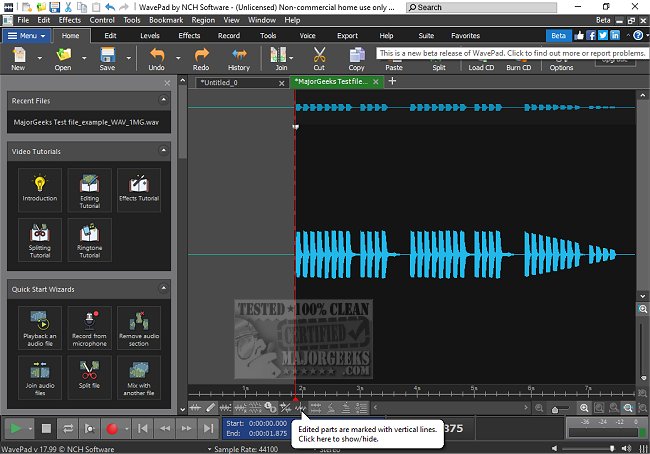
WavePad is a robust audio editing software designed to cater to both professionals and hobbyists in various audio-related fields. This latest beta version, 24.48, continues to build upon its reputation as a feature-rich audio editor suitable for music production, podcasting, and audio refinement.
Why Choose WavePad?
WavePad stands out from other audio editing programs by offering a comprehensive toolkit for tasks ranging from basic audio trimming to intricate sound restoration. Its user-friendly interface is designed to accommodate both novices and seasoned professionals, ensuring that all users can effectively manage their audio editing needs. Whether you're looking to eliminate background noise, apply audio effects, or process multiple files simultaneously, WavePad provides the necessary tools to streamline these tasks efficiently.
Key Features of WavePad
WavePad includes an extensive array of editing capabilities, such as cutting, copying, pasting, and deleting audio segments. Users can manipulate sound through effects like amplification, normalization, equalization, and reverb. Furthermore, it supports a vast range of audio file formats, including MP3, WAV, FLAC, and more, allowing for versatile usage. Notably, the batch processing feature is particularly beneficial for podcasters and musicians tackling large volumes of audio.
Advanced functionalities, such as spectral analysis, voice changing, and speech synthesis, enable users to delve deeper into audio manipulation. Its audio restoration tools—designed for noise reduction, click and pop removal, and hum elimination—help enhance recording quality. For those working with video, WavePad allows for the extraction and editing of audio tracks, complete with visualization tools. Additionally, it includes a library of royalty-free sounds and music clips, providing users with extra resources to enhance their projects. The software is accessible across various platforms, including Windows, macOS, iOS, Android, and Kindle, allowing for audio editing on the go.
Pros and Cons of WavePad
Pros:
- Intuitive interface with powerful editing tools
- Supports a wide array of audio file formats
- Advanced features such as spectral analysis and batch processing
- VST plugin compatibility for enhanced audio customization
- Available on multiple devices for flexible use
Cons:
- The free version has limitations on advanced features
- Interface design may feel slightly outdated compared to newer software alternatives, though it remains functional
- Some tools necessitate an upgrade to the Master's Edition for full access
Final Thoughts
WavePad is an excellent audio editor that balances usability and functionality, making it suitable for everyone from casual users to audio professionals. While the free version may not include all advanced features, the Master's Edition offers an expansive suite of tools that justify its investment for serious users. If you're in search of a reliable and feature-loaded audio editing solution that is easy to learn, WavePad is undoubtedly a commendable choice.
Further Reading:
- Explore how to enable Windows Sonic Surround Sound on Windows 10 & 11
- Learn how to diagnose sound delays, lags, and audio latency issues in Windows 10 & 11
- Troubleshoot low sound volume problems on Windows
- Find solutions for common audio issues in Windows systems.
With ongoing updates and an ever-evolving feature set, WavePad remains a top contender in the audio editing software market
Why Choose WavePad?
WavePad stands out from other audio editing programs by offering a comprehensive toolkit for tasks ranging from basic audio trimming to intricate sound restoration. Its user-friendly interface is designed to accommodate both novices and seasoned professionals, ensuring that all users can effectively manage their audio editing needs. Whether you're looking to eliminate background noise, apply audio effects, or process multiple files simultaneously, WavePad provides the necessary tools to streamline these tasks efficiently.
Key Features of WavePad
WavePad includes an extensive array of editing capabilities, such as cutting, copying, pasting, and deleting audio segments. Users can manipulate sound through effects like amplification, normalization, equalization, and reverb. Furthermore, it supports a vast range of audio file formats, including MP3, WAV, FLAC, and more, allowing for versatile usage. Notably, the batch processing feature is particularly beneficial for podcasters and musicians tackling large volumes of audio.
Advanced functionalities, such as spectral analysis, voice changing, and speech synthesis, enable users to delve deeper into audio manipulation. Its audio restoration tools—designed for noise reduction, click and pop removal, and hum elimination—help enhance recording quality. For those working with video, WavePad allows for the extraction and editing of audio tracks, complete with visualization tools. Additionally, it includes a library of royalty-free sounds and music clips, providing users with extra resources to enhance their projects. The software is accessible across various platforms, including Windows, macOS, iOS, Android, and Kindle, allowing for audio editing on the go.
Pros and Cons of WavePad
Pros:
- Intuitive interface with powerful editing tools
- Supports a wide array of audio file formats
- Advanced features such as spectral analysis and batch processing
- VST plugin compatibility for enhanced audio customization
- Available on multiple devices for flexible use
Cons:
- The free version has limitations on advanced features
- Interface design may feel slightly outdated compared to newer software alternatives, though it remains functional
- Some tools necessitate an upgrade to the Master's Edition for full access
Final Thoughts
WavePad is an excellent audio editor that balances usability and functionality, making it suitable for everyone from casual users to audio professionals. While the free version may not include all advanced features, the Master's Edition offers an expansive suite of tools that justify its investment for serious users. If you're in search of a reliable and feature-loaded audio editing solution that is easy to learn, WavePad is undoubtedly a commendable choice.
Further Reading:
- Explore how to enable Windows Sonic Surround Sound on Windows 10 & 11
- Learn how to diagnose sound delays, lags, and audio latency issues in Windows 10 & 11
- Troubleshoot low sound volume problems on Windows
- Find solutions for common audio issues in Windows systems.
With ongoing updates and an ever-evolving feature set, WavePad remains a top contender in the audio editing software market
Wavepad 24.48 Beta released
WavePad is an advanced audio editing software that offers a wide range of features for professionals and enthusiasts alike.