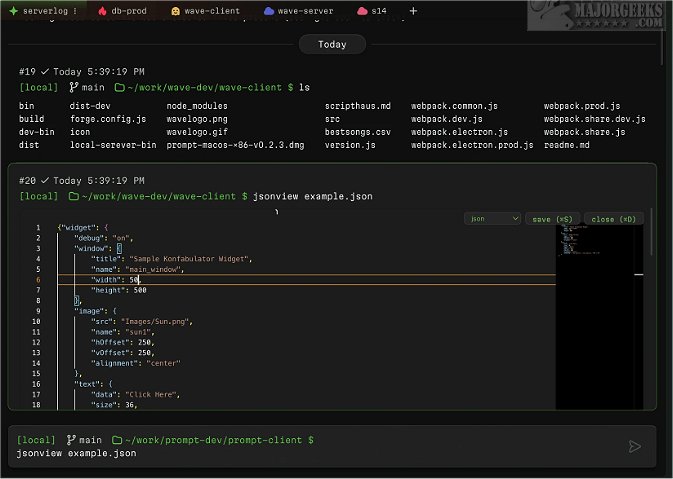
Wave Terminal has recently released versions 0.14.4 Beta and 0.14.3, further enhancing its capabilities as a powerful, cross-platform Linux terminal designed to simplify workflows for all users. Unlike traditional command line interfaces, Wave Terminal offers a fresh approach, making it particularly appealing to those who may not be comfortable with command line usage. Its open-source nature not only allows free access but also provides the flexibility for users to modify the software according to their needs.
One of the standout features of Wave Terminal is its inline rendering capabilities, allowing users to view code, images, markdown, and CSV files directly within the terminal, minimizing the need for context switching. The terminal also supports persistent sessions, ensuring that users can save their work state and easily restore it even after disconnections or reboots.
Additionally, Wave Terminal boasts a searchable contextual command history that is accessible across all remote sessions and is stored locally for ease of access. Users can organize their work efficiently using workspaces, tabs, and command blocks. For instance, developers can group their terminal sessions based on different project stages, such as development, testing, and production environments.
Editing files is streamlined with Wave, as users can perform inline edits without needing to remember complicated keyboard shortcuts, treating the terminal much like a conventional text editor. All data, including command history, environment variables, output, and metadata, is securely stored on the user's machine in the ~/.waveterm directory, ensuring privacy and security.
For those new to Wave Terminal, a dedicated help section is available to facilitate a smooth onboarding experience.
To extend this, future updates could include enhanced collaboration features, allowing multiple users to work on the same session simultaneously, or integration with popular version control systems for seamless project management. Improvements in customization options, such as themes and interface layouts, could also cater to personal preferences, making Wave Terminal not just a tool but a personalized workspace for developers and casual users alike
One of the standout features of Wave Terminal is its inline rendering capabilities, allowing users to view code, images, markdown, and CSV files directly within the terminal, minimizing the need for context switching. The terminal also supports persistent sessions, ensuring that users can save their work state and easily restore it even after disconnections or reboots.
Additionally, Wave Terminal boasts a searchable contextual command history that is accessible across all remote sessions and is stored locally for ease of access. Users can organize their work efficiently using workspaces, tabs, and command blocks. For instance, developers can group their terminal sessions based on different project stages, such as development, testing, and production environments.
Editing files is streamlined with Wave, as users can perform inline edits without needing to remember complicated keyboard shortcuts, treating the terminal much like a conventional text editor. All data, including command history, environment variables, output, and metadata, is securely stored on the user's machine in the ~/.waveterm directory, ensuring privacy and security.
For those new to Wave Terminal, a dedicated help section is available to facilitate a smooth onboarding experience.
To extend this, future updates could include enhanced collaboration features, allowing multiple users to work on the same session simultaneously, or integration with popular version control systems for seamless project management. Improvements in customization options, such as themes and interface layouts, could also cater to personal preferences, making Wave Terminal not just a tool but a personalized workspace for developers and casual users alike
Wave Terminal 0.14.4 Beta / 0.14.3 released
Wave Terminal is a versatile, cross-platform Linux terminal that can be used for streamlining workflows.