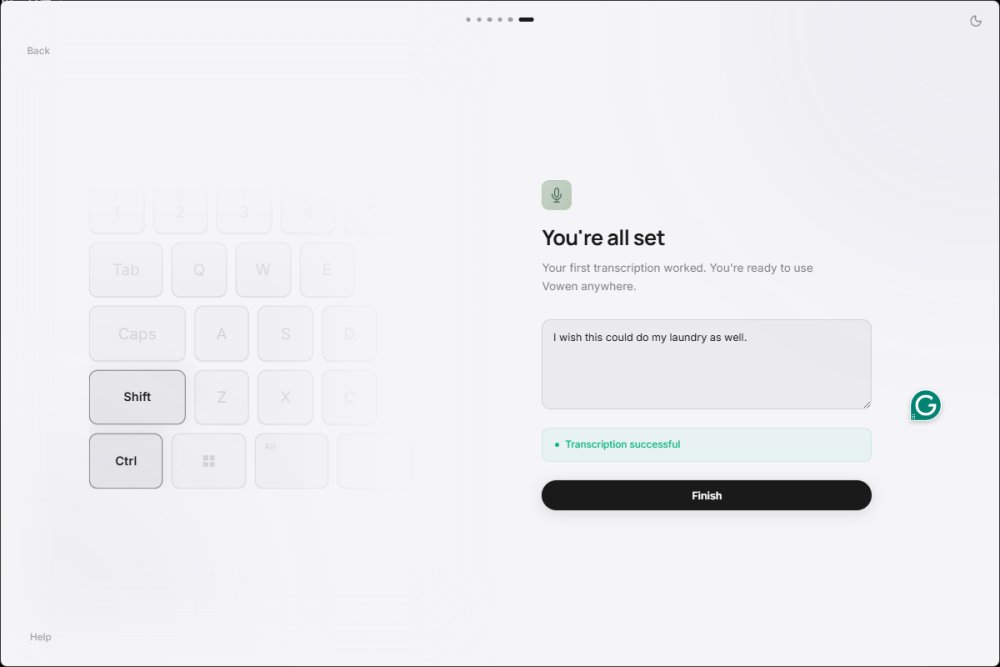
Vowen is a free, privacy-centric voice productivity application available for Windows and macOS, designed to convert speech into text using offline AI transcription. Primarily targeted at writers, coders, and professionals engaged in virtual meetings, Vowen is also beneficial for anyone who prefers speaking over typing. Its standout feature is its commitment to privacy, as it processes dictation locally without automatically sending recordings to the cloud, unless users opt for that.
Key Features and Functionality
Vowen functions as a system-wide dictation tool, allowing users to input text into virtually any application by holding a designated shortcut (Control+Shift) while speaking. Additionally, it offers features such as AI assistance, meeting notes, translations, summaries, and voice commands, all of which can be configured based on user preferences. The offline speech-to-text capability is particularly appealing to those wary of reliance on internet connectivity and cloud services.
Vowen is especially useful in various scenarios, such as dictating emails, taking meeting notes, drafting documentation, or quickly jotting down ideas. Users can activate a hands-free mode (CTRL+H) for added convenience. Furthermore, the application's note-taking feature can organize discussions from meetings into coherent summaries, making it a valuable tool for professionals.
Privacy and Security
The application’s primary advantage lies in its offline AI transcription, which ensures that sensitive information remains on the user's device rather than being uploaded to external servers. This makes Vowen suitable for developers handling confidential code, writers composing private drafts, business users documenting internal meetings, students summarizing lectures, and individuals requiring dictation without cloud dependency.
Limitations and Considerations
While Vowen excels in offline dictation, its advanced features, including AI integrations, necessitate the use of API keys, which could be daunting for casual users. The automation commands, while powerful, may require a learning curve for users unfamiliar with workflow creations. The interface is generally user-friendly, but those new to the software may need some time to familiarize themselves with its various functionalities.
User Experience and Verdict
Vowen is praised for its efficiency in providing fast, offline speech-to-text capabilities while prioritizing user privacy. The application’s optional email registration and system-wide dictation support enhance its usability. Although the setup for advanced features may challenge some users, those seeking a robust dictation tool will find it rewarding. The application also accommodates various local AI models, offering flexibility but requiring significant storage space.
In conclusion, Vowen is a promising tool for anyone engaged in writing, coding, or note-taking, especially for those with physical constraints, like carpal tunnel syndrome. Its effectiveness was demonstrated in the completion of this review, showcasing its potential to streamline productivity with minimal manual input. Given its unique features and privacy-first approach, Vowen is certainly worth exploring for anyone looking to enhance their productivity through voice
Key Features and Functionality
Vowen functions as a system-wide dictation tool, allowing users to input text into virtually any application by holding a designated shortcut (Control+Shift) while speaking. Additionally, it offers features such as AI assistance, meeting notes, translations, summaries, and voice commands, all of which can be configured based on user preferences. The offline speech-to-text capability is particularly appealing to those wary of reliance on internet connectivity and cloud services.
Vowen is especially useful in various scenarios, such as dictating emails, taking meeting notes, drafting documentation, or quickly jotting down ideas. Users can activate a hands-free mode (CTRL+H) for added convenience. Furthermore, the application's note-taking feature can organize discussions from meetings into coherent summaries, making it a valuable tool for professionals.
Privacy and Security
The application’s primary advantage lies in its offline AI transcription, which ensures that sensitive information remains on the user's device rather than being uploaded to external servers. This makes Vowen suitable for developers handling confidential code, writers composing private drafts, business users documenting internal meetings, students summarizing lectures, and individuals requiring dictation without cloud dependency.
Limitations and Considerations
While Vowen excels in offline dictation, its advanced features, including AI integrations, necessitate the use of API keys, which could be daunting for casual users. The automation commands, while powerful, may require a learning curve for users unfamiliar with workflow creations. The interface is generally user-friendly, but those new to the software may need some time to familiarize themselves with its various functionalities.
User Experience and Verdict
Vowen is praised for its efficiency in providing fast, offline speech-to-text capabilities while prioritizing user privacy. The application’s optional email registration and system-wide dictation support enhance its usability. Although the setup for advanced features may challenge some users, those seeking a robust dictation tool will find it rewarding. The application also accommodates various local AI models, offering flexibility but requiring significant storage space.
In conclusion, Vowen is a promising tool for anyone engaged in writing, coding, or note-taking, especially for those with physical constraints, like carpal tunnel syndrome. Its effectiveness was demonstrated in the completion of this review, showcasing its potential to streamline productivity with minimal manual input. Given its unique features and privacy-first approach, Vowen is certainly worth exploring for anyone looking to enhance their productivity through voice
Vowen 0.5.2 released
Vowen is a free, privacy-focused voice productivity app for Windows and macOS that turns speech into text using offline AI transcription.