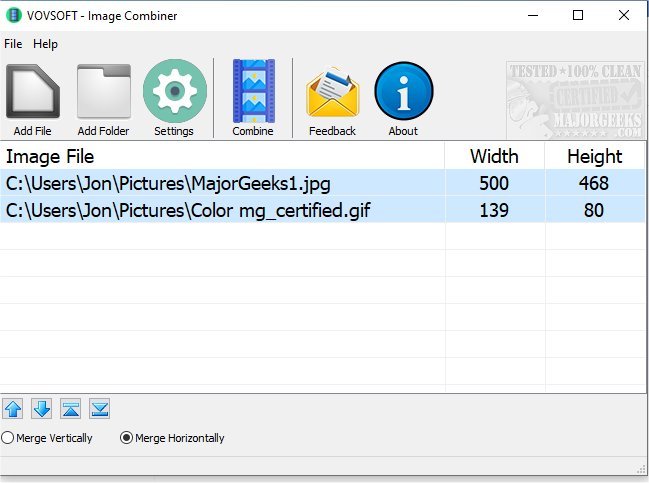
VOVSOFT has released version 2.2 of its Image Combiner, a user-friendly tool designed for merging images either horizontally or vertically. The software allows users to seamlessly combine an unlimited number of photos, regardless of their sizes, maintaining the original quality. It supports multiple image formats, including JPG, PNG, BMP, and TIFF, making it versatile for various projects.
The process is straightforward: users can drag and drop their images or use the "add file" feature to import images from a folder. After selecting the desired orientation, users can simply click "combine" to create a merged image, which will be saved to a chosen location on their device. This feature is particularly beneficial for those who prefer to keep their images local rather than uploading them to online servers, thus ensuring privacy and control over their files.
VOVSOFT Image Combiner is ideal for creating collages, cartoons, or visual progressions, limited only by the user's creativity. This release emphasizes ease of use and flexibility, making it a valuable tool for anyone looking to combine images for personal or professional use.
In addition to the Image Combiner, users may find interest in related tools and tips for managing photos on Windows 10 and 11, including methods for viewing pictures as slideshows, restoring the Windows Photo Viewer, and managing folders within the Photos app. These resources further enhance the user experience by providing comprehensive support for image handling in modern operating systems
The process is straightforward: users can drag and drop their images or use the "add file" feature to import images from a folder. After selecting the desired orientation, users can simply click "combine" to create a merged image, which will be saved to a chosen location on their device. This feature is particularly beneficial for those who prefer to keep their images local rather than uploading them to online servers, thus ensuring privacy and control over their files.
VOVSOFT Image Combiner is ideal for creating collages, cartoons, or visual progressions, limited only by the user's creativity. This release emphasizes ease of use and flexibility, making it a valuable tool for anyone looking to combine images for personal or professional use.
In addition to the Image Combiner, users may find interest in related tools and tips for managing photos on Windows 10 and 11, including methods for viewing pictures as slideshows, restoring the Windows Photo Viewer, and managing folders within the Photos app. These resources further enhance the user experience by providing comprehensive support for image handling in modern operating systems
VOVSOFT Image Combiner 2.2 released
VOVSOFT Image Combiner can horizontally or vertically combine images through a straightforward process.