Vivaldi version 7.8.3925.76 has been released, offering users a unique web browsing experience. Developed by the original founders of the Opera Web Browser, Vivaldi is available for free on both Windows and Linux platforms. Users can download the beta version to explore its features.
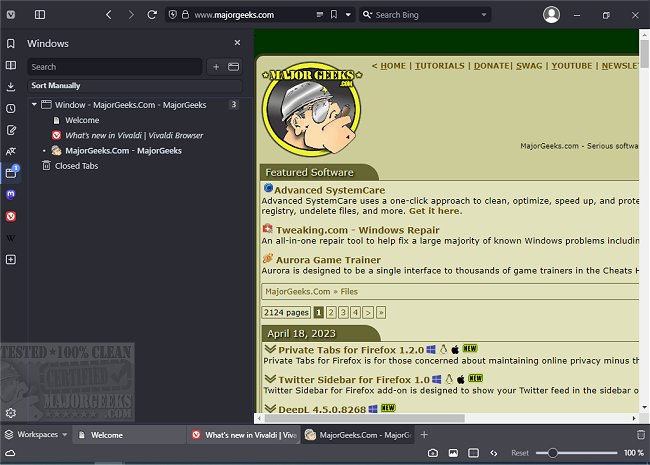
Vivaldi's interface is reminiscent of Google Chrome, featuring essential navigation buttons such as back, forward, refresh, and home, conveniently placed next to the address bar. The browser allows users to open new tabs easily and close them with a simple click. It includes a sidebar for quick access to bookmarks, downloads, and notes, although the mail feature is still not available. One user interface suggestion is to reposition the options gear icon from the bottom left to a more accessible location, such as the top right corner or within the sidebar.
Additionally, Vivaldi provides users with tools to customize their browsing experience. Users can control image visibility and speed up their browsing by displaying only cached images. The browser also includes a zoom feature that allows users to adjust the size of web pages easily. For those who struggle with readability, Vivaldi offers various rendering options, including filters like grayscale and intensify, as well as customizable font settings.
As Vivaldi enters a competitive browser market, it faces the challenge of gaining popularity among users who are often loyal to their choices. Despite its somewhat cumbersome name, Vivaldi has the potential to carve out a significant niche for itself.
In conclusion, Vivaldi is positioned as a promising alternative in the web browser landscape, particularly for users seeking customization and improved readability. As it continues to develop and refine its features, it may very well emerge as a leading option for web browsing in the future. Users interested in exploring Vivaldi's capabilities can easily download the beta version and experience its unique offerings firsthand
Vivaldi's interface is reminiscent of Google Chrome, featuring essential navigation buttons such as back, forward, refresh, and home, conveniently placed next to the address bar. The browser allows users to open new tabs easily and close them with a simple click. It includes a sidebar for quick access to bookmarks, downloads, and notes, although the mail feature is still not available. One user interface suggestion is to reposition the options gear icon from the bottom left to a more accessible location, such as the top right corner or within the sidebar.
Additionally, Vivaldi provides users with tools to customize their browsing experience. Users can control image visibility and speed up their browsing by displaying only cached images. The browser also includes a zoom feature that allows users to adjust the size of web pages easily. For those who struggle with readability, Vivaldi offers various rendering options, including filters like grayscale and intensify, as well as customizable font settings.
As Vivaldi enters a competitive browser market, it faces the challenge of gaining popularity among users who are often loyal to their choices. Despite its somewhat cumbersome name, Vivaldi has the potential to carve out a significant niche for itself.
In conclusion, Vivaldi is positioned as a promising alternative in the web browser landscape, particularly for users seeking customization and improved readability. As it continues to develop and refine its features, it may very well emerge as a leading option for web browsing in the future. Users interested in exploring Vivaldi's capabilities can easily download the beta version and experience its unique offerings firsthand
Vivaldi 7.8.3925.76 released
Vivaldi is a free web browser from the original Opera Web Browser founders in 1994, designed for Windows and Linux. Download the beta version here.